






DNS History: How to Trace a Domain’s Past
November 27, 2026
10 min read

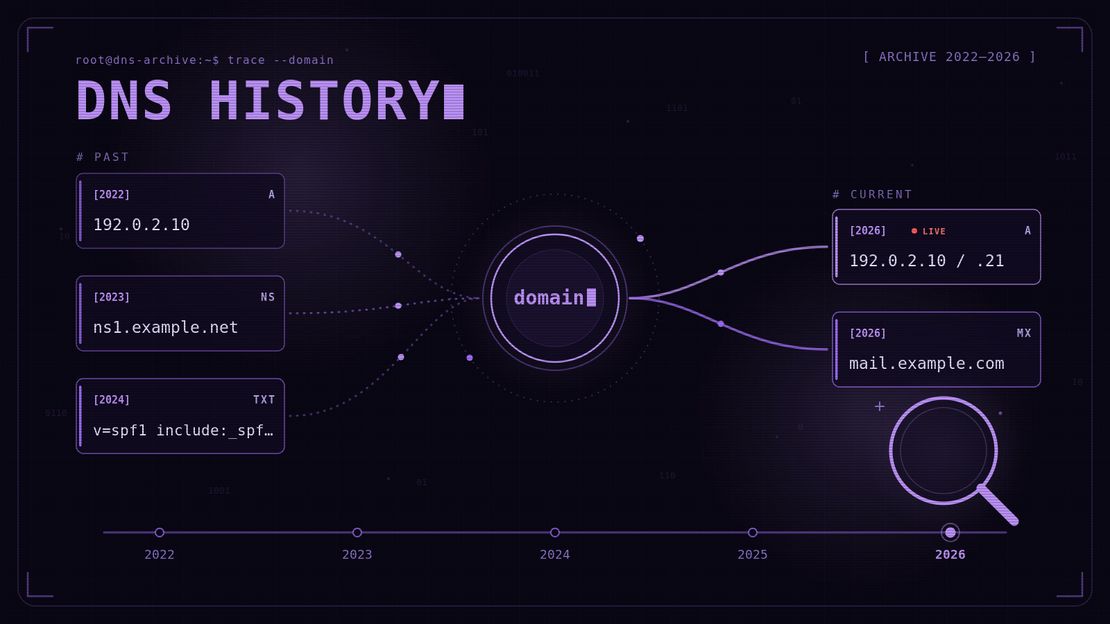
Domain names rarely remain unchanged for years. Their records change when a company migrates its hosting, adds new services, or deliberately erases evidence of a former connection between two companies. A standard DNS query shows only the current state. DNS history preserves these records.
In this article, we explain what DNS history is, examine practical use cases, compare available tools, and provide an investigation workflow you can apply to your own research.
Basic concepts
DNS (Domain Name System) is a distributed system that stores essential information about domain names. It commonly translates human-readable domain names into IP addresses. All DNS-related data for a domain is stored in DNS records.
Types of DNS records
DNS records are essential components that quietly keep the Internet running. They link domain names to IP addresses and help troubleshoot problems across Internet services. The most commonly used records are:
- A record: The IPv4 address associated with a domain name.
- AAAA record: The IPv6 address associated with a domain name.
- CNAME: An alias that points to another (canonical) domain name, for example
www.example.com→example.com. - MX: The mail server address for a domain.
- NS: The address of the server responsible for a DNS zone.
- TXT: Information not covered by other record types, such as a system administrator’s email address.
DNS history and the benefits of analyzing historical DNS records
DNS history is a retrospective list of a domain’s DNS records. It tracks changes over time, including changes to a domain’s IP address, TXT records, and other details.
This extensive archive can help domain managers and website owners in several ways:
- Verify traffic routing after significant changes.
- Identify patterns that may reveal security vulnerabilities or unauthorized domain registration changes.
- Link past DNS configurations to malicious activity or cyberattacks.
Historical DNS records provide information that supports DNS forensics, especially when investigating suspicious activity. These data enable teams to respond quickly and protect online assets.
How to use DNS history in cybersecurity
DNS history has four main applications in cybersecurity:
- Attack surface discovery: Identify assets that belong to a target and map the relationships among them. This is the first step in any penetration tester’s work.
- Business-focused OSINT: DNS record history shows how an organization has developed over time. Researchers can use this information for competitive intelligence.
- Anti-phishing measures: Attackers often impersonate resources owned by large companies to extort or deceive their customers. DNS history can help a specialist indirectly assess how a domain was used previously and whether it is linked to an organization.
- Recovery and auditing: When someone overwrites a record and the new value has propagated across the network, history preserves the previous value and serves as a configuration backup.
Attack Surface Discovery
This process involves identifying an organization’s assets and the relationships among them. DNS history helps in this context in several ways.
First, DNS records themselves can indicate connections. For example, if two domains use the same NS record, they may be related. Matching MX or A records can also suggest a connection, but they do not prove one: shared email providers such as Google Workspace and Microsoft 365, CDNs, and virtual hosting often use the same addresses for thousands of unrelated domains. Treat such matches as leads that require further verification. Relying only on current DNS records limits an attack surface assessment. It obscures infrastructure changes that may indicate an attempt to hide connections.
Example: Suppose Company A and its subsidiary, Company B, initially used the same mail server. This naturally created a shared MX record for both domains.
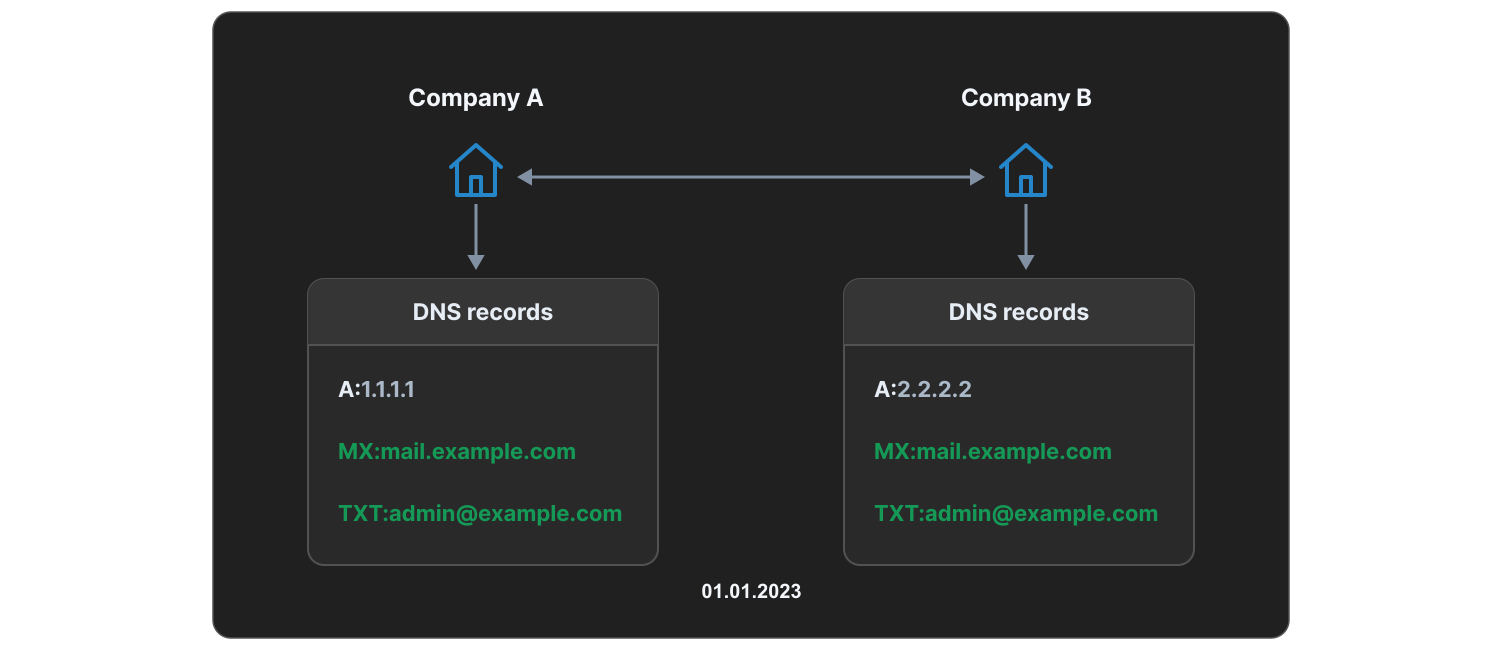
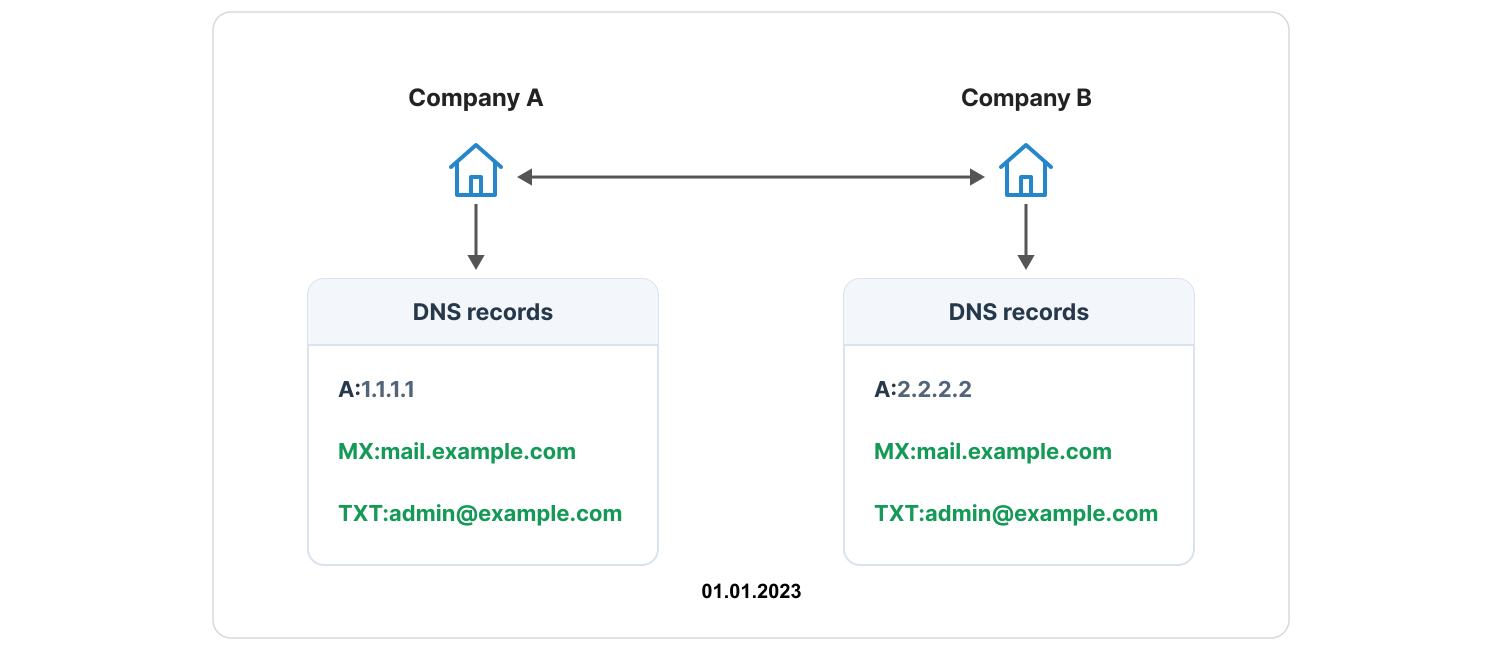
At some point, however, the companies may decide to separate Company B from Company A — for example, to prepare the business for sale. They change the server and update the DNS record accordingly. Additional changes further conceal the connection.
After these changes, an outside observer who has not monitored the companies from the beginning finds it much harder to recognize their relationship.
Even so, the companies may not have completely severed their internal infrastructure connections. Either company can still serve as an entry point into the other after a breach. Red team specialists, especially those without a narrowly defined scope, should keep this possibility in mind.
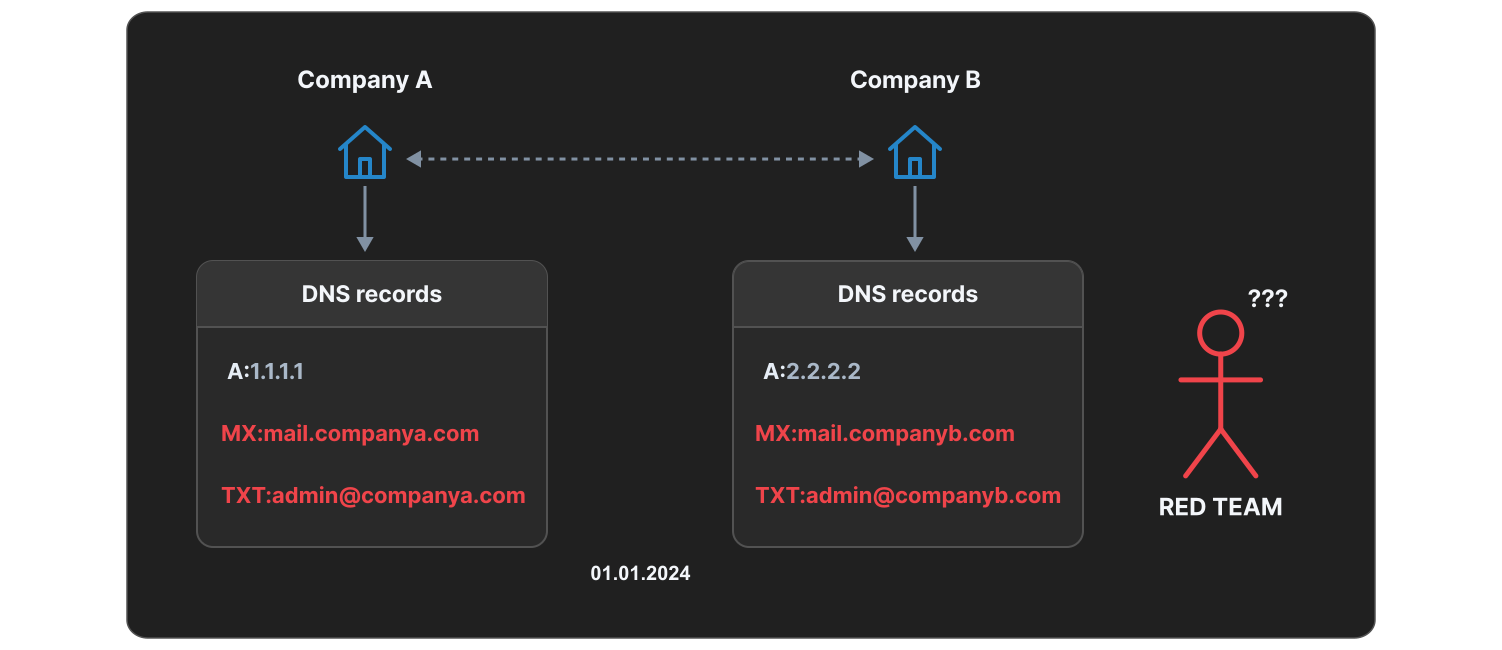
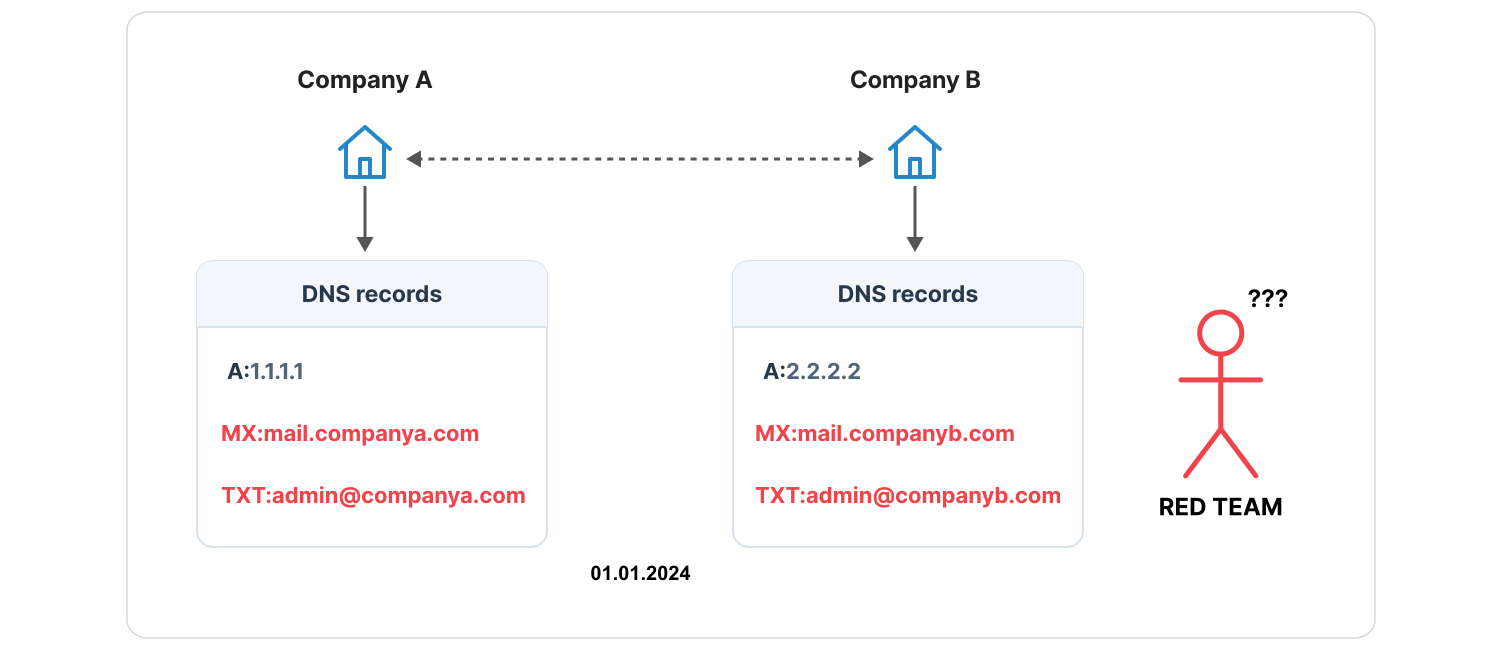 This is where DNS history becomes invaluable. By reviewing an organization’s DNS records, a specialist can observe the changes made over time. This retrospective analysis reveals old records that may have been concealed, making DNS history a valuable addition to attack surface mapping.
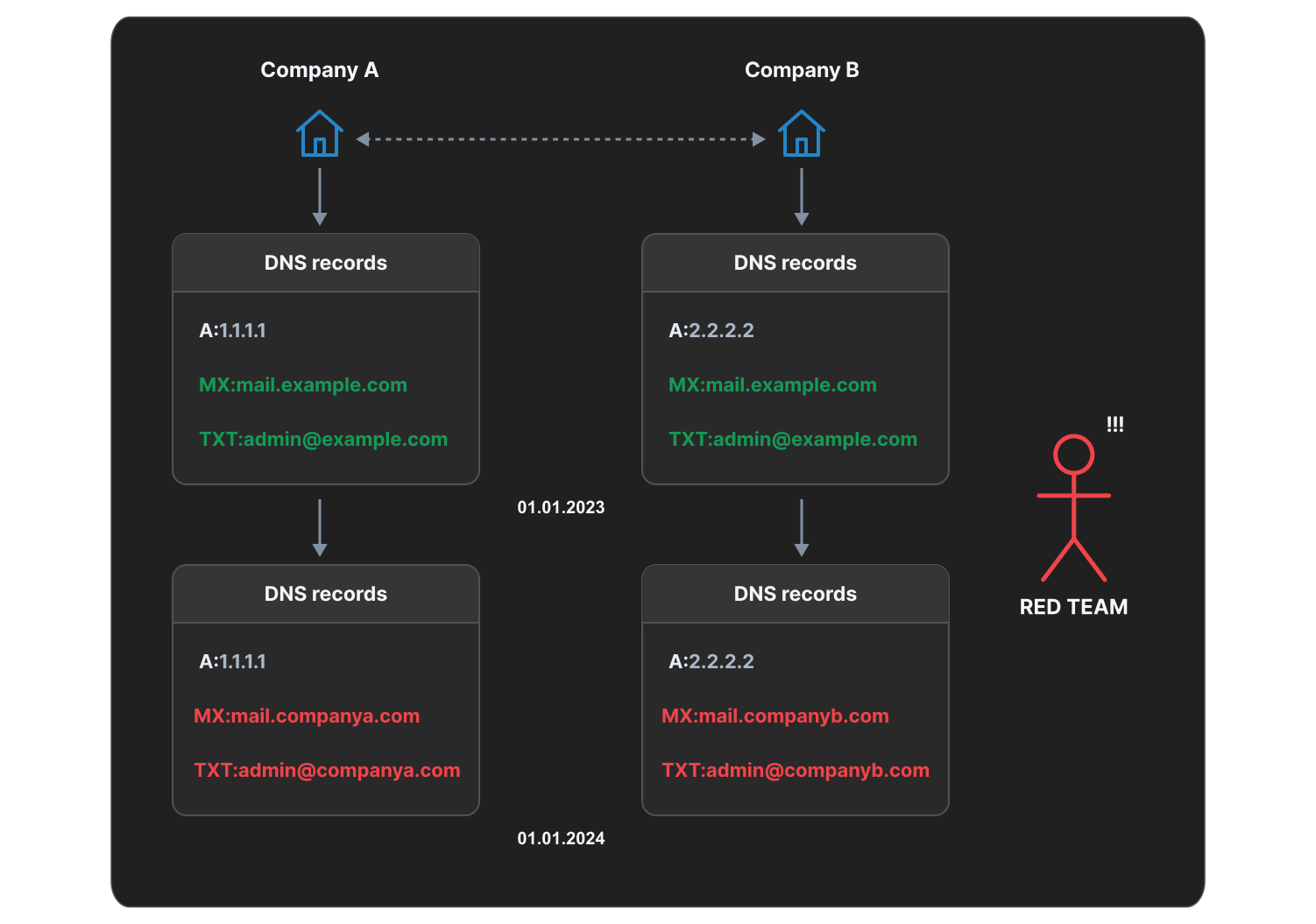
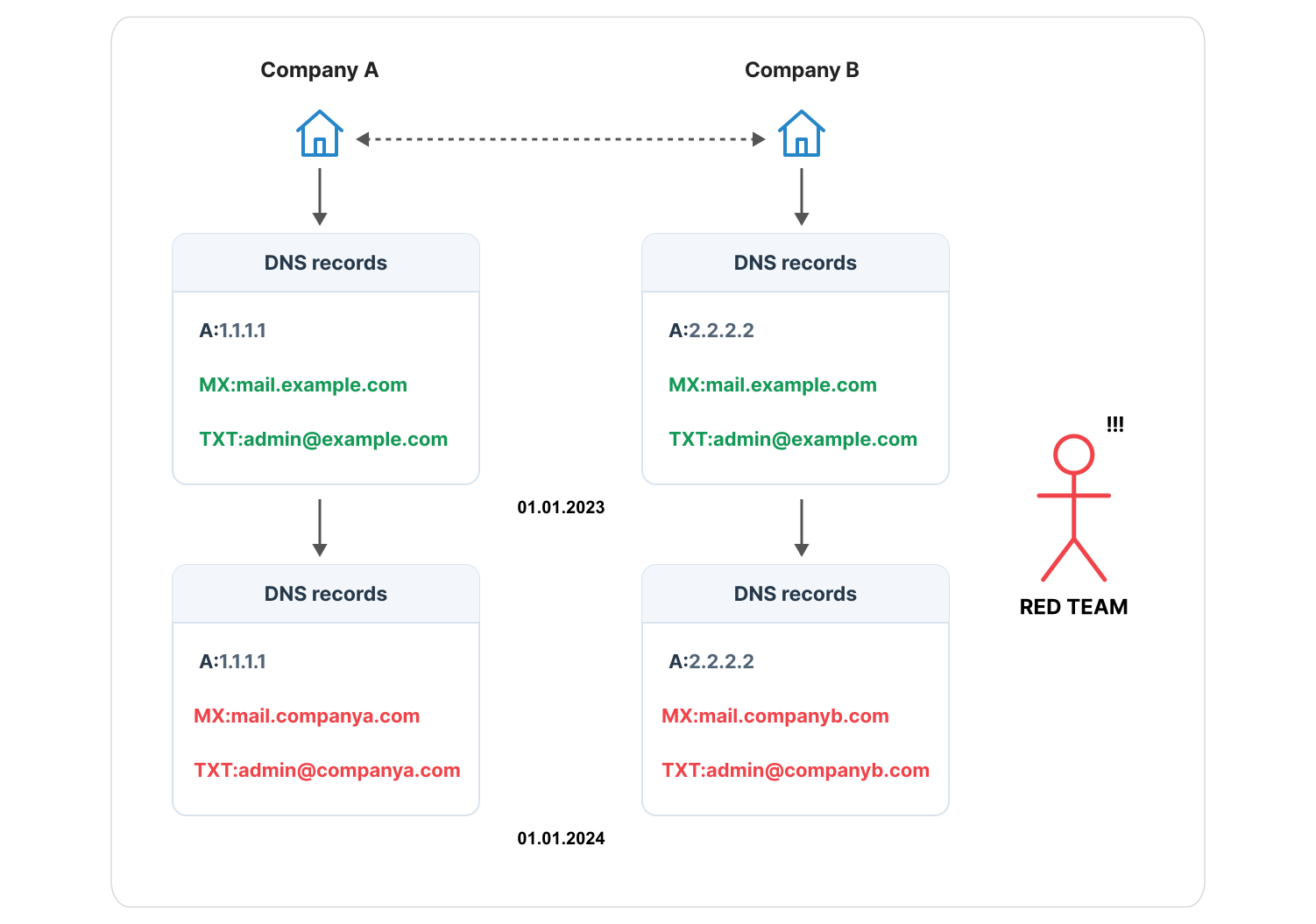 Using the same method, you can track mergers, infrastructure changes, and other organizational developments.
Business-focused OSINT
The second use case is especially valuable for independent OSINT researchers and company managers who want to study competitors. Here, we focus on competitive intelligence.
DNS does not limit the number of IP addresses that can be associated with a single domain name. A domain can resolve to several IP addresses. Organizations often use this practice for load balancing: when many users try to access a website, the service can distribute their traffic across several servers.
The more backup servers an organization uses, the more users it probably expects to handle. By tracking changes in the number of A records over time, you can cautiously infer how service load has changed and how actively the company is growing.
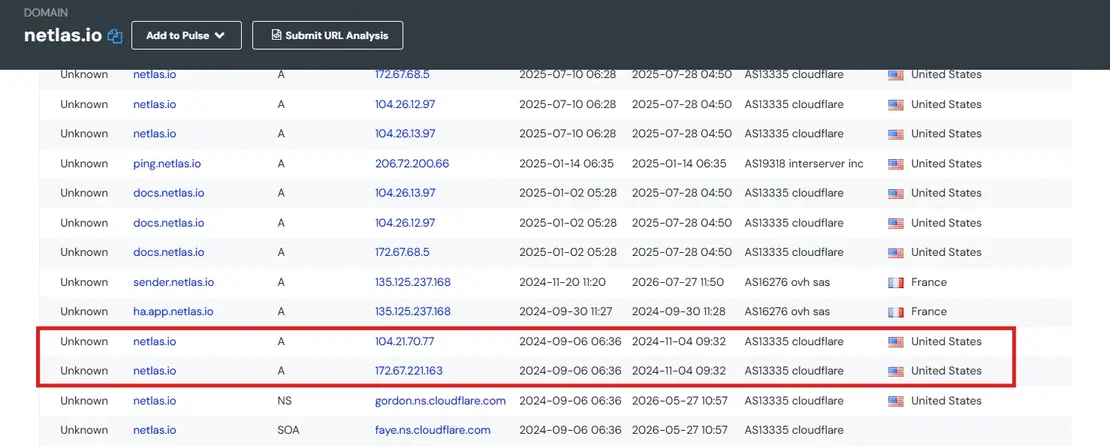
Netlas provides a real-world example. Its historical DNS records show one IP address associated with the domain in 2020-2021 and two in 2024. For this investigation, we will use the AlienVault OTX platform.
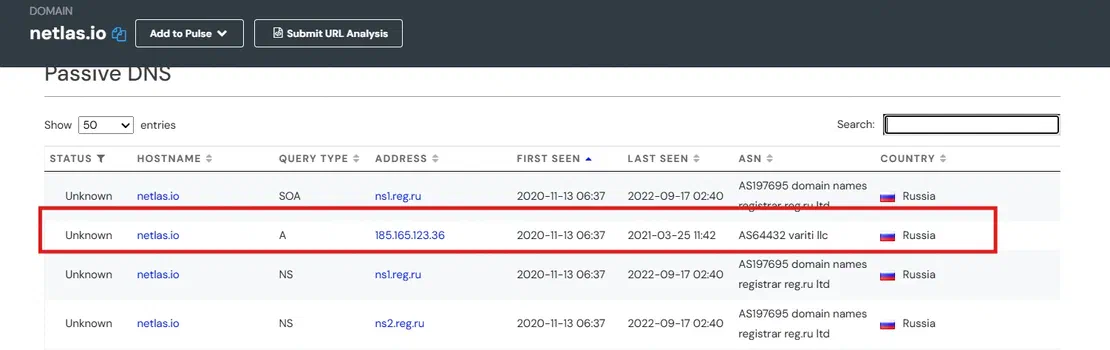
This record shows that the domain now resolves to two IP addresses. As our user base grew, we added the second address to improve fault tolerance.
DNS history reveals how an organization’s services evolve over time. For example, TXT records verify domain ownership when integrating new tools. Let’s examine the 2024 TXT records for discord.com.
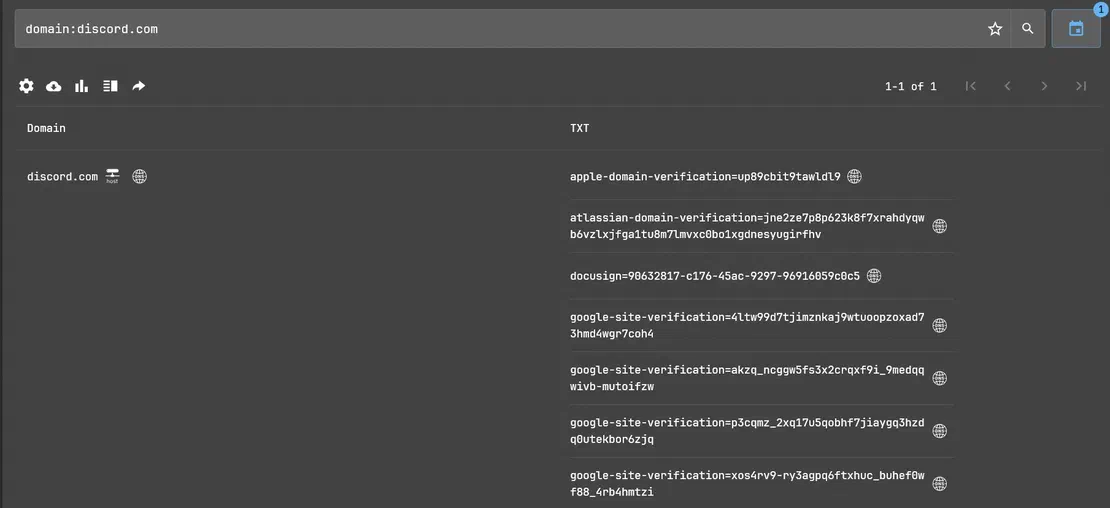
By 2026, a slack-domain-verification.... string appears in these records.
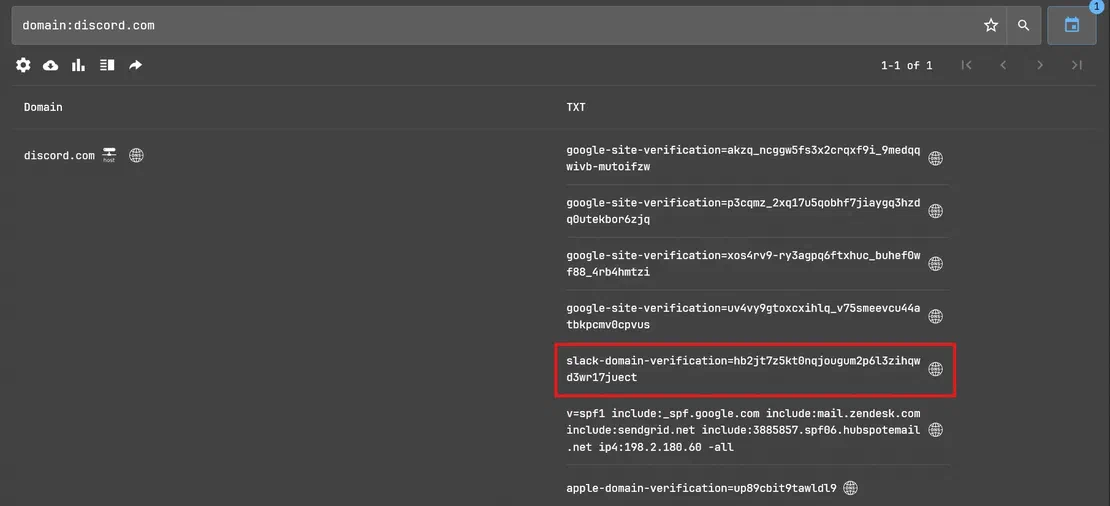
The organization eventually added Slack. This discovery raises questions about their internal processes: why they chose Slack and what drove its adoption. Deeper competitive intelligence can answer these questions, as a TXT record serves only as an initial lead.
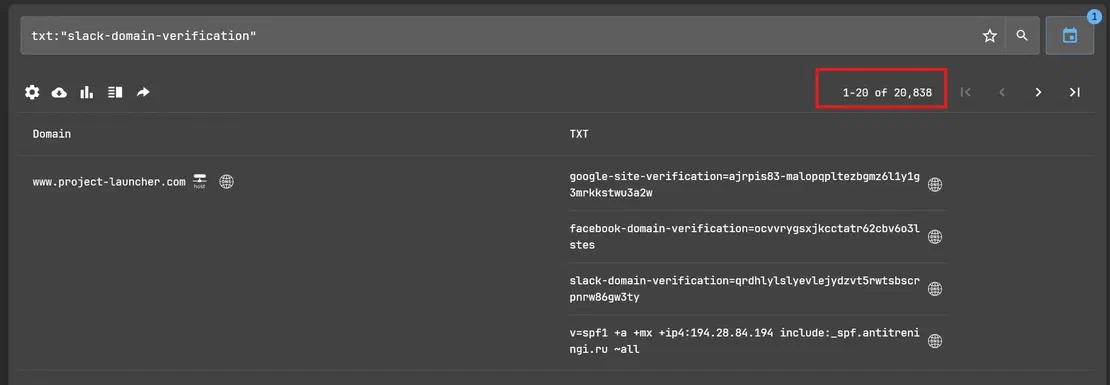
Analysts can also estimate a service’s customer base. Since we spotted a Slack verification key, let’s examine it next.
Number of records in 2024:
Number of records in 2026:
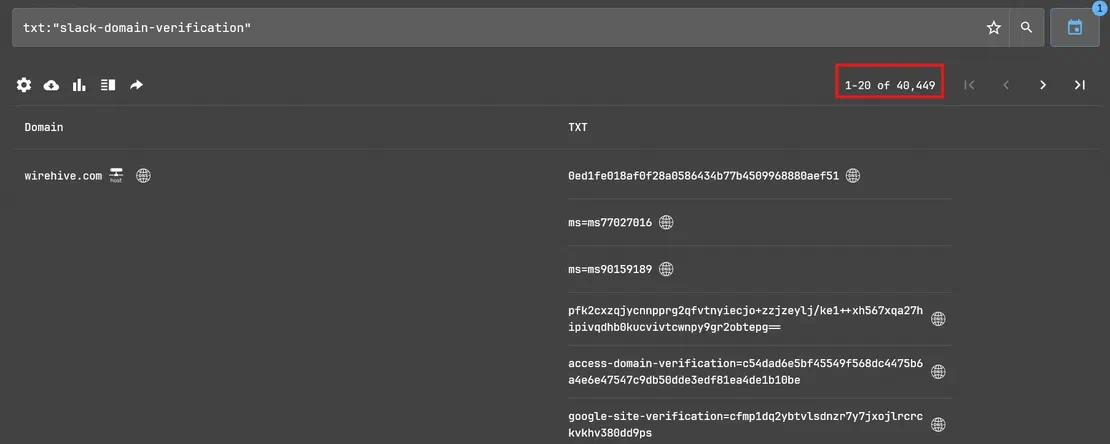
The record count nearly doubled. This growth suggests that the company remains active and continues to update its services.
Request Your Free 14-Day Trial
Submit a request to try Netlas free for 14 days with full access to all features.
Phishing Countermeasures
Phishing ranks among the most dangerous cyberattack methods. An employee clicks a malicious link, and attackers gain access to sensitive corporate data. Many high-profile ransomware attacks on major corporations started this way.
Imagine that attackers register d1scord.com (a fictional address) to mimic a well-known company’s domain. This phishing site replicates the original interface and tricks users into paying for service access.
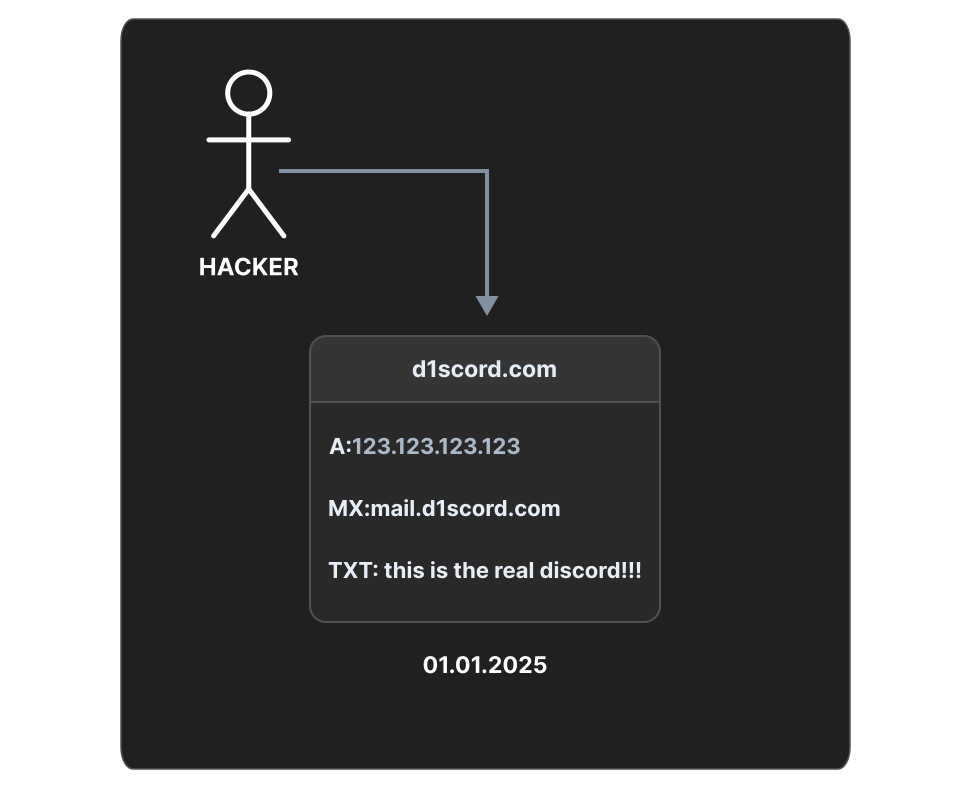
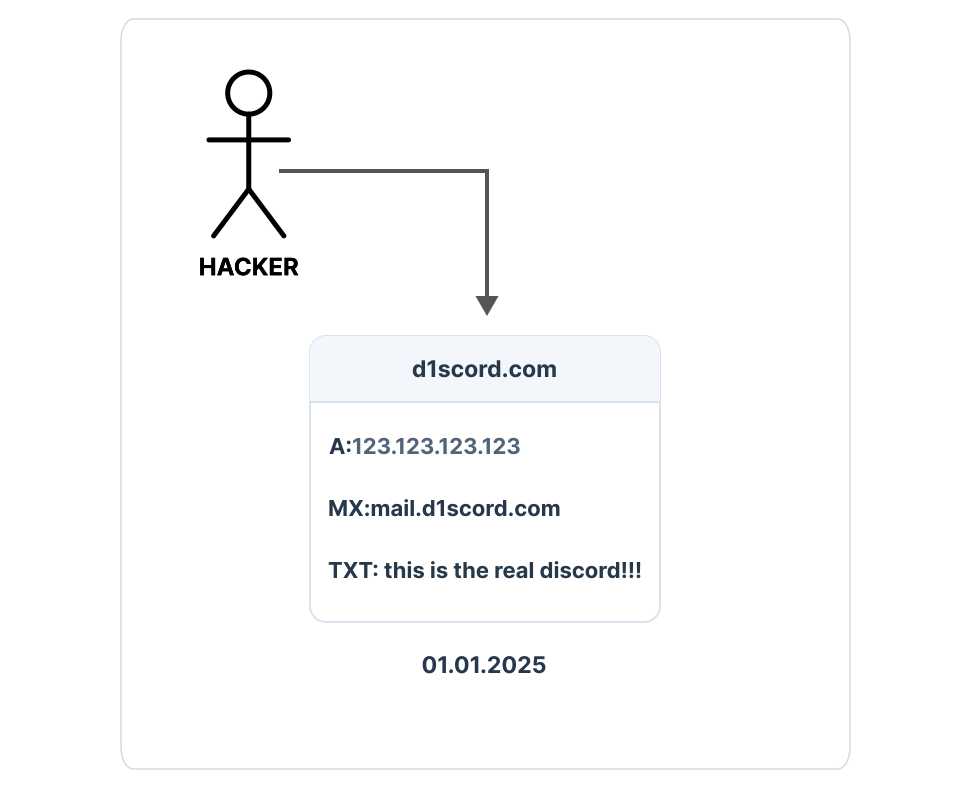
The impersonated company will naturally act fast to take down the fake site. However, deleting the domain blocks researchers from uncovering malicious addresses. By examining the DNS history for d1scord.com, a researcher can still trace the attacker or expose the malicious IP address to prevent future attacks.
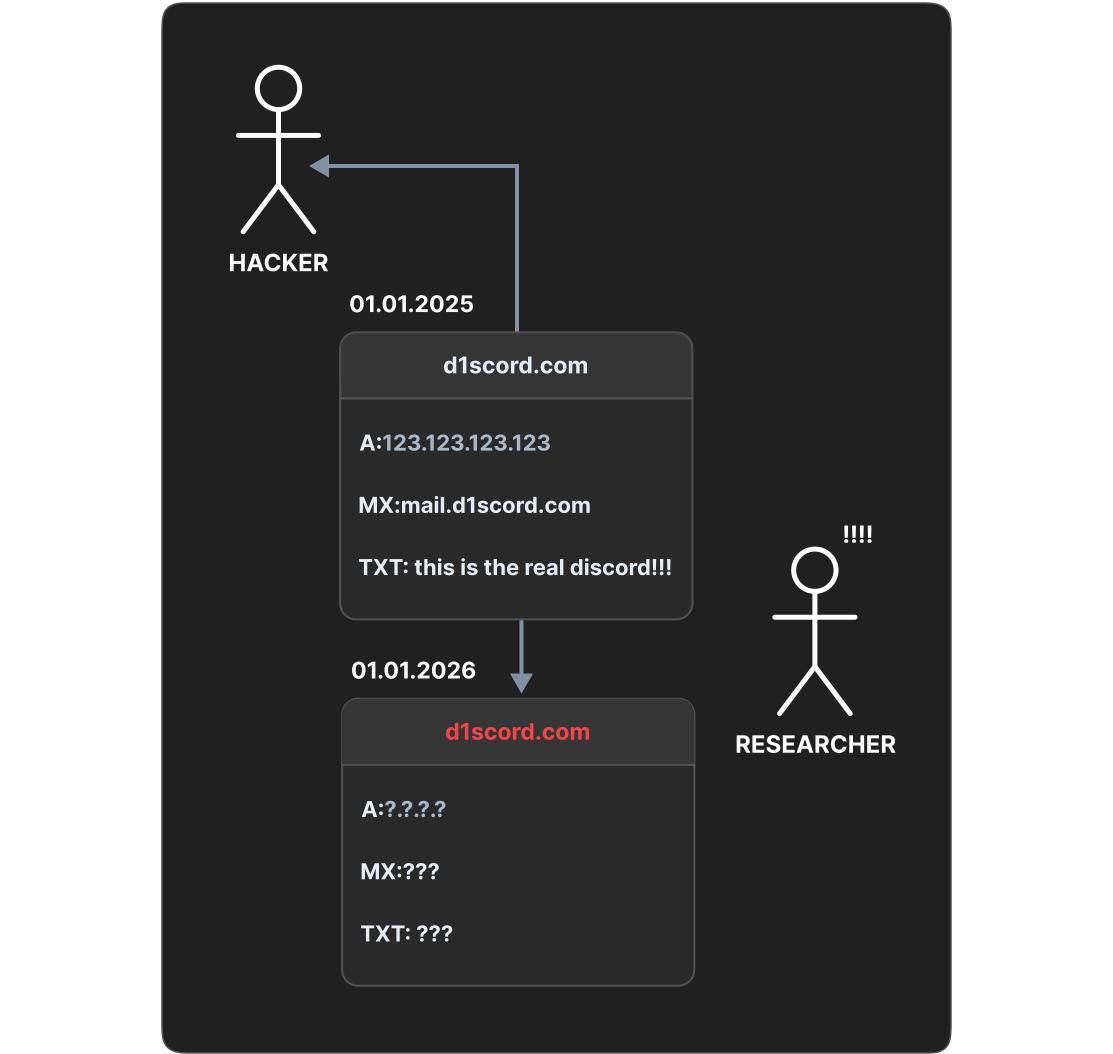
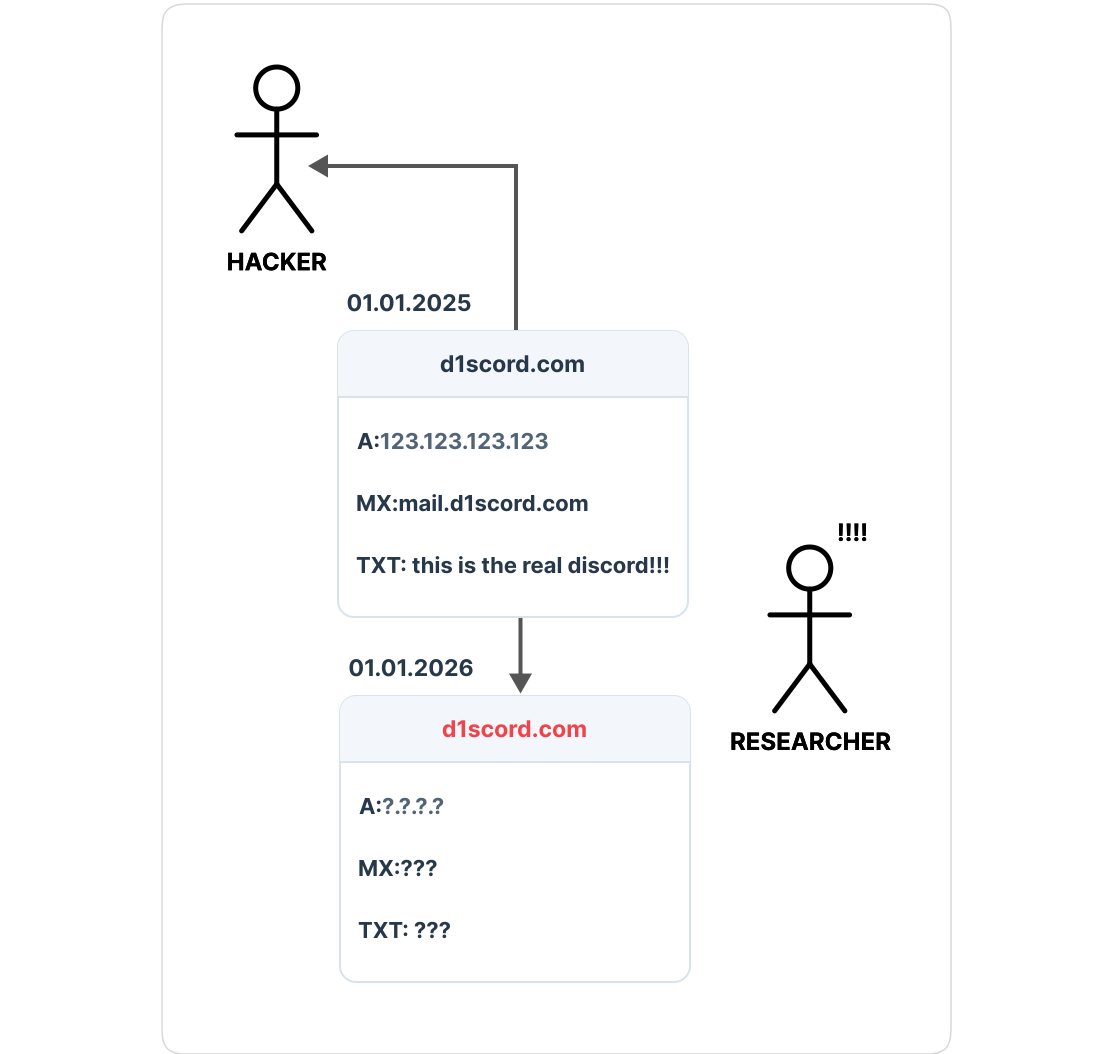 This investigation rarely proves simple; a researcher often sifts through hundreds of modified records to identify the hacker. Yet, without DNS history, this task would be far harder.
Recovering Lost DNS Records with DNS History Services
Modern DevOps workflows often combine application development with DNS zone and record management. Once a record updates and fully propagates, previous values vanish from public view; domain pings return only the new IP address, which complicates rollbacks.
Consider this scenario: a site administrator accidentally overwrites an A record during routine maintenance. Hours later, all resolvers point to the new IP address, and the team lacks an internal backup of the old configuration.
Follow these steps to recover the record:
- Select a DNS history service.
- Query historical records. Use the service’s web interface or API to pull past values for the target domain and record type.
- Locate the timestamped entry. Identify the exact date and value you need.
- Restore the record in your DNS console. Copy the retrieved value into your DNS provider’s dashboard or IaC configuration, then publish the change.
DNS History Analysis Tools
Now that we know why DNS history matters and where it comes from, let’s examine specific tools that retrieve domain data.
Where DNS History Data Comes From
Public registries rarely provide DNS history. Instead, commercial and research platforms compile this data from several channels. Understanding these sources explains why records often differ across services.
- Passive DNS collection: This primary source yields the richest data. Sensors at internet service providers and public name servers log responses to real user queries. Archives capture only queried domains; they may miss abandoned sites, yet they uncover subdomains absent from public lists.
- Active scanning: Automated bots crawl domains and the IPv4/IPv6 address space to record responses. This approach reveals low-traffic sites, though records can change undetected between scans.
- Zone files: Registries like Verisign (for .com and .net) publish lists of all registered domains along with their name servers. While official, these files remain incomplete because they omit final IP addresses (A and AAAA records).
Comparing the same domain across different platforms reveals diverging timelines. First, passive collection coverage depends on sensor network size: large providers spot IP changes immediately, whereas smaller services detect updates weeks later. Second, scanning budgets dictate crawl frequency and timeline granularity. Finally, launch dates set hard limits on historical depth — a service started in 2025 cannot show where a domain pointed in 2012.
Selection Criteria
Choosing a DNS history service requires evaluating its launch date, database volume, data sources, archive depth, and available record types. Platforms gather data from proprietary DNS sensors, certificates, WHOIS databases, and other channels, so results for the same domain often vary across services. Compare providers across these key parameters:
- Archive depth: How far back the service stores DNS records.
- Data completeness: Which record types the platform supports (A, AAAA, CNAME, MX, NS, TXT, and others).
- Timestamps: Records showing when the platform first and last observed a link between a domain and an IP address.
- Data sources: Proprietary passive DNS sensors, SSL certificates, WHOIS logs, active scans, or aggregated third-party feeds.
- Related entities: Subdomains, associated domains, certificates, and URLs.
- Search direction: The ability to query both IP addresses by domain and domains by IP address.
- Access and automation: API availability, data export options, free-tier limits, pricing plans, and web interface usability.
- Freshness: Continuous updates and current records.
Tools
The following popular services help researchers inspect DNS history. Each platform handles data differently: some reveal historical IP addresses, others track nameserver changes, and some uncover subdomains through certificates. Combine multiple tools to achieve the most thorough results.
Complete DNS
Complete DNS tracks domain history and DNS infrastructure changes. Its database updates daily and stores over 2.2 billion nameserver change records, creating a detailed timeline of modifications.
Registered users receive 100 free queries per month, though these free lookups display only partial reports.
AlienVault OTX
AlienVault OTX offers a free threat intelligence platform for investigating domains, IP addresses, URLs, and related threat indicators. Its Passive DNS section displays historical IP addresses, record types, ASNs, countries, and “First Seen” and “Last Seen” timestamps. Beyond Passive DNS, the platform provides domain reputation scores, WHOIS records, and associated threat indicators. OTX also supports an API, letting teams automate domain checks and integrate threat intelligence into their workflows.
DNS Spy
DNS Spy provides a paid service for continuous DNS monitoring and configuration backups. Unlike retrospective databases, this tool helps administrators protect their own domains: it checks records every 10 minutes, logs every modification, and enables rapid rollbacks of faulty edits. While continuous monitoring and history require a paid subscription, the site offers free utilities without registration — including a live DNS scanner, CAA/SPF/DMARC validators, a DNS propagation checker, and a look-alike phishing domain scanner.
SecurityTrails
SecurityTrails operates one of the world’s largest commercial Passive DNS aggregators for OSINT, cyber investigations, and attack surface analysis. Its database holds over 10 trillion records, letting analysts reconstruct multi-year timelines of DNS changes, subdomains, and WHOIS data. The platform offers no public free tier; access requires registration and a paid subscription.
Internet Asset Search Engine
Researchers can also retrieve historical DNS records through search engines powered by internet-wide scanners. You can read detailed comparisons of popular platforms like Shodan, Fofa, and Censys. In this section, however, we focus on Netlas.
Netlas provides these capabilities through its DNS Search tool, which lets users:
- Search across all major DNS record types, including reverse DNS records.
- Use wildcards in queries, such as inside domain names.
- Access past scans for free to investigate DNS history.
For more details, consult our reference documentation.
After creating an account and logging in, open the DNS Search tool to begin your investigation.
The image below highlights two useful features: query examples and mapping. Netlas uses a straightforward query syntax, and DNS Search relies on a compact set of keywords. While the help section explains query construction in detail, this block provides a few simple examples to illustrate the search engine’s capabilities.
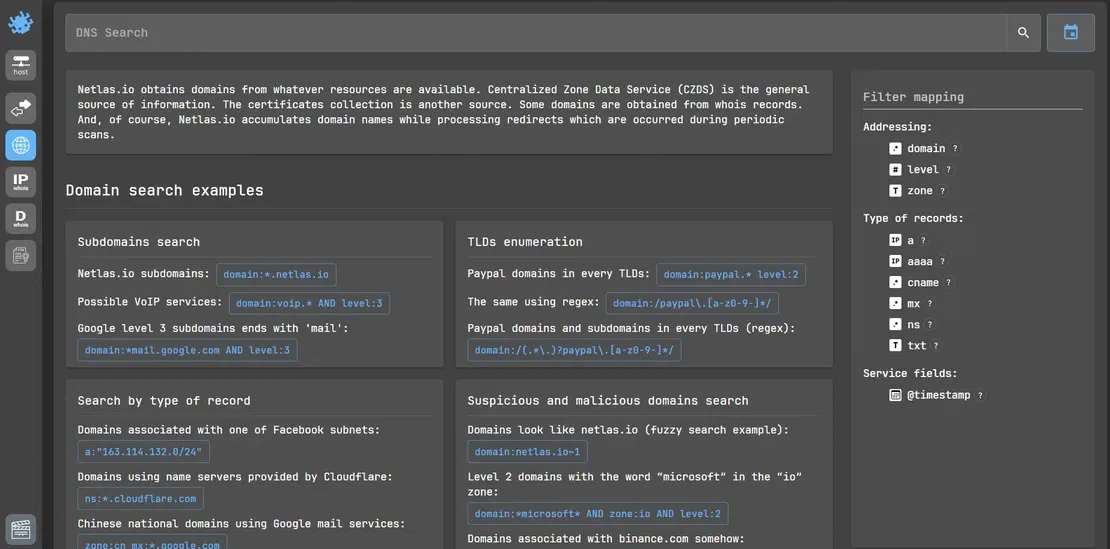
The first and simplest query retrieves all DNS records for a specific domain. Use a dork like this:
domain:example.comFor this investigation, let’s examine discord.com, which we mentioned earlier.
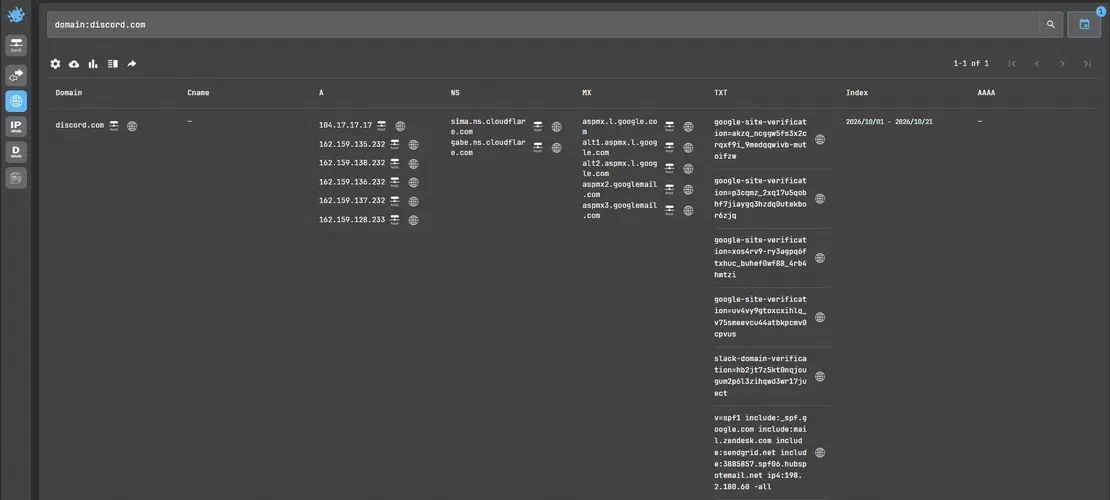
Beyond resolving a domain name into its DNS records, Netlas also lets you reverse the process. To find all domains linked to a specific IP address, use this query:
a:8.8.8.8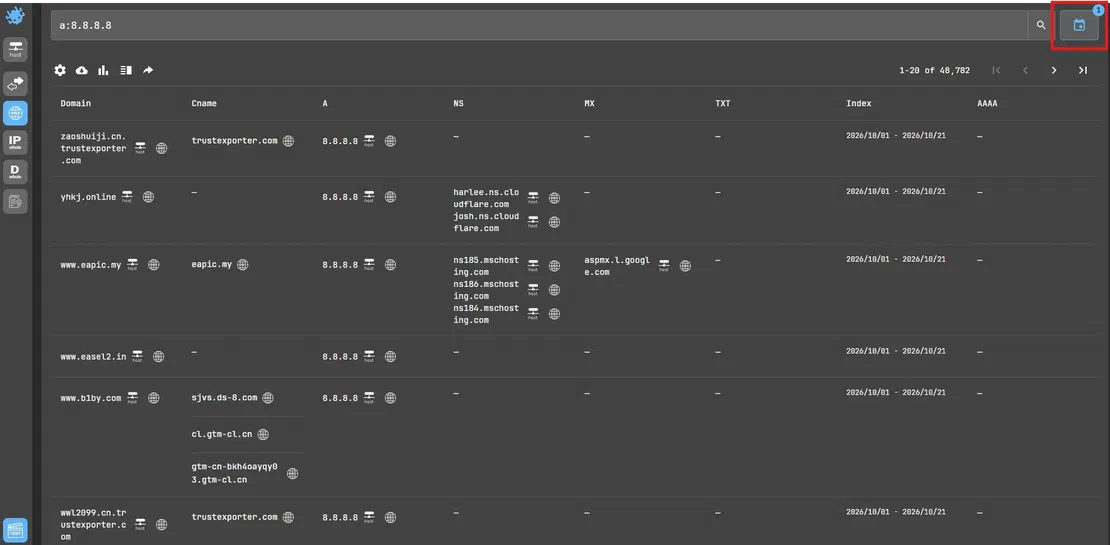
You can query other record types—such as MX, TXT, and NS—in the same way. To view DNS history, click the button in the top-right corner.
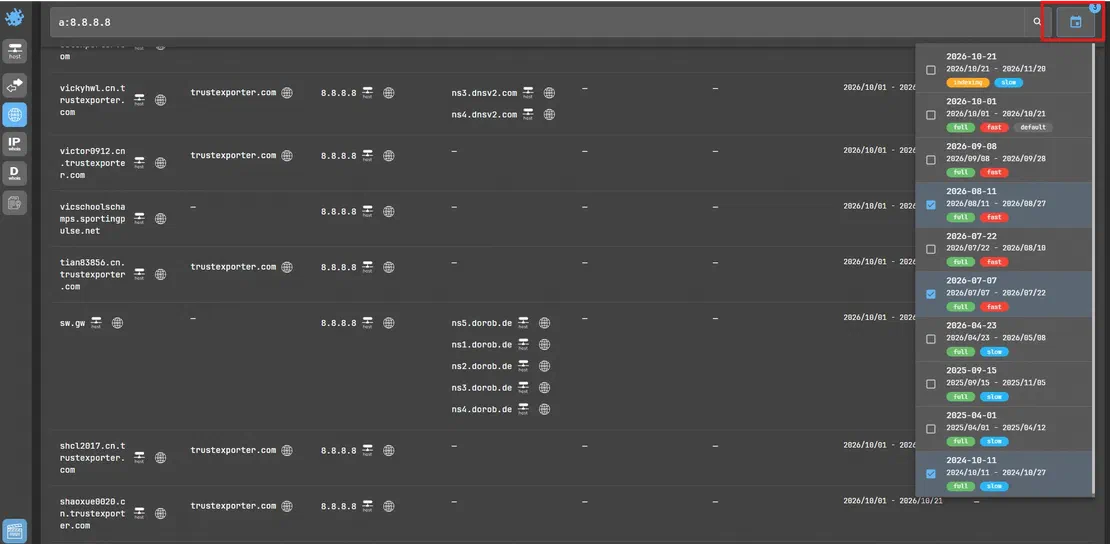
Selecting specific indices then retrieves the records for those dates.
Querying individual DNS records makes Netlas a strong tool for attack surface mapping and OSINT investigations. However, because the platform launched relatively recently, its archive offers limited historical depth.
How to Perform a Complete DNS History Lookup
Whether you need to investigate a suspicious domain or restore deleted configurations, follow this general workflow with any DNS history provider:
- Open the service portal. Navigate to your preferred DNS history tool’s website.
- Enter the target domain. Type the domain you want to inspect into the search bar.
- Authenticate if required. Log in with your credentials or register a free account.
- Locate the historical data section. Open the tab or menu labeled “History,” “DNS Timeline,” or a similar heading.
- Select the record type. Choose the specific DNS record (A, AAAA, MX, CNAME, TXT, and others) you want to inspect.
- Review and export the data. Examine the list of past entries, each showing a timestamp and record value, then copy or export the relevant records for recovery or analysis.
Tips for Analyzing Historical DNS Data
Auditing DNS configurations regularly keeps records accurate and current, preventing performance issues and security vulnerabilities. This routine catches and resolves misconfigurations before they disrupt your domain.
Follow these strategies to streamline your DNS analysis:
- Automate checks: Use monitoring tools to run periodic DNS audits, ensuring every record stays accurate and up to date.
- Flag discrepancies: Compare past and current DNS records to spot unusual changes or mismatches that signal emerging issues.
- Track DNS performance: Monitor current response times to pinpoint slowdowns and other performance issues.
- Run security audits: Inspect DNS records regularly to uncover vulnerabilities or unauthorized changes that could compromise your network.
- Verify backups: Test historical backups routinely to confirm they remain intact and ready for rapid restoration.
Integrating these practices into your workflow strengthens DNS management, protecting both the security and performance of your domain infrastructure.
Conclusion
DNS history turns a simple “what is running now?” lookup into a full investigation. It reveals where a domain lived previously, which services and vendors supported it, and which connections vanished from current records. Analysts rely on this tool across all four scenarios covered in this article: uncovering hidden infrastructure, conducting competitive intelligence, exposing phishing networks, and restoring overwritten zones.
Combining multiple data sources yields the strongest results: passive DNS exposes real user resolutions, active scans cover blind spots, and certificate or zone archives add historical depth. Because every platform features unique coverage and launch dates, different tools complement one another — making cross-checks against WHOIS records and live DNS resolution standard practice in any investigation.

Book Your Netlas Demo
Chat with our team to explore how the Netlas platform can support your security research and threat analysis.
Related Posts

October 20, 2026
Using Netlas in Houdin

August 30, 2024
Using DNS History in Cybersecurity

February 7, 2025
Using Subfinder with Netlas Module

January 20, 2025
Using Maltego with Netlas Module

December 27, 2024
Using theHarvester with Netlas

December 23, 2024
Using TLDFinder with Netlas