





Fingerprinting Exposed Siemens S7 PLCs with Netlas
October 23, 2026
15 min read

In the summer of 2010, security researchers began investigating a piece of malware unlike anything they had seen before. At first, it looked like another Windows worm. It spread through USB drives, exploited multiple zero-day vulnerabilities, and moved aggressively through networks. But as analysts dug deeper into it, it became clear that Windows machines were never the real target.
The malware, later named Stuxnet, was designed to attack industrial control environments and manipulate specific Siemens programmable logic controllers (PLCs). It is widely known as the first publicly documented malware designed to cause physical effects in the real world through cyber means.
PLCs are the computers that quietly run industrial processes. They open and close valves, regulate pressure, control motors, and automate countless operations inside factories, power plants, water treatment facilities, and other critical infrastructure. Unlike traditional IT systems, their job is not to process emails or host websites but to interact with the physical world.
More than fifteen years later, Siemens is still one of the most recognizable names in industrial automation, and Siemens PLCs continue to power a large share of the world’s industrial infrastructure. While modern deployments are often protected by layers of segmentation and access controls, not every device sits behind those boundaries. Thousands of industrial systems remain visible from the public internet, either directly or through services that expose information about them.
The existence of exposed industrial devices is not particularly surprising. What’s surprising is how much they can reveal without anyone interacting with them.
A single publicly indexed response can sometimes disclose the exact PLC family, hardware model, firmware version, and other details useful for understanding what sits behind an IP address. Host metadata and naming conventions can add useful context, helping us understand what a response tells us about the device and its network.
In this article, we’ll use Netlas to explore how exposed Siemens PLCs can be identified and profiled using publicly indexed scan data. We’ll examine the information returned by S7comm services, look at real responses from exposed devices, and see how fields such as module IDs, firmware versions, and system names can help us identify the reported hardware. We’ll also look at what happens when responses are incomplete, inconsistent, or potentially misleading.
The goal is not to interact with industrial systems but to understand what they reveal on their own.
Inside the S7Comm Protocol
To understand why exposed Siemens PLCs are often so easy to identify, let’s understand the protocol that sits at the center of Siemens automation environments, which is S7comm.
S7comm is the communication protocol used by Siemens controllers and engineering software to exchange information. When an engineer connects to a PLC from Siemens STEP 7 or TIA Portal, much of that interaction takes place through this protocol. It’s used for tasks such as device discovery, diagnostics, configuration, program management, and status monitoring. In simple words, it exists to help engineers understand and manage industrial equipment.
Many industrial networks were historically made around the assumption that control systems would operate within industrial facilities and controlled network environments. When services become reachable from the public internet, the information they return can be observed and collected by anyone who can access them.
Because engineering software needs to identify and diagnose controllers, S7comm responses can contain useful device metadata. The same information can support fingerprinting when those services are publicly reachable.
At the network level, S7comm typically operates over TCP port 102. Communication is carried through several protocol layers before reaching the Siemens-specific messages themselves.
TCP/102
 └── TPKT
      └── COTP
└── S7commFor this article, the lower protocol layers are not particularly important. What matters is that S7comm was made to allow engineering workstations to identify and communicate with PLCs efficiently. Before performing any engineering tasks, software often needs to understand what device it is talking to, what capabilities it supports, and how it is configured.
To facilitate this, Siemens devices expose various pieces of information through protocol responses. Depending on the controller and the data available, these responses may contain details such as the device family, module type, firmware version, hardware identifiers, and other system information.
Individually, these fields may not seem particularly interesting. However, when combined, they can provide a surprisingly accurate picture of the device behind an IP address. What begins as routine engineering metadata can often be transformed into a detailed device fingerprint.
Before looking at how exposed devices can be discovered and analyzed, let’s see exactly what information these systems reveal and how each signal contributes to identifying a specific controller.
The Device Fingerprint
The information exposed through S7comm becomes useful once we stop looking at it as a collection of protocol fields and start looking at it as a collection of clues.
At first, many of the values returned by a Siemens PLC appear fairly ordinary; together, however, they can tell us a surprising amount about the device behind an IP address.
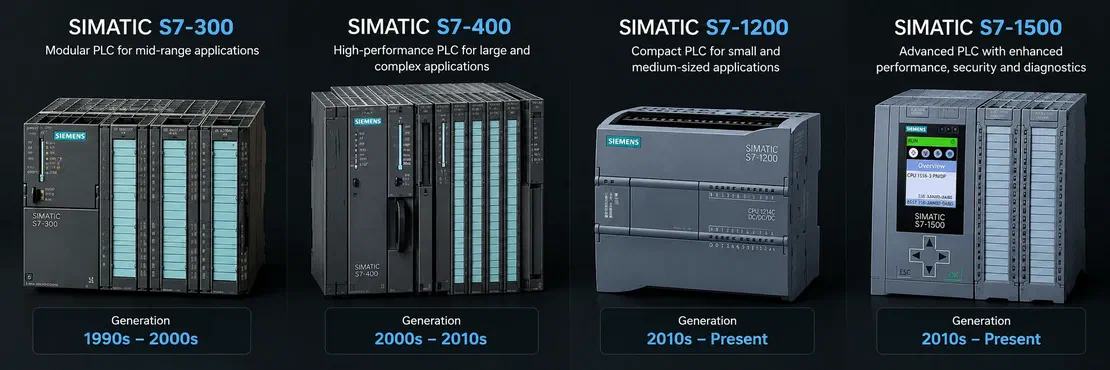
One of the most useful clues is the device family itself. Siemens controllers span multiple generations, including the S7-300, S7-400, S7-1200, and S7-1500 series. Identifying the family immediately narrows the scope of analysis. Each device family has a very different deployment history. Even before getting into any additional information, we already have a rough idea of the technology we are dealing with.
Hardware information provides another layer of context. Depending on the device, responses may expose module identifiers, order numbers, or CPU information that can be mapped directly to Siemens documentation and can be narrowed down to a specific controller model.
Firmware information is equally valuable. Much like software versions on traditional IT systems, firmware versions help place devices within a particular generation. They can also serve as an additional validation point when combined with hardware information.
Additional information such as network ownership, host metadata, or other publicly available signals can strengthen the picture even more.
In the next section, we will look at how exposed Siemens PLCs can be discovered at scale before returning to these signals and using them to identify real-world devices.
Locating exposed devices with Netlas
Now that we know what information Siemens PLCs can expose, it’s time to find some.
A good starting point is a simple search for S7 devices. Running the query below immediately returns thousands of results.
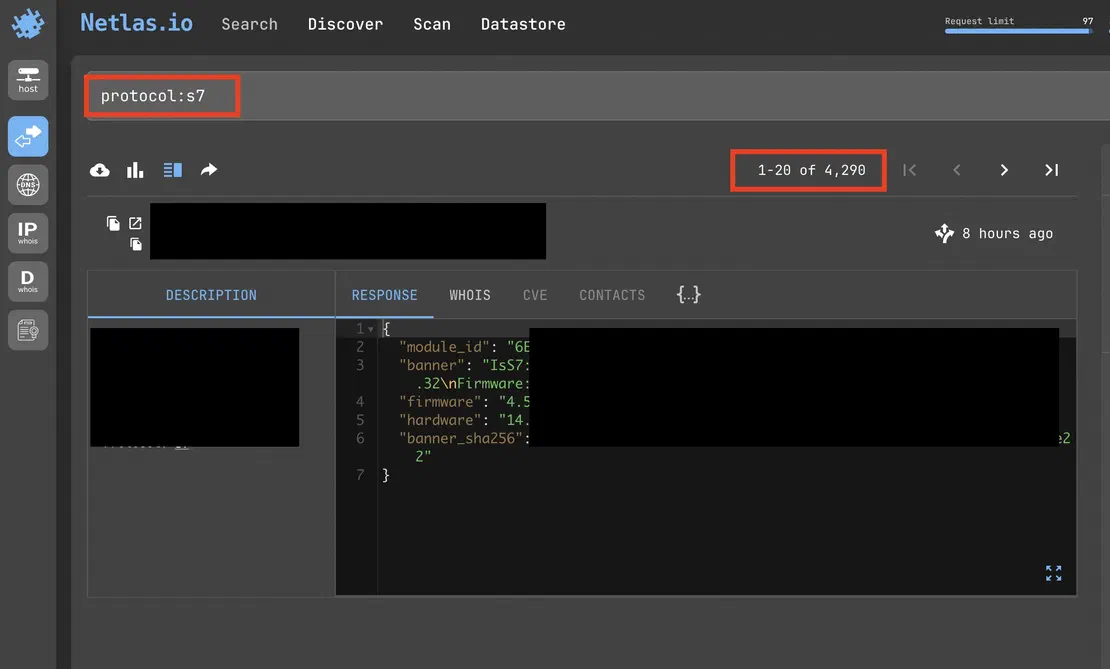
At this point, we’ve confirmed that exposed S7comm services are far from rare. The problem is that the list of IP addresses isn’t useful on its own. What we’re interested in are the devices that expose enough information to be fingerprinted.
Scrolling through the results, it quickly becomes clear that not all responses are equal. Some contain only a small amount of information, while others expose a lot more detail.
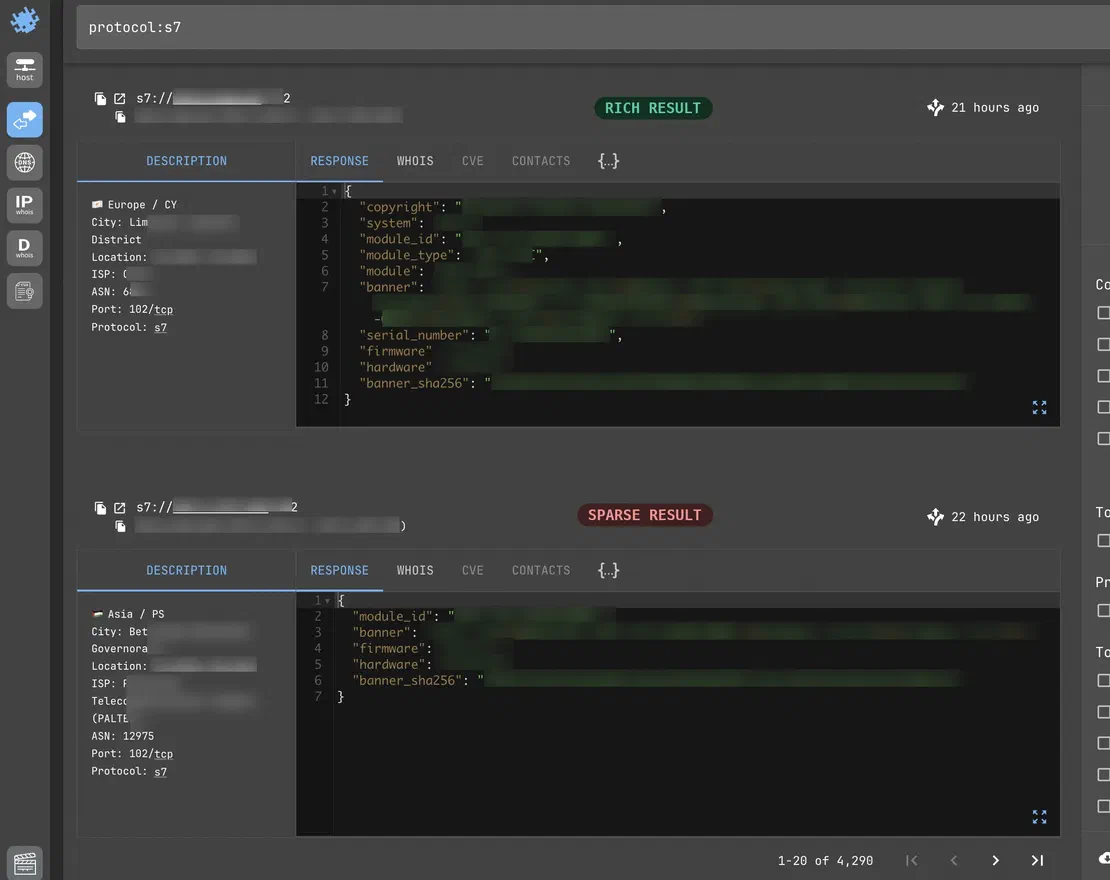
The first device provides a rich response containing a system name, module identifier, module type, serial number, hardware version, and firmware version. In contrast, the second device exposes only a subset of this information.
This distinction becomes important when performing fingerprinting. While both devices can be identified as Siemens PLCs, the first provides a lot more context that can be later used to determine the exact hardware model and validate our findings.
After reviewing a number of responses, a pattern begins to emerge. While most devices expose basic information such as hardware and firmware versions, only a few expose additional fields that are particularly useful for identification.
One such field is module_type
Unlike a generic firmware version, the module type often reveals exactly what CPU the device is reporting. This makes it one of the most valuable fields available for passive fingerprinting.
To focus on these richer responses, we can refine the search:
(protocol:s7) AND s7.module_type:*s7.module_type narrows the results to responses with reported module-type information. This makes the dataset more useful for hardware identification, but it also means the results do not represent all exposed S7comm services.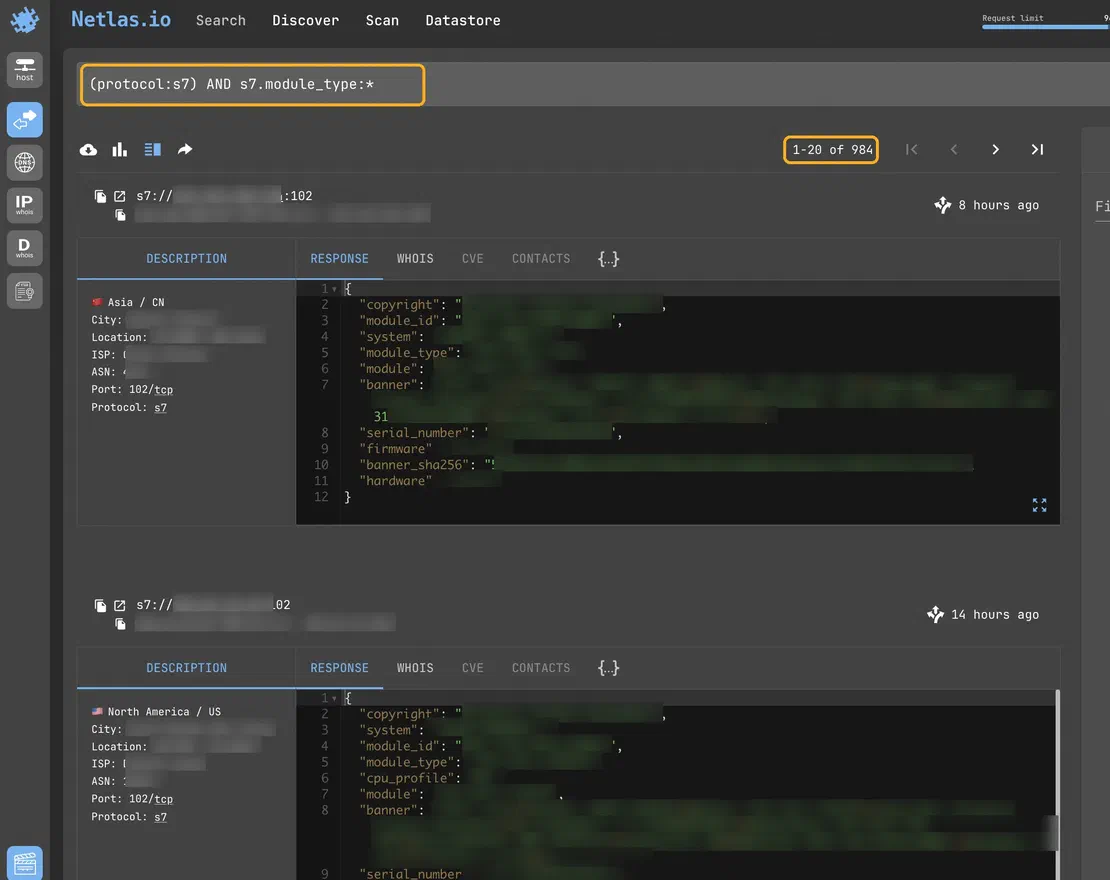
The impact is immediate. The dataset shrinks from over 4,000 exposed S7 devices to fewer than 1,000 systems exposing module type information.
More importantly, the quality of the results improves significantly.
Instead of seeing only hardware and firmware values, many devices now expose a combination of system names, module identifiers, module types, serial numbers, and version information. These additional attributes provide multiple independent signals that can later be used to identify and validate a device.
With a dataset of richer responses in hand, we can move beyond discovery and start examining the devices themselves. This is where the fingerprinting process starts to get interesting.
Request Your Free 14-Day Trial
Submit a request to try Netlas free for 14 days with full access to all features.
Fingerprinting in Practice
To demonstrate the process, let’s examine one of the devices returned by our search.
System: PLC Gruppo
Plant ID: Viguzzolo

Module Type: CPU 315-2 PN/DP
Module ID: 6ES7 315-2EH14-0AB0

Hardware: 5.0.1
Firmware: 3.2.10

Serial Number: S C-DNWA12942013At first, this looks like a collection of values with little meaning on their own. However, each field contributes a piece of information, and when those pieces are combined, they begin to form a much clearer picture of the device behind the IP address.
The most useful place to start is the reported module type:
CPU 315-2 PN/DPUnlike firmware versions or serial numbers, the module type immediately tells us what kind of controller we’re dealing with. A quick lookup shows that the CPU 315-2 PN/DP belongs to Siemens’ SIMATIC S7-300 family, one of the most used PLC platforms in industrial environments.
The S7-300 series has been used for decades across manufacturing, utilities, process industries, and many other industrial applications. As a result, seeing an exposed S7-300 controller on the internet is not unusual. What matters is that we’ve already narrowed our identification to a specific controller family.
The next field provides an even stronger signal:
6ES7 315-2EH14-0AB0To someone unfamiliar with Siemens hardware, this may look like a random string of characters. In reality, Siemens order numbers are highly structured and often map directly to individual hardware models.
Looking up this identifier in Siemens documentation confirms the reported CPU type and provides additional information about the controller itself.
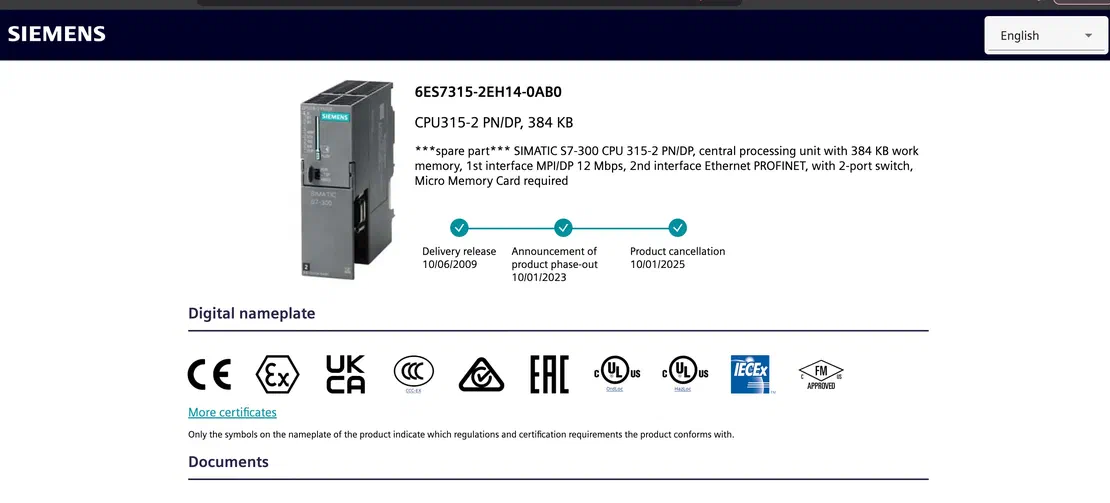
At this point, we’re no longer making a broad assumption based on a single field. Two independent values, the module type and the module ID — both point to the same hardware. This is an important part of passive fingerprinting.
The response also includes hardware and firmware revision information:
Hardware: 5.0.1
Firmware: 3.2.10These values don’t tell us much on their own, but they provide another layer of validation. If a device claims to be a particular controller model, we would generally expect its reported hardware and firmware revisions to be consistent with that platform.
Up to this point, the analysis has focused entirely on technical identifiers. However, the most interesting fields in this response are arguably the simplest ones:
System: PLC Gruppo
Plant ID: ViguzzoloUnlike the hardware and firmware information, these values were most likely chosen by whoever configured the device.
On their own, they don’t tell us exactly what the PLC controls, and it’s important not to jump to conclusions. But they do provide something that the technical fields don’t: context.
Instead of looking at an anonymous controller somewhere on the internet, we’re now looking at a system that has been given a name and associated with a particular plant identifier. That may not sound significant, but it’s the kind of information engineers often use internally to organize and manage industrial equipment.
This is something that appears regularly when analyzing exposed PLCs. Devices are frequently named after production lines, facilities, departments, or projects. Most of the time, those names are only meant to help operators and engineers navigate large environments. When they’re exposed through management protocols, however, they can provide useful clues during analysis.
The response also includes a serial number:
S C-DNWA12942013A serial number isn’t particularly interesting by itself, but it becomes more useful when looking at devices at scale. It provides another data point that can be compared across systems and can sometimes help validate whether a device appears genuine or not.
At this stage, we’ve already learned quite a bit from a single response. We’ve identified the controller family, confirmed the exact hardware model, recovered firmware and hardware information, and found a few human-assigned identifiers that provide additional context about the system.
The protocol response alone gives us a solid starting point. In the next section, we’ll look at how additional host and network metadata can help validate these findings and provide even more context around exposed devices.
Correlating Signals Beyond the Protocol
The S7comm response already gives us a lot of information, but the host running the service also leaves behind some other pieces of information that can help us understand the device better; this is where the analysis gets a little more interesting.
Going back to the same PLC Gruppo device, so far we’ve only considered information returned by S7Comm.
Netlas also gives us information about the host itself, including its geographic location, ISP, and network ownership.
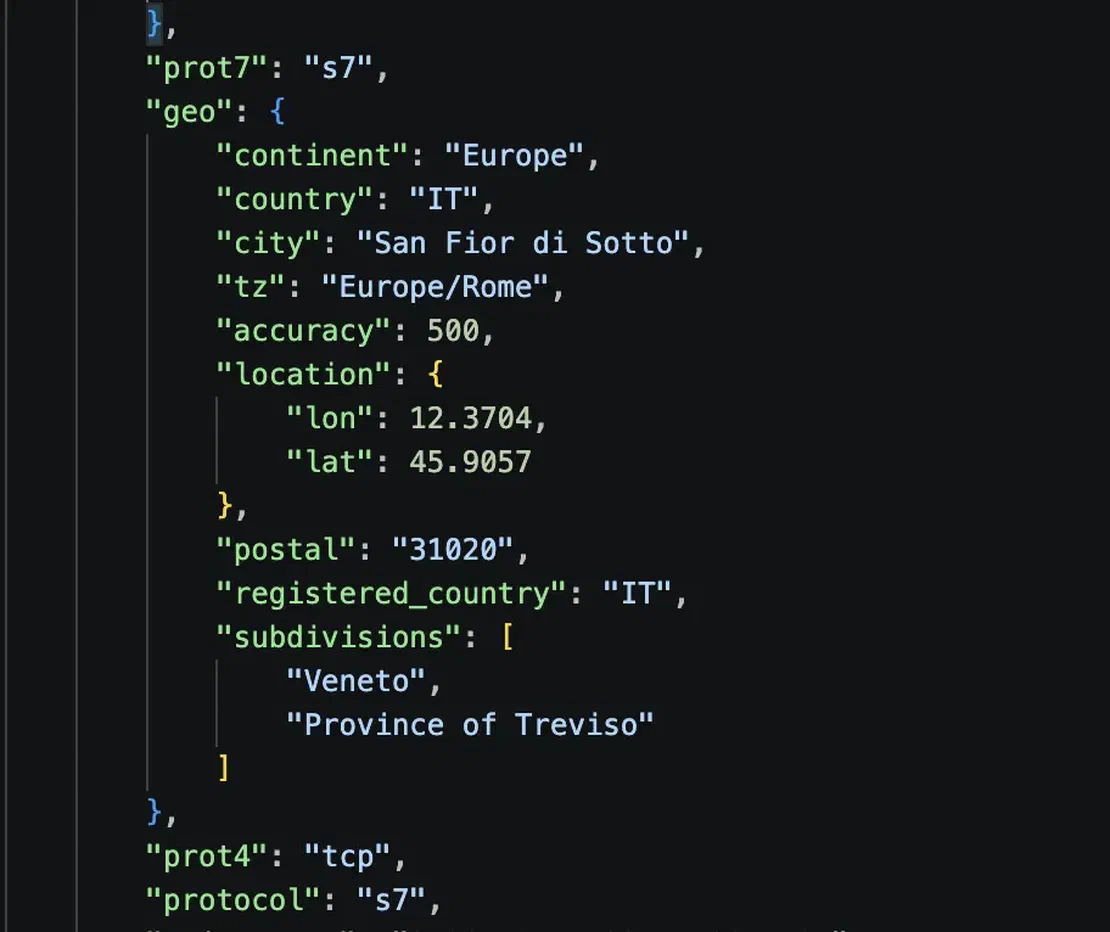
The host is associated with Italy, and the geographic data places it in the Veneto region. The network information also points to EOLO as the ISP.
None of this proves that the PLC itself is physically located at a particular facility. IP geolocation is not precise enough for that, and an internet connection can be used from a different location than the registered network information suggests.
Still, the S7comm response gives us another clue:
Plant ID: ViguzzoloThe next step is to follow the identifier outside of the PLC response and see what it actually refers to.
Viguzzolo is a municipality in the Province of Alessandria in northern Italy. Instead of treating the Plant ID as just another string in the banner, we can ask whether the name has any relation to the system itself.

The fact that the identifier refers to a real location is useful, but the mismatch with the IP’s Veneto geolocation is also important. There are several possible explanations. The PLC could be connected through an ISP network whose registered location differs from the physical site, or the connection could pass through a router, VPN, proxy, or other network infrastructure. The Plant ID could also refer to a facility, project, or internal naming convention rather than the location of the internet connection.
Because of that, Viguzzolo should be treated as a lead, not a confirmed physical location.
This is an important distinction when working with passive data. Different fields describe different aspects of the system: a module ID identifies the hardware, a firmware version describes the software, a plant identifier provides contextual clues, and IP metadata tells us about the network connection.
The value comes from understanding what each piece of data actually represents, rather than treating every field as a direct description of the physical device or its location.
Mapping the Exposed Population at Scale
To examine the information exposed by Siemens PLCs, I filtered Netlas results for S7comm responses containing module-type information and analysed a sample of 200 records. This gave me a dataset of responses with useful hardware-identification fields, allowing me to examine which module types appeared most frequently, how the records were distributed geographically, and what additional information the devices exposed.
The first question was geographic distribution. The country-level data shows that the United States accounted for 37 records, followed by China with 29 and Italy with 22. Germany and Spain followed with 19 and 15 records, respectively.
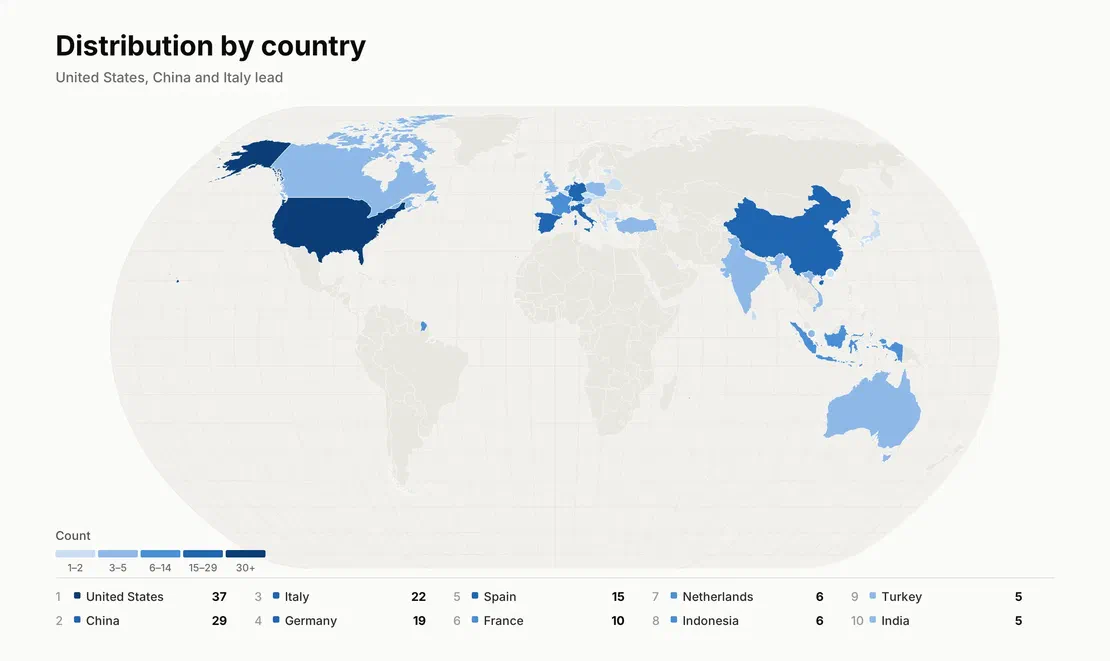
The records span 31 countries, although the distribution is far from uniform. A few countries account for a large portion of the sample, while some appear once or twice.
Geography, however, tells us very little about the controllers themselves. To understand the hardware, we next examined the reported module types.
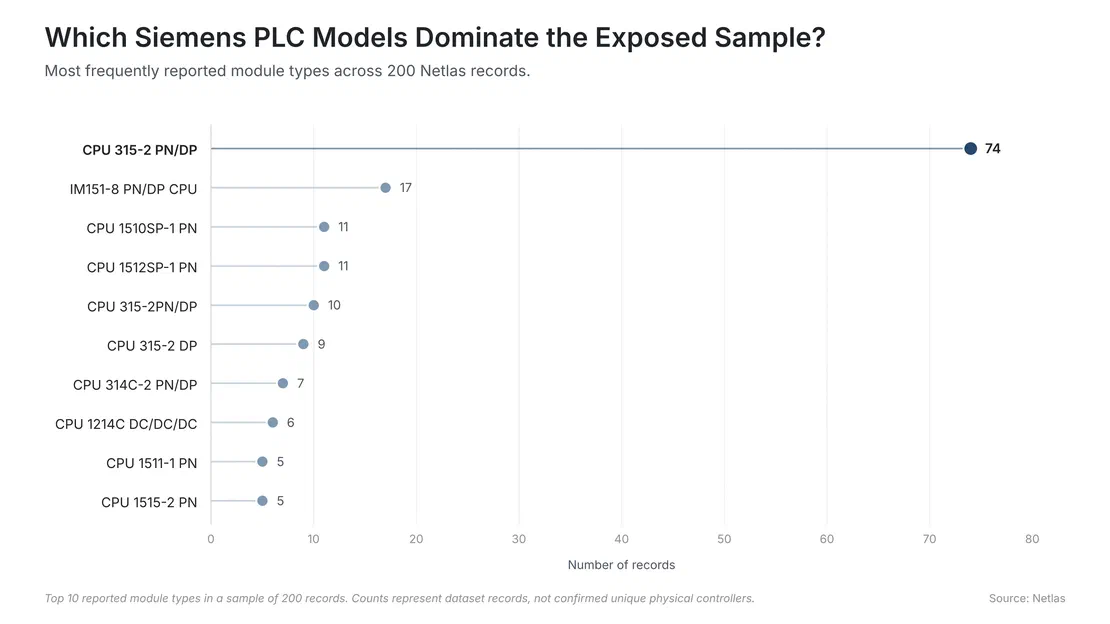
The distribution is notably concentrated around the CPU 315-2 PN/DP, which appears in 74 records, or 37% of the entire sample. The next most common type is IM151-8 PN/DP CPU, which appears 17 times. Other frequently reported models include the CPU 1510SP-1 PN and CPU 1512SP-1 PN, with 11 records each.
The next question was how much information these devices actually expose.
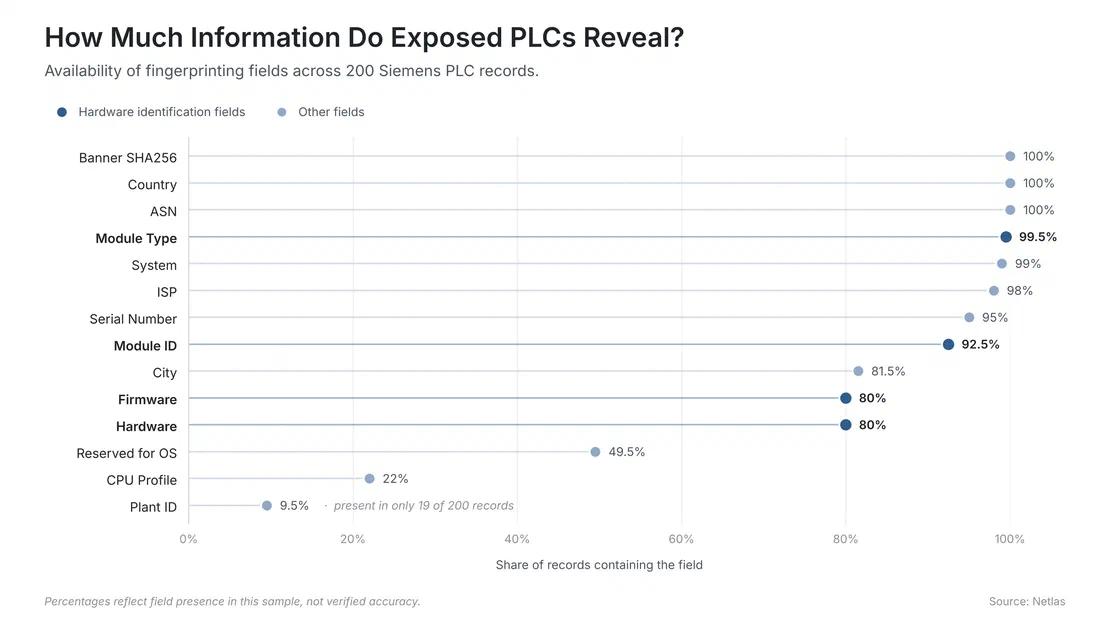
The field availability results show that several useful identifiers are present across most of the sample. Module type appears in 199 of the 200 records, while system name appears in 198. Module IDs are present in 185 records, and serial numbers in 190. Firmware and hardware versions are each available in 160 records. Other fields are considerably less common.
We also examined the Module IDs reported by the devices. Unlike a descriptive system name, a module ID is a hardware order number that can be checked against Siemens product documentation. It therefore provides another way to examine the reported hardware beyond the module-type label alone.
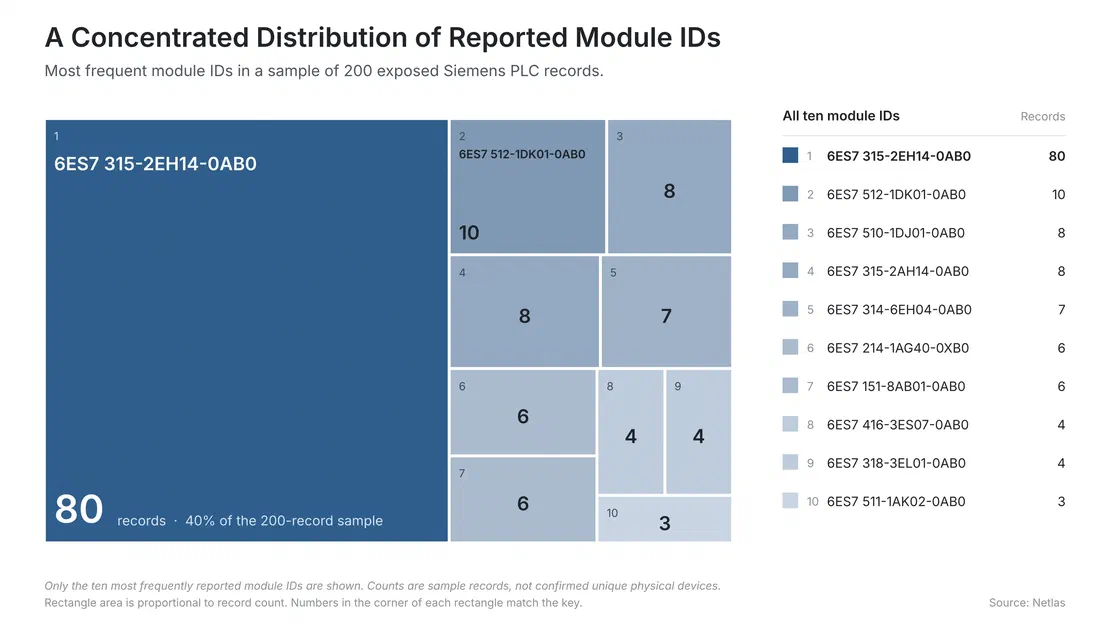
The most frequent module ID in the sample is 6ES7 315-2EH14-0AB0, which appears in 80 records. The next most frequent is 6ES7 512-1DK01-0AB0, with 10 records. The remaining entries occur eight times or fewer.
The concentration around one module ID is notable. Comparing it with the reported module type and Siemens documentation helps us check whether the hardware details are consistent, although repeated identifiers do not necessarily represent repeated physical devices.
Overall, the sample shows how much information S7comm responses can reveal about exposed PLCs. However, the aggregate data only tells us so much. Looking at repeated names, serial numbers, and unusual responses can help us investigate potentially simulated devices and understand the limits of passive fingerprinting.
Detecting Deception and Dealing with Limits
So far, we’ve treated the information returned by exposed S7comm services as a way to identify and understand the devices behind them. But there’s an important catch.
Some services may be simulated, deliberately configured as honeypots, or exposed through environments that reproduce the behaviour of real industrial equipment. Others may simply return incomplete or inconsistent information. The challenge is distinguishing unusual responses from genuinely misleading ones without jumping to conclusions.
When a PLC response looks a little too interesting
While reviewing the dataset, one particular combination of fields stood out. A device reported the system name Technodrome and the Plant ID Mouser Factory.
For anyone who grew up watching Teenage Mutant Ninja Turtles, the names are an amusing coincidence. The Technodrome is the fictional fortress associated with the series’ villains; the Mouser robots are another familiar part of that fictional universe.
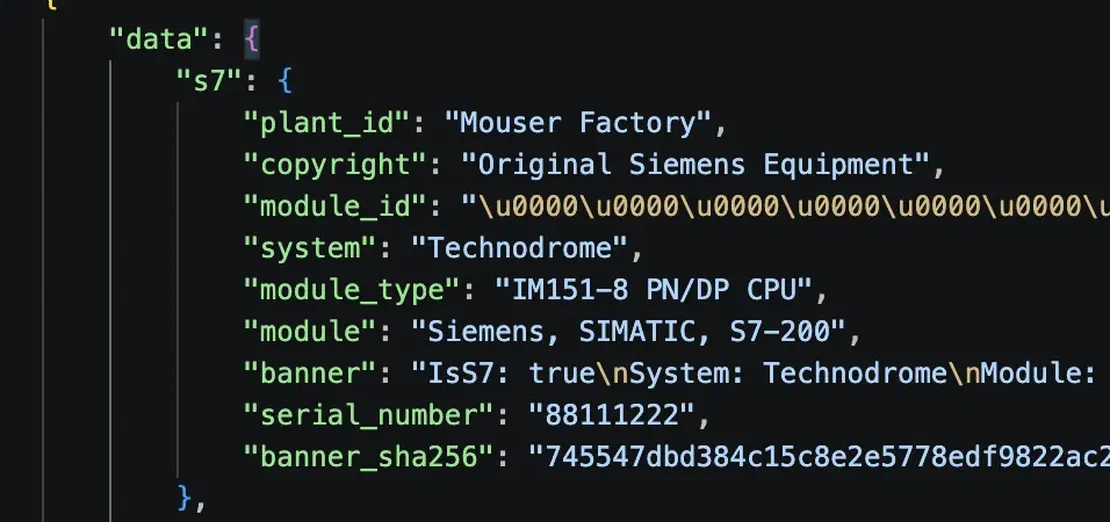
Of course, a reference like this doesn’t prove that the service is a honeypot or a simulator. Someone could have chosen the names as a joke, used them as placeholders, or configured a test environment.
What makes the record worth looking at is that the naming isn’t the only unusual detail. The same record contains a serial number of 88111222 and an unusual module identifier. Taken together, these details provide a reason to investigate the response more closely.
Looking for repeated identities
The same principle applies to the repeated values found elsewhere in the dataset.
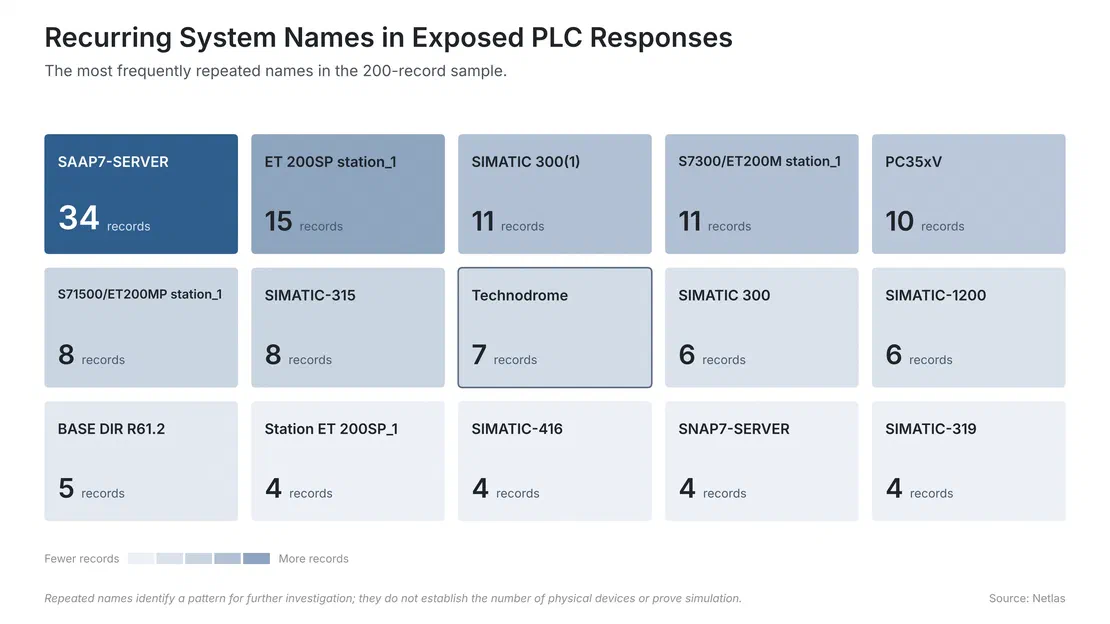
The system name SAAP7-SERVER appears in 34 records, making it the most frequently repeated name in our sample. The name Technodrome appears in seven records, while several other names recur across multiple responses.
Repeated names can have perfectly ordinary explanations. Engineers may use standard naming conventions; multiple devices may share a template. However, repetition can also be a useful starting point for identifying records that deserve closer inspection.
For example, if the same system name appears across hosts belonging to different network providers or countries, it becomes worth checking whether the accompanying hardware identifiers, firmware versions, serial numbers, and response contents are also identical. The more details that match, the stronger the case for investigating a shared configuration or replicated environment.
When identifiers stop behaving like identifiers
Serial numbers offer another way to examine these patterns.
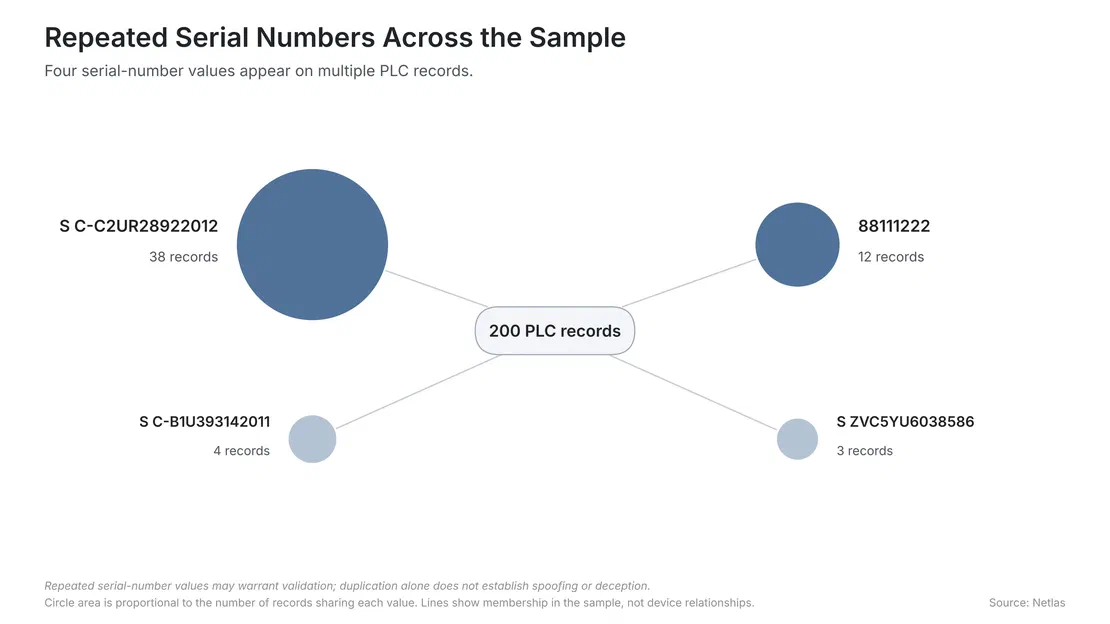
The value S C-C2UR28922012 appears in 38 records, while 88111222 appears in 12. Several other serial-number values also recur, although less frequently.
A serial number is useful because it is intended to distinguish a particular piece of hardware. When a value appears across numerous records, it raises a reasonable question: are these separate devices reporting the same identifier, or are we observing a shared configuration, a replicated service, or a simulated response?
These comparisons can help us identify records that deserve a closer look, but they don’t establish deception on their own. Identical values may result from duplicated configurations, default settings, or simulated services. Confirming the cause would require additional evidence beyond the exposed response.
The limits of passive fingerprinting
Ultimately, passive fingerprinting tells us what a service reports about itself, not necessarily what exists behind the connection. Hardware identifiers can be checked against Siemens documentation, and repeated values can reveal patterns, but neither guarantees that a device is genuine. Similarly, IP geolocation provides clues about a network connection, not definitive proof of a PLC’s physical location.
Unusual responses are worth investigating, but passive data alone may not explain why they occur.
Defensive perspective
The same techniques used to identify Siemens PLCs can also help organizations understand what their own infrastructure reveals to the outside world. Instead of looking for devices across the internet, defenders can apply the same process to their own public-facing IP addresses.
A practical starting point is to check:
- Exposure: Are industrial services such as S7comm reachable from the public internet?
- Device identification: Do the responses reveal module IDs, firmware versions, serial numbers, or internal system names?
- Access controls: If remote access is necessary, is it restricted to authorized users and trusted networks?
- Asset inventory: Do externally observed device details match the organization’s internal records?
- Ongoing monitoring: Have previously internal systems or temporary access rules accidentally become internet-facing?
These checks help answer two important questions: what can an outsider discover, and does that exposure need to exist?
For example, a module ID or firmware version may help defenders identify a controller and check whether it matches their inventory. An unexpected system name or unfamiliar public-facing service could point to a configuration that needs further investigation. External observations should always be checked against internal records before drawing conclusions.
Where remote access is required, it should be provided through controlled mechanisms such as a properly secured VPN, with access limited to the people and systems that need it. Unnecessary public exposure should be removed rather than relying on hiding banners or changing device names.
Passive fingerprinting provides an outside-in view of industrial infrastructure. It cannot replace internal audits or access controls, but it can help organizations discover what they are exposing before someone else does.
Conclusion
Exposed Siemens PLCs can reveal much more than the fact that an industrial service is reachable. Through S7comm responses, we can often identify reported controller models, examine hardware and firmware information, and find contextual details that help characterize individual systems.
Our analysis of 200 records showed how these fields vary in availability, which module types appeared most frequently, and how repeated system names and serial numbers can raise questions about the underlying devices.
Three lessons stand out:
Individual fields provide clues, not complete answers. A module ID can help identify reported hardware, while a system name may provide context. Neither establishes everything about a device.
Cross-checking makes the analysis stronger. Comparing protocol responses with manufacturer documentation and host-level metadata helps identify inconsistencies and validate reported details.
Unusual patterns require investigation, not assumptions. Repeated identifiers or suspicious-looking names may warrant closer examination, but they do not independently prove that a device is simulated or deceptive.
For defenders, the implications are straightforward: understand what your industrial systems expose, restrict access wherever possible, and regularly verify that public-facing services are intentional.
Ultimately, passive fingerprinting is about making the most of information that is already available. The goal isn’t to draw sweeping conclusions from a single response but to build a clearer picture from multiple signals while remaining honest about what the evidence can and cannot tell us.

I can show you how deep the Internet really goes
Discover exposed assets, infrastructure links, and threat surfaces across the global Internet.
Related Posts

October 15, 2026
Hunting Exposed LLM Infrastructure with Netlas

October 20, 2026
Using Netlas in Houdin

May 28, 2026
Device Code Phishing: Technical Analysis and Proactive Hunting via Netlas

May 21, 2026
Discovering Data Exposure with Netlas

April 3, 2026
Using OWASP Amass with Netlas Module

March 20, 2026
How we hunt C2 infrastructure at RST Cloud using Netlas