





Fingerprinting Exposed Solar Inverters with Netlas
October 29, 2026
8 min read

In March 2025, researchers at Forescout published a report called SUN:DOWN. It documented dozens of vulnerabilities spread across inverters from three of the largest solar vendors in the world. The findings were serious on their own, but the sentence that stuck with people was simpler than any single CVE: an attacker who could reach enough inverters at once could use them to nudge the grid itself.
That is a strange idea to sit with. We are used to thinking of a hacked device as a problem for its owner. A compromised inverter on a rooftop in one country, aggregated with thousands of others, becomes a problem for the frequency and voltage of an entire regional grid. Over the same period, regulators started treating remote-control access to inverter fleets as a national-security question rather than a maintenance convenience, and at least one country moved to restrict foreign remote access to larger installations.
None of that works without one quiet precondition: the devices have to be reachable. And a surprising number of them are.
This article keeps the same framing as the rest of this series. We are not going to touch, log into, or send commands to anything. We are going to look at what solar hardware already tells the public internet about itself and use Netlas to turn that noise into a map: which vendor, which model, which firmware family, and roughly where. The point is to understand and measure exposure, the same way an operator auditing their own fleet would.
Why solar hardware ended up on the internet
Modern photovoltaic (PV) installations are not just panels and an inverter. They ship with a monitoring layer, and that layer is the whole reason any of this is visible.
A homeowner wants an app that shows today’s production. An installer wants to diagnose a fault without driving two hours to a site. A commercial operator wants dashboards across a portfolio of plants. To make all of that work, inverters and their dataloggers expose management interfaces: an embedded web UI, a cloud-monitoring agent that phones home, and very often an industrial field bus bridged onto TCP so monitoring software can read registers directly.
In a careful deployment, that interface lives on a segmented network or behind a VPN, and only the outbound cloud connection leaves the site. In a lot of real deployments, it does not. A datalogger gets a public IP and a port-forward so the installer can reach it. A small commercial site puts the inverter’s web panel straight on the internet because that was the fastest way to get monitoring working. The exposure is rarely an exploit. It is the system doing exactly what the owner asked, in the most convenient way available.
That is what makes it worth mapping. “Working as intended” exposure does not get patched away. It sits there for years.
What actually leaks
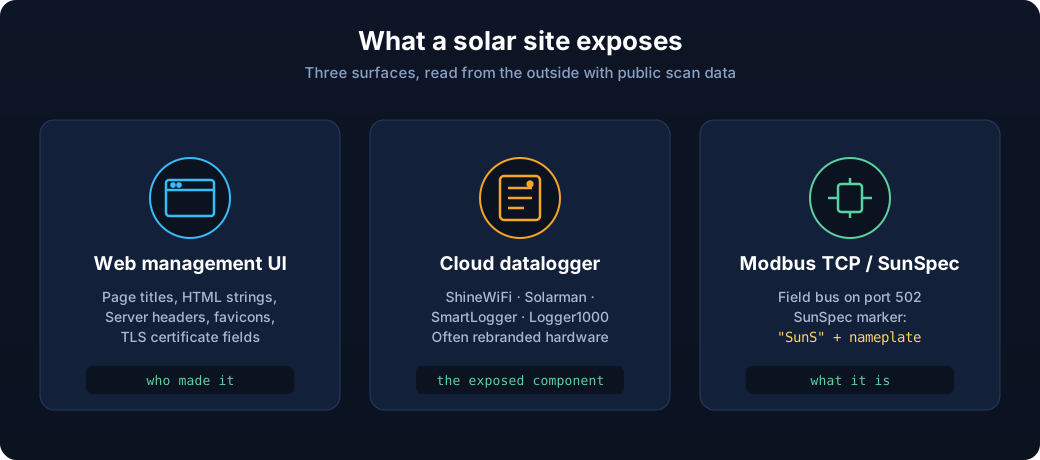
Before writing a single query, it helps to know what these devices say when something knocks on the door. There are three broad surfaces.
Web management interfaces. Most inverters and dataloggers run an embedded HTTP or HTTPS server for configuration and monitoring. These are rich fingerprints: page titles, HTML snippets, login-form markup, Server headers, favicon hashes, and TLS certificate fields all tend to carry the vendor’s name or a product-specific string.
Cloud monitoring dataloggers. Devices like Growatt’s ShineWiFi/ShineLAN sticks, the Solarman-based loggers used by Deye and many rebrands, Huawei’s SmartLogger, and Sungrow’s Logger1000 either expose a local web UI or present recognizable banners. Rebranding is common here, so the same underlying logger shows up under several brand names.
Modbus TCP and SunSpec. Industrial and commercial inverters frequently speak Modbus TCP on port 502. On top of Modbus, many implement the vendor-neutral SunSpec model, where a known register block begins with the ASCII marker SunS. That marker, and the common model that follows it, is one of the cleanest non-branded ways to say “this is energy equipment” rather than just “something on 502.”
The useful mental model: the web layer tells you who made it, and Modbus/SunSpec tells you what it is even when the branding is stripped.
Fingerprinting with Netlas
Netlas indexes responses from across the internet, so the work is mostly about writing queries that isolate one vendor’s fingerprint and then reading the results carefully. The queries below are written against Netlas’s response-search syntax and are meant as starting points; field names and exact strings are worth validating against the live index before you lean on them, because vendors change firmware and markup over time.
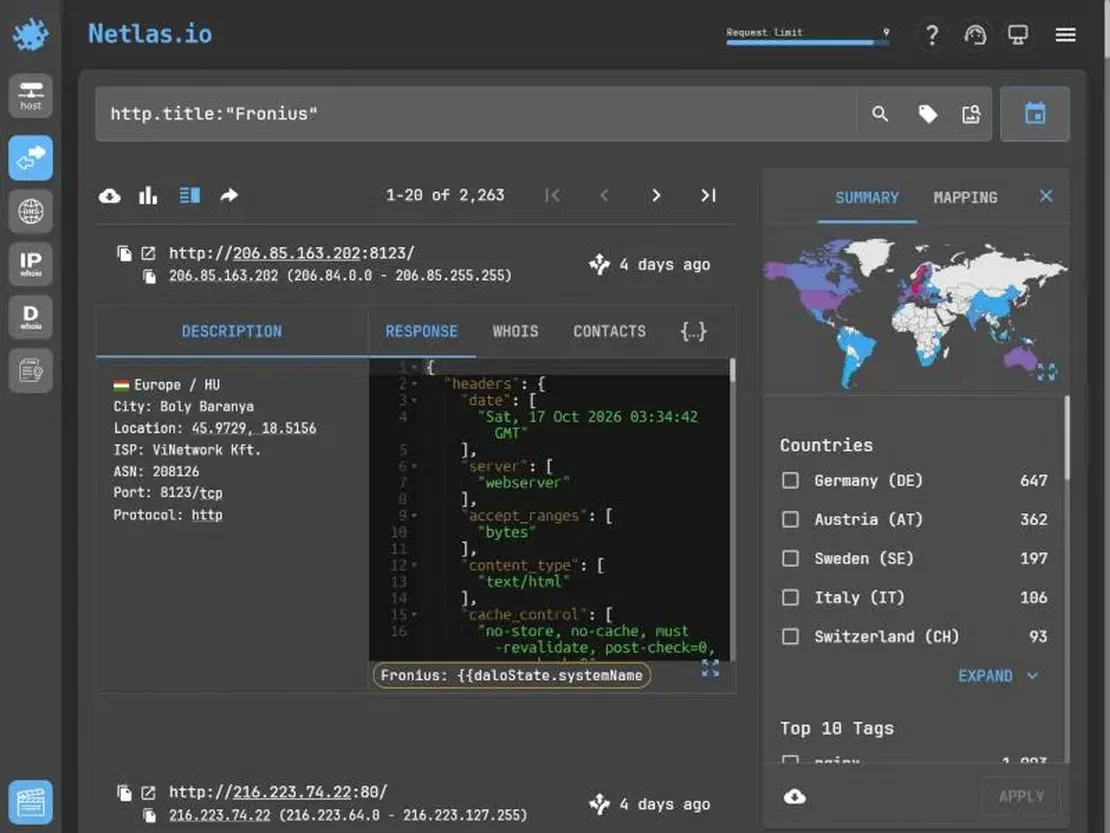
The screenshot above is a good illustration of how much a single query returns. One title match surfaces a few thousand Fronius dataloggers, broken down by country, each with an indexed response you can read without touching the device. The body even carries the device’s own template string, which is exactly the kind of detail that confirms a product rather than merely matching a vendor name.
Start broad, then narrow
A first pass usually keys off the page title or a distinctive, device-specific string, then gets tightened with a header, a port, or a geography filter. The queries below each return a confirmed population of real devices.
Fronius dataloggers announce themselves in the page title, and the title alone is a clean signal — a few thousand hosts, almost all genuine devices:
http.title:"Fronius"SMA exposes the Sunny WebBox string in both the title and the Server header. Either works; the header is the tighter of the two:
http.headers.server:"Sunny WebBox"Solar-Log dataloggers (Solare Datensysteme’s loggers, built on a Beck IPC@CHIP controller) carry a distinctive title that maps straight to the hardware:
http.title:"Solar-Log"Enphase Envoy gateways title themselves with their serial number and serve it over OpenResty, so pairing the two isolates the real gateways from unrelated hosts that also say “Envoy”:
http.title:"Envoy" AND http.headers.server:"openresty"The common thread is that every one of these keys off something the device emits — a datalogger’s own title, an embedded server header — not just a brand name that could appear on anyone’s marketing page. That is what turns a query into a population you can trust. A favicon hash or a TLS certificate field works the same way when the HTML is sparse.
Reading one response well
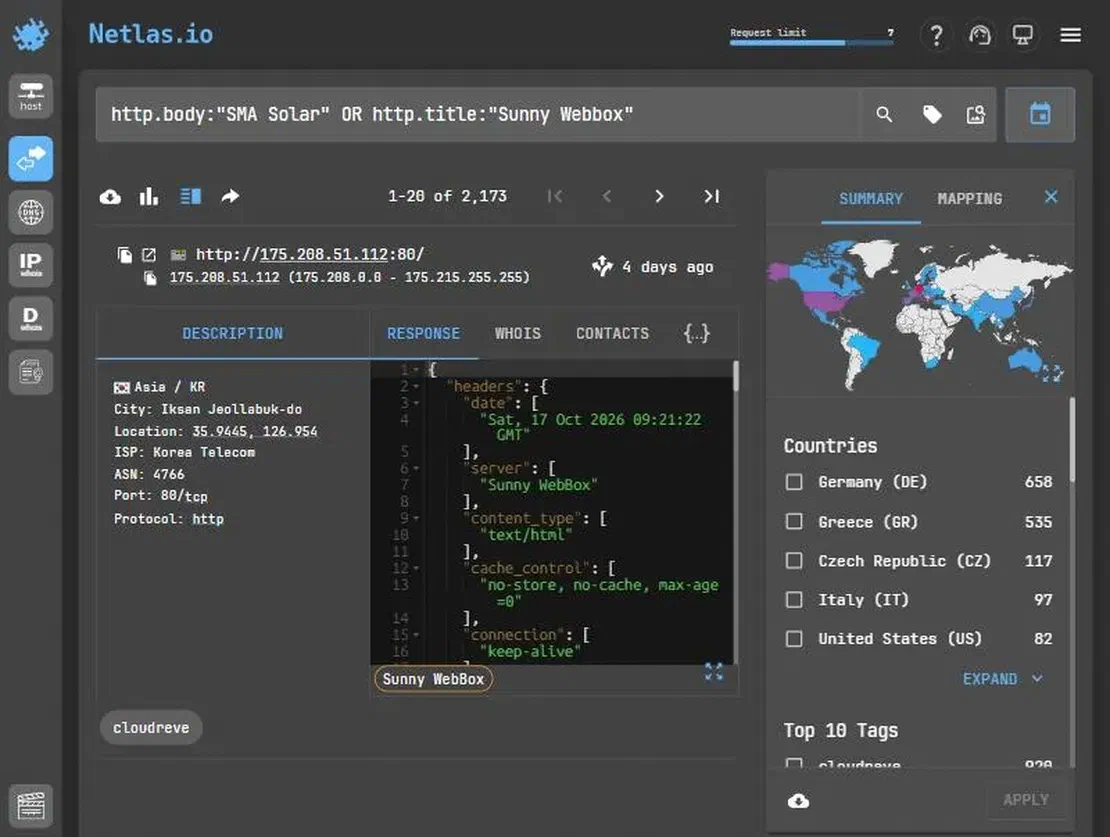
The method is not vendor-specific. Swapping the fingerprint for SMA’s Sunny WebBox returns a comparable population with its own geographic shape, and the Server header alone (Sunny WebBox) is enough to confirm the product. A single indexed HTTP response can often hand you the model and firmware without any further interaction. Login pages leak version strings in hidden fields and script paths. Server headers sometimes carry an embedded-webserver build. Certificates expose a common_name that encodes a device serial or a site identifier. Favicon hashes let you pivot from one confirmed device to every other host serving the same icon, which is useful when the HTML itself is sparse:
http.favicon.hash_sha256:"<hash from a confirmed device>"Finding the field bus
For the Modbus surface, start from the port and narrow toward energy equipment rather than every industrial controller on 502:
port:502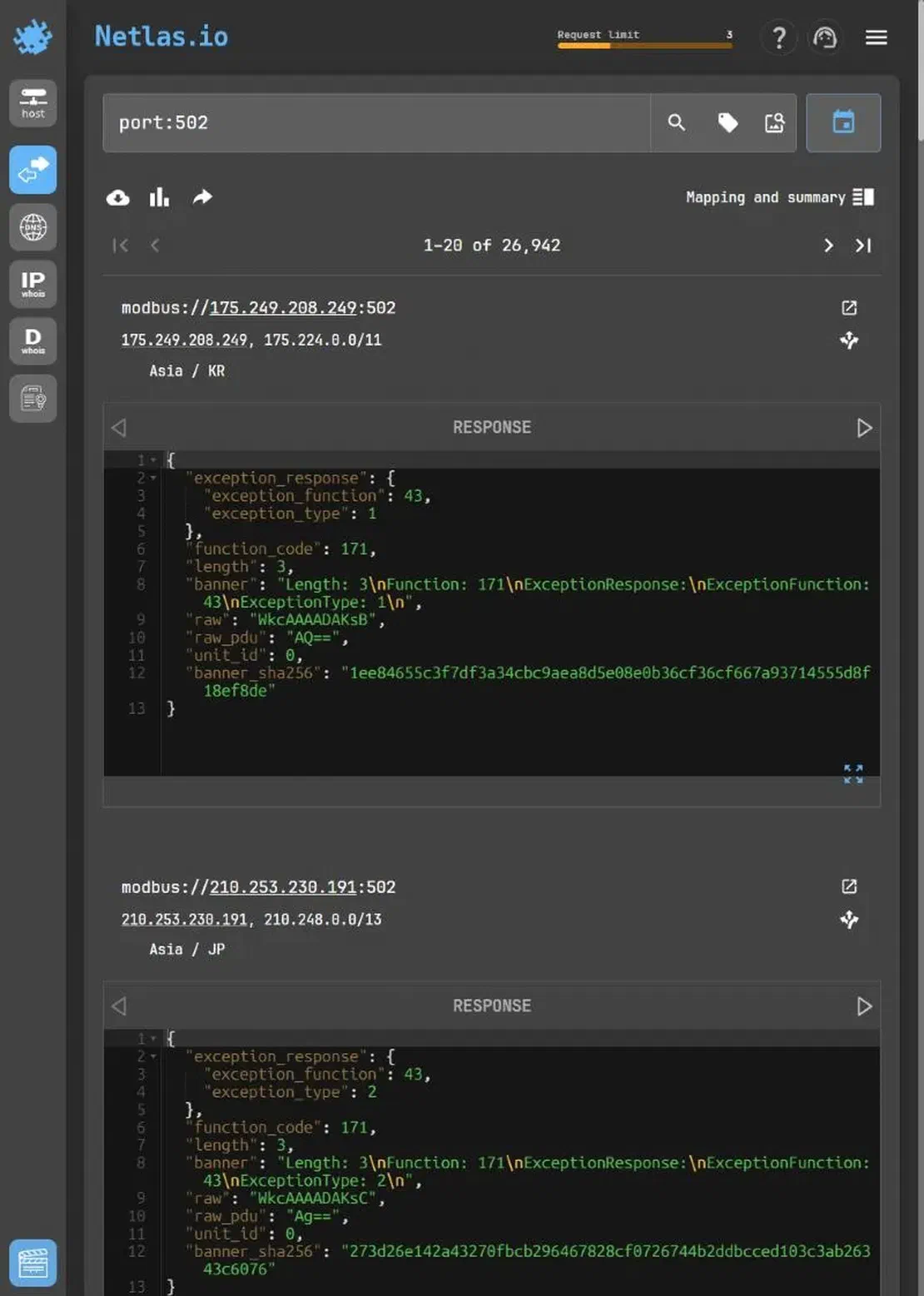
Netlas parses Modbus directly rather than treating 502 as an opaque port: results come back as modbus:// services with the decoded response (function code, unit ID, and the raw PDU) already broken out, as the screenshot shows. That is the whole field-bus surface in one query, and the next step is narrowing it toward energy equipment.
SunSpec-capable devices are the ones worth isolating, because the SunS marker and common-model fields (manufacturer, model, version, serial) turn a generic Modbus host into a confirmed inverter with a readable nameplate. Combining a Modbus match with a geography or organization filter is often what separates a plausible fleet from background scan noise.
Adding context
Once a set of devices is isolated, Netlas’s other fields fill in the picture. Geography (geo.country) shows where a vendor’s exposure concentrates. WHOIS and network ownership separate residential broadband from a hosting provider or an energy company’s own range. Naming conventions in certificates and reverse DNS occasionally reveal the operator outright. None of this requires talking to the device; it is all already in the index.
From fingerprints to exposure, not exploitation
The reason to profile model and firmware is measurement. When you can read, at a population level, which firmware families are exposed, you can line that up against public advisories like the SUN:DOWN set and ask a defender’s question: how much of the internet-facing fleet is running something that already has a known problem?
That is a very different activity from attacking a device, and it is worth being explicit about the line. Identifying that a host is a particular inverter on a particular firmware is reconnaissance against public data. Logging in, sending Modbus writes, or issuing control commands is interaction, and this analysis stays on the near side of that line. The value here is the same value an operator gets when they run these queries against their own ranges: a count, a map, and a prioritized list of things to pull off the public internet.
When the data lies
Internet-wide scan data is never clean, and energy equipment has its own traps.
Honeypots. Exposed ICS and inverter interfaces are a popular thing to fake. A response that looks too perfect, sits on a cloud provider with no plausible energy context, or exposes an improbable stack of protocols on one host deserves suspicion. One quick tell: an embedded-device banner served by a general-purpose web framework is almost never the real device. Netlas also tags many of these directly, so tag.name:honeypot is worth combining into a query.
Portals versus devices. A match on a vendor string is sometimes a shared cloud monitoring portal, not a device at a site. Those are owned by the vendor and behave completely differently from a datalogger on someone’s connection. Separating the two is usually a matter of network ownership and whether the host looks like one endpoint or an aggregation point.
Rebrands and OEM overlap. The Solarman logger platform in particular shows up under many brand names, so a fingerprint can tell you the logger family while the actual inverter behind it is anyone’s guess. Be precise about what a match proves.
Stale index entries. A device seen weeks ago may have moved, been patched, or been taken offline. Exposure counts are a snapshot, not a live census.
What operators can actually do
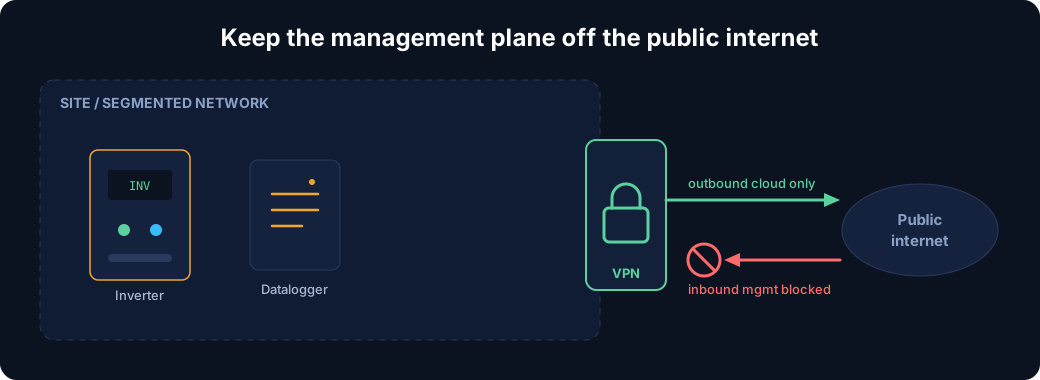
The defensive takeaways fall out of everything above:
- Get management interfaces off the public internet. The embedded web UI and the Modbus port should not be directly reachable. Remote operations and maintenance belong behind a VPN or on a segmented network, with only the outbound cloud connection leaving the site.
- Patch the datalogger, not just the inverter. The logger is often the exposed, internet-facing component and the one with the weaker update story. It deserves the same attention as the inverter firmware.
- Audit your own exposure with the same queries. Everything in this article works just as well pointed at your own ranges. Run the vendor fingerprints and the Modbus/SunSpec queries against the networks you own, and treat every hit as a finding.
- Treat remote-control capacity as sensitive. The grid-scale concern is real. Knowing which of your devices can be commanded remotely, and by whom, is now part of the security picture, not just the operations one.
The devices are not going to stop being helpful. The monitoring layer that makes solar manageable is the same layer that makes it visible, and that trade-off is baked in. The best any operator can do is make sure that when someone maps their fleet from the outside, the map comes back empty.

Book Your Netlas Demo
Chat with our team to explore how the Netlas platform can support your security research and threat analysis.
Related Posts

October 23, 2026
Fingerprinting Exposed Siemens S7 PLCs with Netlas

October 15, 2026
Hunting Exposed LLM Infrastructure with Netlas

October 20, 2026
Using Netlas in Houdin

May 28, 2026
Device Code Phishing: Technical Analysis and Proactive Hunting via Netlas

May 21, 2026
Discovering Data Exposure with Netlas

April 3, 2026
Using OWASP Amass with Netlas Module