







Hunting Exposed LLM Infrastructure with Netlas
October 15, 2026
23 min read


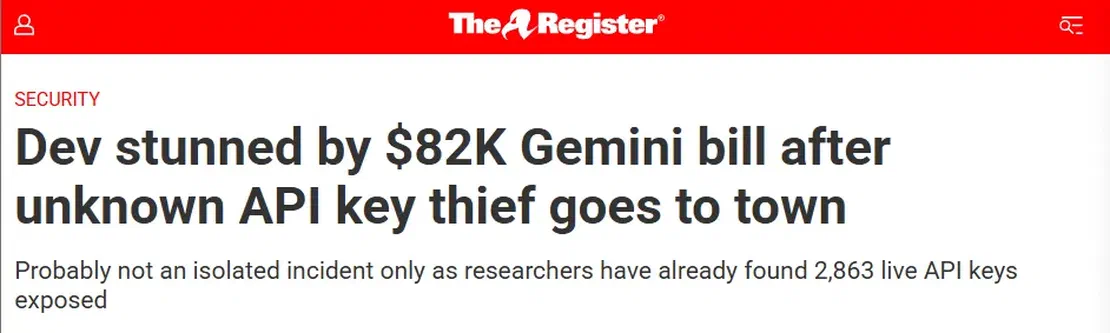
Imagine launching your AI application and going to bed after a successful release and waking up the next morning to an $82,314 cloud bill. Not because your product suddenly went viral but because someone found a single API key in production. That’s exactly what happened to a three-person startup in Mexico after attackers abused a stolen Google API key to generate massive volumes of unauthorized requests against the Gemini API. The attackers didn’t exploit the AI model , they exploited the infrastructure surrounding it. One leaked key was enough to turn an AI service into an 82k security incident.
So what does exposed AI infrastructure actually look like on public internet? Using Netlas we will explore how AI gateways and configurations files can be systemically discovered and why even seemingly harmless exposures can lead to security risks.
Introduction
Artificial intelligence has moved from research labs to production infrastructure faster than almost any technology category ever could before it. In the space of roughly two years, large language models went from a novelty accessed through a handful of hosted APIs to a standard component of enterprise software stacks. New model release , agent frameworks and tooling ecosystems now ship on a monthly manner. AI is no longer just a chatbot; it has become part of everyday software. AI can now write production ready code and even generate applications. Organizations are rapidly integrating AI into software development, cybersecurity, healthcare, finance, legal service and countless other industries, According to the Stanford AI index report 2026, organizational AI adoption reached 88% in 2025 highlighting how quickly AI has become a core part of modern business operations.
Claude, GPT, AI agents, enterprise adoption, and real-world deployments
Commercial models such as OpenAI GPT, Anthropic Claude, Google Gemini, and open-weight models like Llama have become the foundation of modern AI applications. Organizations are integrating these models into coding assistants, enterprise search, customer support, document intelligence and even Retrieval-Augmented Generation systems through both hosted APIs and self-hosted deployments. The rise of AI agents has further expanded these mere capabilities, rather than simply generating text, AI agents can now invoke tools, query enterprise systems, interact with APIs and execute multi step workflows directly into a user’s system. Microsoft’s 2026 Work Trend Index, organizations are increasingly redesigning work around AI agents, with the most advanced adopters embedding agents into everyday business operations.
What self-hosted AI is, and why organizations are adopting it
Self-hosted AI refers to deploying and operating the core components of an AI system such as the model runtime, orchestration layer, user interface and the API gateway on the infrastructure which is managed by the organization or a person rather than relying on a cloud hosted AI provider. This means that instead of sending prompts directly to services such as ChatGPT or Claude, organization or an individual run inference like Ollama or vLLM and expose them through interfaces such as Open WebUI or LibreChat and often use proxy layers like LiteLLM to manage routing, authentication, logging and access to multiple models. Organizations are adopting this architecture because of these benefits:
| Benefit | Why it matters |
|---|---|
| Cost optimization | Avoid recurring API costs for high-volume inference workloads. |
| Data privacy | Sensitive prompts and responses remain within the organization’s infrastructure. |
| Regulatory compliance | Easier to meet data residency and industry-specific compliance requirements. |
| Lower latency | Local inference reduces network round trips and improves response times. |
| Model flexibility | Deploy and switch between open-weight models such as Llama, Mistral, Gemma, and Qwen. |
| Infrastructure control | Configure hardware, authentication, networking, logging, and monitoring according to organizational requirements. |
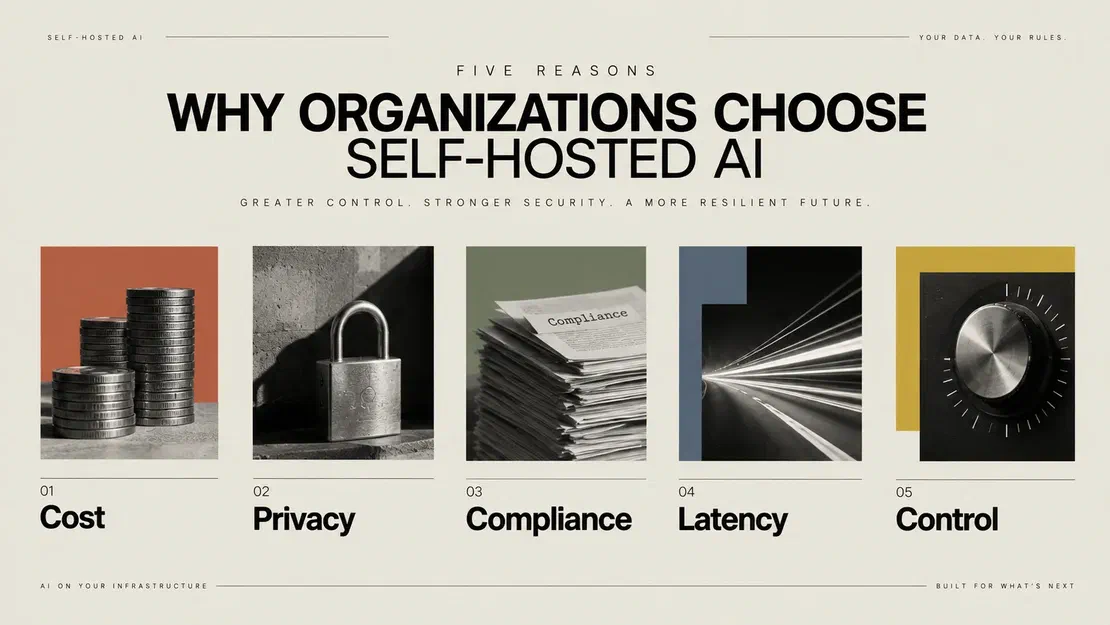
However the same AI models that accelerates the adoption also introduces new security risks. Many deployments are created for internal testing or proof of concept environments and are frequently exposed with -
- Default configurations
- Weak or missing authentication
- Publicly accessible management interfaces
- Exposed configuration files
- Internet-facing inference endpoints
- Embedded cloud AI credentials
Source: Open-source AI Cookbook
The three layers of the problem: Runtime, Frontend, and Proxy
Modern self-hosted AI deployments rarely consist of a single application. Instead they are typically built as combination of independent services, which are responsible for a different part of the AI workflow. A user may interact with a web interface, which forwards requests through an API gateway before they eventually reach the model responsible for generating responses. Although the technologies used vary between deployments, the basic architecture is mostly consistent. For the purpose of this research, we group the self-hosted AI stack into three logical layers.
| Layer | Description | Common Technologies |
|---|---|---|
| Runtime | Hosts the model, processes prompts, and performs inference. | Ollama, vLLM |
| Frontend | Provides the chat interface, manages users and conversations, and communicates with one or more runtimes. | Open WebUI, LibreChat |
| Proxy | Sits between applications and AI providers, routing requests while managing authentication, API keys, logging, and provider selection. | LiteLLM |
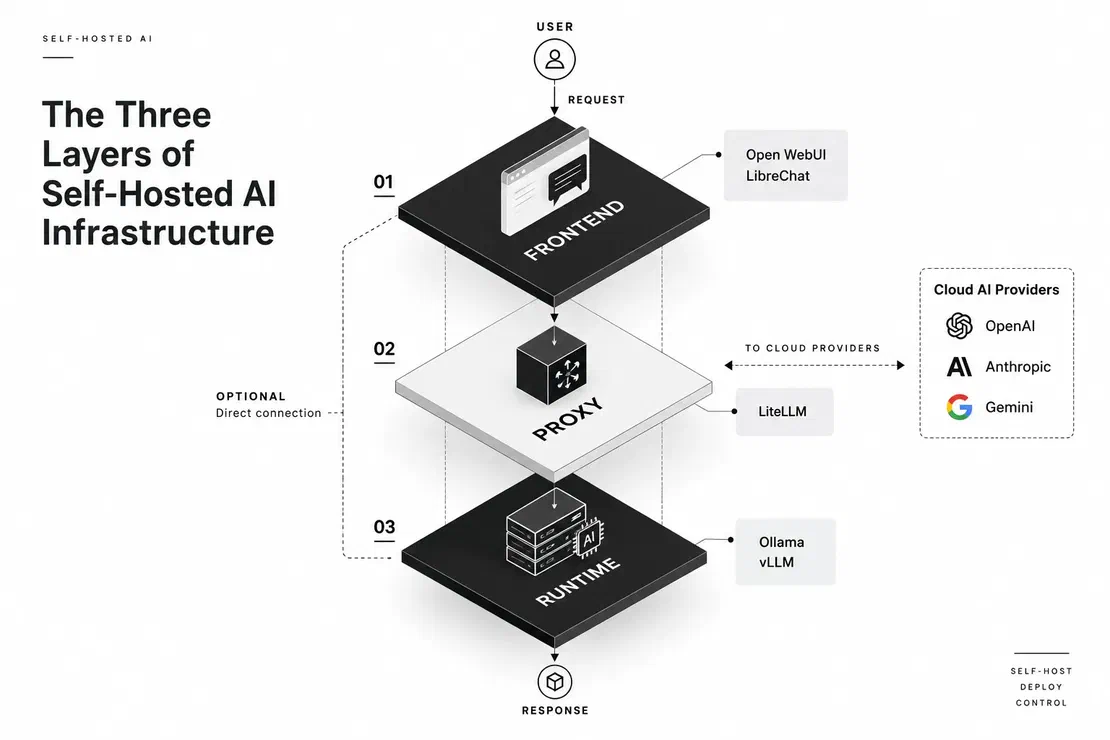
This separation is important because each layer behaves differently from both an operation and a security perspective. A runtime exposes inference API, a frontend exposes user-facing functionality, and a proxy exposes routing logic. Throughout the rest of the article, we will look into how the exposures of the layers can be identified using Netlas and what security implications they introduce.
How AI Infrastructure Works
Although self-hosted AI is often associated with internal chatbots, organizations deploy local AI infrastructure for a variety of workloads. The common factor across all the deployments is the desire to keep sensitive data, workloads, or operational control within an organization’s own environment.
| Use Case | Purpose | Typical Technologies |
|---|---|---|
| Internal Coding Copilot | Private code generation and review | Ollama, Open WebUI |
| Enterprise Knowledge Search (RAG) | Search internal documentation using natural language | Open WebUI, Ollama, ChromaDB |
| Customer Support Assistant | Automate support requests using internal knowledge bases | LiteLLM, OpenAI, Claude |
| Multi-Model Gateway | Route requests across local and cloud models through a single API | LiteLLM |
| Research & Development | Rapid testing of models, prompts, and workflows | Ollama, vLLM, Open WebUI |
These are frequently deployed for internal teams, proof of concept projects. Because these deployments are often created quickly for experimentation, they are rarely revisited to verify authentication, firewall rules, or network segmentation after the project is complete.
How Organizations Deploy and Use AI Systems
In practice, most organizations do not build a self-hosted AI stack from scratch, they assemble one from existing open source components, like runtime to serve a model, a frontend so employees can’t interact with it and once the more than one model or provider is involved a proxy to unify access. This modular approach offers flexibility and allows individual components to be replaced without redesigning the entire system.
The typical deployment chain: Runtime → Frontend → Proxy
Although AI deployments differ across organizations, the lifecycle of a prompt is remarkably same. Every user interaction passes through one or more infrastructure components before a response is generated. Each layer processes different data, exposes different services and presents a different attack surface.
                    User
                      │
             HTTPS Request
                      │
                      ▼
        Frontend (Open WebUI / LibreChat)
       Authentication • Sessions • UI
                      │
          OpenAI-Compatible API
                      │
                      ▼
          Proxy (LiteLLM) [Optional]
    Routing • API Keys • Rate Limits • Logging
              ┌───────────────┐
              ▼               ▼
      Ollama Runtime      OpenAI / Claude
      vLLM Runtime         Gemini APIs
              │
              ▼
Model InferenceFigure – A typical request flow in a modern AI deployment.
What these runtimes expose by default
Most self-hosted AI components are designed to operate within a trusted environment, such as behind a reverse proxy, VPN or an internal network. As a result many users prioritize ease of deployment over secure by default configurations. When these services are deployed on internet systems without proper authentication or network restrictions. By default, most runtimes ship with no authentication at all, on the assumption that they will only ever be reachable from localhost.
Key components at a glance
| Component | Typical Port(s) | Default Auth |
|---|---|---|
| Ollama (Runtime) | 11434 | None (localhost-only by design; often reconfigured to 0.0.0.0) |
| vLLM (Runtime) | 8000, custom | None unless an API key is explicitly configured |
| LocalAI (Runtime) | 8080 | None by default |
| Text Generation WebUI (Runtime / Frontend hybrid) | 7860, 5000 | None by default |
| Open WebUI (Frontend) | 3000, 8080 | Local accounts; open self-registration by default |
| LibreChat (Frontend) | 3080 | Local accounts; registration configurable |
| Dify (Frontend / Orchestration) | 80, 3000 | Admin account created on first run |
| Flowise (Frontend / Orchestration) | 3000 | None unless FLOWISE_USERNAME/PASSWORD set |
| LiteLLM (Proxy) | 4000, 8000 | Master key; disabled or weak in some deployments |
What Each Layer Exposes by Default
Each layer of a self-hosted AI deployment exposes a different set of APIs, interfaces and configuration data and none of these exposures is automatically a vulnerability. The risk appears when a service intended for a trusted network and infrastructure is made reachable from the internet without the authentication, authorization or a network controls expected around it.
Runtime layer exposures
The runtime sits closest to the model and exposes the APIs used to manage and perform inference. Depending on the software and configuration, these APIs can reveal what models are installed, accept inference requests or provide model management functionality Common exposures in runtime layer can include:
- Model enumeration through the endpoints such as /api/tags or /v1/models.
- Unauthenticated inference, which allow arbitrary users to consume the host’s CPU/GPU resources.
- Model-management endpoints that may allow models to be created, pulled or pushed.
- Runtime metadata such as versions and health information can be exposed too.

A real example of this type of exposure is CVE-2026-7482, which affected Ollama before 0.17.1. A malicious GGUF model could trigger an out-of-bounds read and expose the process memory, which can potentially include API keys, environment variables, system prompts and conversation data.
Frontend Layer Exposures
The frontend is the user facing part of the AI stack. Platforms such as Open WebUI and LibreChat typically handle authentication, sessions, conversations, file uploads and access to connected models. Common exposures in the frontend layer include:
- Open registration which can allow unauthorized users to create accounts.
- Administrative interfaces that can expose without a sufficient access controls
- Configuration data revealing connected providers or backend endpoints.
- File and knowledge base functionality which can expose an organization’s sensitive data.

Open WebUI has also experienced vulnerabilities demonstrating the impact of frontend exposure. CVE-2025-64496, for example, a vulnerability in Open WebUI’s direct connections feature. In affected versions, a malicious model server could send a crafted SSE event that caused JS to execute in the user’s browser. This could steal the user’s JWT and lead to account takeover, exposing chat history, uploaded documents and API keys.
Proxy Layer Exposures
The proxy sits between applications and one or more AI providers. Tools such as LiteLLM can centralize provider routing, API keys, authentication, login and usage controls, making the proxy a particularly valuable part of the infrastructure to expose accidentally. Common Proxy Layer exposures include:
- OpenAI-compatible API endpoints accessible without appropriate authentication.
- Provider configuration revealing connected AI services.
- API credentials or virtual keys can be exposed through insecure configuration or management interfaces.
- Logs and debugging endpoints which may contain prompts, responses, or operational data.

The consequences can extend beyond a single AI model. CVE-2026-42208 affected how LiteLLM’s proxy API key verification and that allowed an unauthenticated SQL injection, which could expose or modify the proxy database data, including credentials managed by the gateway.
What Is the Worst That Can Happen at Each Layer?
| Layer | Typical Software | Default Exposure Risk | Worst-Case Impact |
|---|---|---|---|
| Runtime | Ollama, vLLM | Unauthenticated inference, model enumeration, vulnerable APIs | Compute abuse, DoS, information disclosure, credential leakage |
| Frontend | Open WebUI, LibreChat | Open registration, exposed configuration, client-side key leakage | Unauthorized access, data exposure, account takeover, potentially RCE |
| Proxy | LiteLLM | Exposed APIs, configuration, credentials, administrative endpoints | Provider credential theft, large-scale AI abuse, database compromise |
The AI Stack, Cloud Credentials, and Why Netlas
Before searching for exposed AI infrastructure, it is useful to understand what these services actually look like from the outside. The tools involved are not interchangeable as some run models, some provide the interface to the users and others sit between applications and multiple AI providers. For this blog, we will primarily focus on Ollama, vLLM, Open WebUI, LibreChat, and LiteLLM, as they provide a representative view of the runtime, frontend, and proxy layers of modern self-hosted AI infrastructure.
Ollama
Ollama is a local AI runtime for downloading, managing and serving models, its HTTP API provides endpoints for tasks such as generating responses, listing available models, and retrieving runtime information.
vLLM
vLLM is an inference and serving engine designed for high throughput LLM workloads. Its OpenAI-compatible server exposes APIs such as /v1/completions, /v1/chat/completions, and /v1/embeddings, which allows applications to interact with locally served models using the OpenAI API format.
Open WebUI
Open WebUI is self-hosted AI platform that provides a web interface over local and remote model providers. It supports Ollama as well as OpenAI compatible APIs and can provide features such as conversations, knowledge/RAG, authentication and model management. It can also connect to cloud providers which means an Open WebUI deployment does not necessarily imply that the underlying models are running locally.
LibreChat
LibreChat is another self-hosted AI frontend, but its architecture is particularly relevant to this research because it supports both local and commercial providers. Its documentation lists OpenAI, Anthropic, Azure OpenAI, Google, Vertex AI, Ollama, and other local or remote providers, as well as arbitrary OpenAI-compatible endpoints.
LiteLLM
LiteLLM operates the gateway layer, its proxy provides a common interface for accessing more than 100 LLM providers and includes features such as authentication, authorization, virtual keys, rate limiting and even cost tracking. Its configuration can also contain provider information and credentials. The official documentation, for example, shows configurations containing Azure API keys, API bases, and a proxy master_key.
What Role Does Each Tool Play?
These technologies fit naturally into the three-layer model used throughout this article:
| Layer | Technologies | What they do |
|---|---|---|
| Runtime | Ollama, vLLM | Serve and manage AI models |
| Frontend | Open WebUI, LibreChat | Provide the user-facing AI application |
| Proxy | LiteLLM | Route and manage requests across providers |
But these layers do not have to appear together.
The Cloud Credential Angle
Most of the self-hosted AI does not necessarily means that they run everything locally. For example, WebUI can connect to OpenAI and other cloud providers alongside local models. The documentation clearly describes using OpenAI models through an API key while the Open WebUI application remains self-hosted. The resulting architecture can look like this:
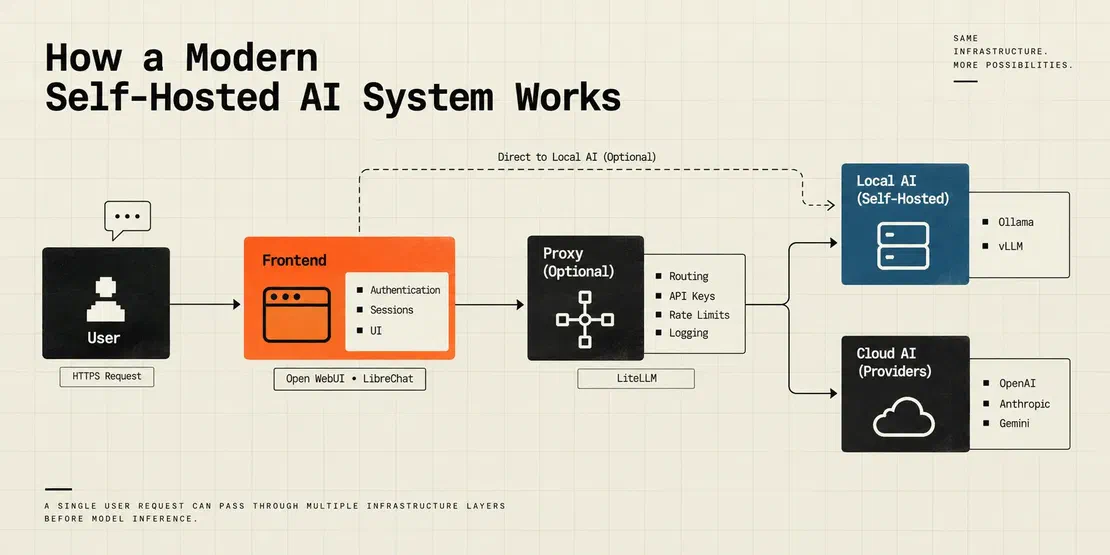
This creates a second dimension to the exposure problem. An exposed local runtime can allow someone to consume the organization’s compute resources. But an exposed configuration containing provider credentials can be more dangerous as it can allow unauthorized requests to be made against the organization’s external AI account.
How Netlas Uses HTTP Response Intelligence to Find Them
The key to finding exposed AI infrastructure is that these services often leave identifiable traces in their HTTP responses, that can be captured by Netlas. Netlas captures HTTP responses data from internet facing services, including page titles, response bodies, headers, status codes and other metadata. For example
- HTTP titles can be used to identify recognizable frontend applications.
- Response bodies often contain product names, API messages, or other distinctive strings.
- HTTP headers can be used to reveal server or application characteristics.
- Body hashes can help identify hosts returning identical content Netlas is not simply telling us which ports are open, it gives us a way to search the content and characteristics returned by those services. That is what allows us to hunt for exposed Ollama, vLLM, Open WebUI, LibreChat, and LiteLLM deployments at Internet scale.
Finding Exposed AI Infrastructure with Netlas
The objective is to identify AI services through the information they return over HTTP. Netlas indexes HTTP responses from internet facing hosts. For this blog we will be following the three-layer model which we introduced earlier. For each layer, the goal is to identify HTTP response indicators which are distinctive enough to identify the technology, while remaining reliable across the minor version and configuration differences. The process is straightforward: AI service → HTTP response → identifiable fingerprint → Netlas search → candidate host → manual validation Rather than relying only on open ports, we use page titles, response bodies, headers, and other HTTP characteristics as fingerprints.
Runtime Layer Queries
The runtime layer is likely the most direct place to start because inference engines often expose recognizable API responses. Let us look at some of the queries that can be used for runtime layer.
OLLAMA Ollama default API returns a distinctive response when the service is running making it a useful fingerprint for internet wide discovery:
http.body:"Ollama is running"A broader search can look for common Ollama configuration or port references:
http.body:"OLLAMA_HOST" OR http.body:"11434"

http.body:"api/tags" AND http.body:"ollama"

http.body:"api/generate" AND http.body:"ollama"vLLM vLLM deployments are more variable because the inference server can be deployed with many different interfaces and configurations. The default branding here is retained, so the page title can provide a simple starting fingerprint:
http.title:"vLLM"This is intentionally broad discovery query, results should be manually reviewed to distinguish genuine vLLM deployments from demonstrations, documentation or pages that simply mention the technology.
http.body:"vLLM" AND http.body:"OpenAI"

http.body:"vLLM" AND http.body:"OpenAI"

http.body:"v1/models" AND http.body:"vLLM"

http.body:"vLLM" AND http.body:"model"vLLM is harder to fingerprint because deployments mostly expose only the OpenAI-compatible API without keeping the default branding. These should be treated as discovery queries instead of definitive identification.
Frontend Layer Queries
Frontend applications usually provide stronger visual fingerprints than raw inference servers because they return HTML, JavaScript, titles, and application-specific routes.
Open WebUI Open WebUI can be identified through its application title and frontend content:
http.title:"Open WebUI"A more specific search combines the title with its authentication-related content:
http.title:"Open WebUI" AND http.body:"auths/signup"We can also look for evidence that the frontend is connected to Ollama:
http.title:"Open WebUI" AND http.body:"ollama"The combination is particularly useful because it can help us to differentiate between a generic Open WebUI reference from a deployment that appears to be using Ollama.
LibreChat LibreChat does support multiple providers that can be customized heavily, so fingerprints might vary between deployments. A simple starting query can be:
http.title:"LibreChat"A broader body based search can help us find instances where the default title is changed:
http.body:"LibreChat" AND http.body:"OpenAI"And another useful indicator is its provider configurations:
http.body:"librechat.yaml"However, this query can produce documentation and configuration examples, so the results require manual validation. LibreChat’s configuration supports multiple endpoints including OpenAI, Anthropic, Google, Azure OpenAI, and custom endpoints.
Proxy Layer Queries
Unlike runtime and frontend, proxy services like LiteLLM can expose information about the AI providers and routing configuration behind them. This makes configuration files, API responses, and gateway-specific content useful fingerprints. LiteLLM A simple starting point for LiteLLM fingerprints is to search for the application’s configuration filename:
http.body:"litellm.yaml"A more targeted query combines LiteLLM with the references to its proxy configuration:
http.body:"litellm" AND http.body:"master_key"Another query that can also search for LiteLLM’s OpenAI-compatible API characteristics:
http.body:"litellm" AND http.body:"/v1/models"For deployments exposing the proxy’s documentation or API interface:
http.title:"LiteLLM"This query search can help identify gateways that reference multiple AI providers:
http.body:"litellm" AND (openai OR anthropic OR gemini)A result containing master_key or litellm.yaml, for example can simply be documentation or configuration example. Thus the response must be inspected to determine whether it belongs to a live deployment.
How to Read Netlas Output and Identify Meaningful Findings
Across all three layers, the same triage checklist applies before treating a Netlas result as a genuine finding. A Netlas result is only a starting point.
- Application Evidence: Does the response contain genuine application fingerprints such as titles, - JavaScript assets, API routes, or product-specific content?
- Deployment: Does the response actually look like a live AI deployment rather than documentation, a demo, CDN or a WAF page?
- Exposure: Is the application accessible without authentication, or does it expose registration, guest access, APIs or configuration?
- Information: Does the response reveal models, providers, endpoints, configuration, or other useful information about the underlying AI stack?
Queries that consistently produce useful results
| Query | Target Layer | Noise Sources |
|---|---|---|
| title:“Open WebUI” AND body:“auths/signup” | Frontend | Blogs/docs referencing Open WebUI by name |
| title:“Open WebUI” AND body:“ollama” | Frontend + Runtime | Low; fairly specific combination |
| title:“vLLM” | Runtime | Unrelated pages mentioning vLLM; demo apps not in production |
| body:“litellm.yaml” | Proxy | Documentation pages, GitHub mirrors, tutorial sites |
| body:“OLLAMA_HOST” OR body:“11434” | Runtime | General discussion/documentation content |
| title:“LibreChat” | Frontend | Marketing pages, GitHub project pages |
| body:“litellm” AND body:“master_key” | Proxy | False positives from generic key-management documentation |
Request Your Free 14-Day Trial
Submit a request to try Netlas free for 14 days with full access to all features.
The Findings
The following findings are drawn directly from Netlas queries.
Finding 1 — Open WebUI Instance with Open Registration and Embedded Cloud API Key
Open WebUI ships with the self-registration enabled by default and when it is combined with frontend configured to route to a commercial cloud provider and openly registerable instance can turn out to be a gateway to paid API capacity.
Netlas Query
http.title:"Open WebUI" AND http.body:"auths/signup"What Netlas Revealed
One indexed instance exposed its connection settings in the browser-side JavaScript, including a third party OpenAI-compatible endpoint and an API key. The same code also stored the key in localStorage and included a guest access option that could be triggered through a URL parameter, allowing users to bypass the login form entirely.
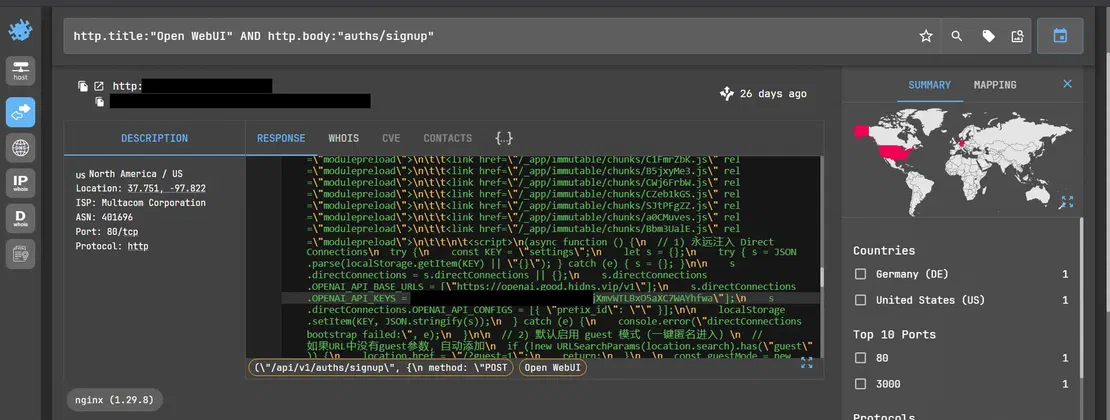
Shows the Open WebUI client-side configuration which is exposing a third-party OpenAI- endpoint and an API key. The configuration is being loaded into localStorage, meaning the credential is delivered to the browser.
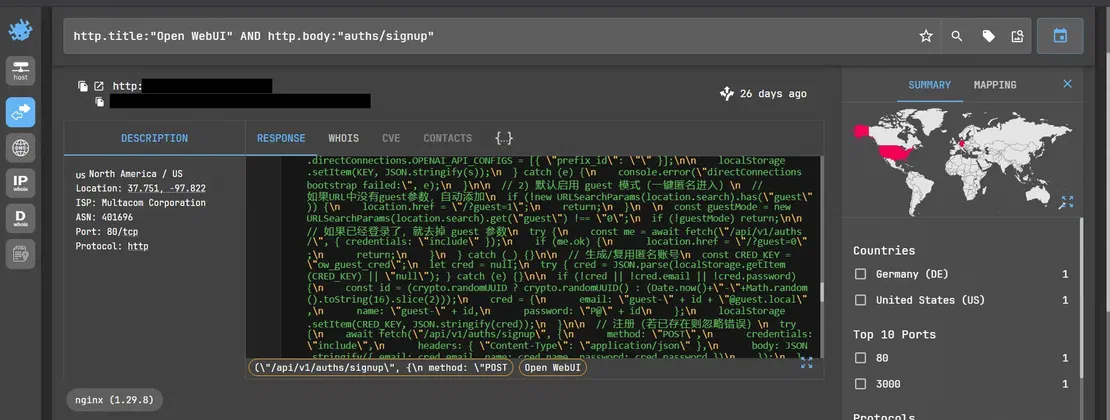
Shows that the guest access and signup logic in the same frontend code, including /api/v1/auths/signup endpoint and the URL-based guest mode that can bypass the normal login flow.
Security Impact
This is a deployment misconfiguration, not a vulnerability in Open WebUI itself, the API key is exposed from the client-side code, which means that anyone who can access the page can retrieve and reuse it.
Possible Escalation
If the key is valid, it can be used against the connected cloud provider which is under the organization’s account, potentially consuming quota, generating unexpected charges or even triggering provider side abuse controls.
Finding 2 — LiteLLM Configuration File Exposed via Adjacent File Browser
Not every exposure comes directly from the AI component itself, in this case the litellm.yaml file was not found on the LiteLLM proxy directly but it was rather found through an open unauthenticated file browser running on the same host and when a proxy configuration file sitting on a shared or adjacent directory served without any access control, the exposure moves from AI infrastructure issue to general file management issue, but the impact is the same as a LiteLLM configuration, which can contain provider routing details and credentials, becomes retrievable by anyone who finds the page.
Netlas Query
http.body:"litellm.yaml"What Netlas Revealed
One indexed host exposed the file management interface which listed multiple files which also included litellm.yaml, and with direct download links and no visible authentication requirement the interface was running on a Python/uvicorn stack.
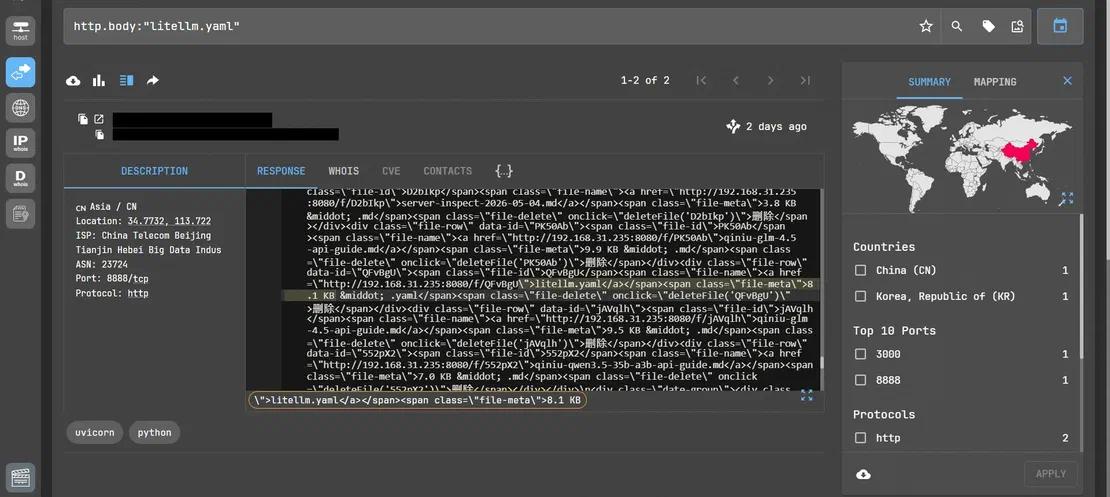
This image shows the exposed file browser listing, including the litellm.yaml entry with unrelated uploaded files, with a per file deleteFile() action visible in the markup.
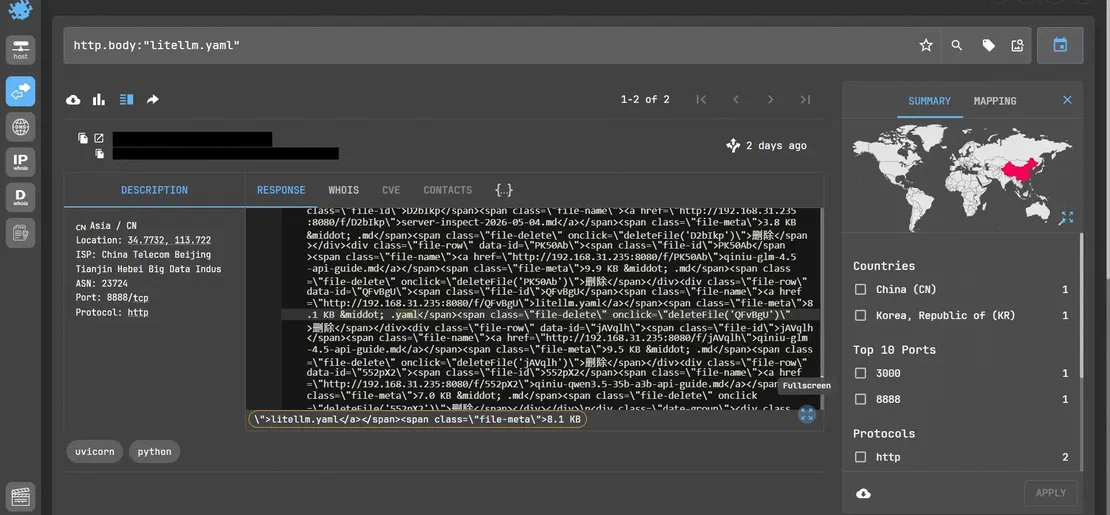
This picture shows the same listing with litellm.yaml entry and delete controls in focus, this confirms that the file is both retrievable and subject to unauthenticated delete functionality.
Security Impact
This is a deployment misconfiguration in how the file browser was exposed alongside the LiteLLM proxy, it is not a vulnerability in LiteLLM itself. The configuration file can be retrieved by anyone who can reach the page and even the same interface can allow files to be deleted without any authentication.
Possible Escalation
If litellm.yaml contains a live provider credentials or a valid master_key then any attacker doesn’t need to compromise anything else. They can just directly authenticate to the LiteLLM proxy, then enumerate or hijack the configured provider routes and start making requests against connected AI services, which is all billed to that organization’s account.
Finding 3 — Exposed vLLM Workshop / Pod Allocator Interface
vLLM is commonly used to serve and manage large language models. Deployment or management interfaces which are exposed directly to the internet and can reveal implementation details and depending on their functionality, may provide access to underlying infrastructure.
Netlas Query
http.title:"vLLM"What Netlas Revealed
Netlas identified an internet-accessible application titled “vLLM Workshop-Pod Allocator”. The response exposed the application’s HTML and also identified a Python/Flask-based backend. The page appears to provide an interface that can be used for managing or allocating vLLM pods.
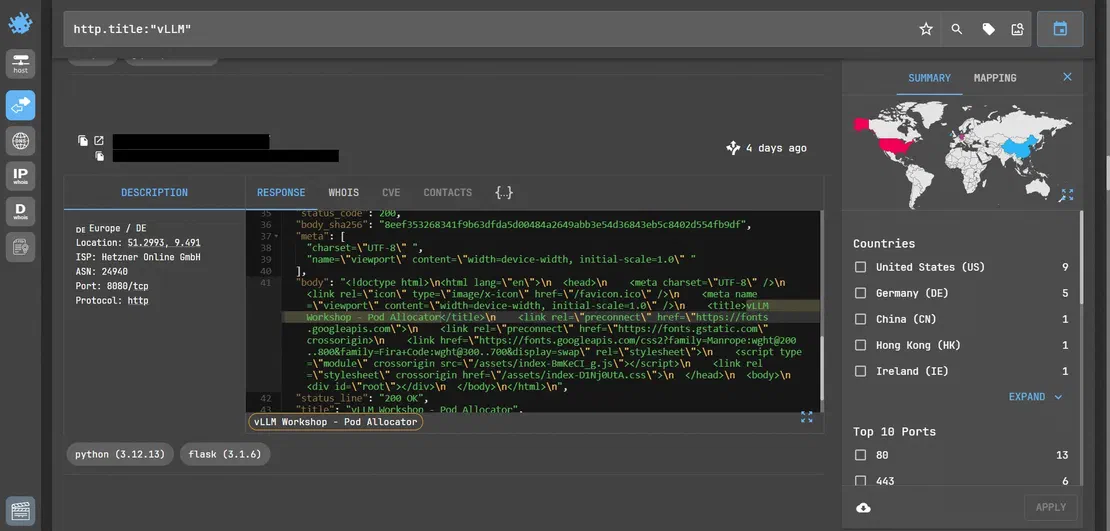
The findings shows that the indexed vLLM application with its title, and exposed web interface with Python/Flask technology stack. It also shows the “vLLM-Pod Allocator” as the application name.
Security Impact
This exposes an internal looking AI infrastructure management component rather than just a conventional model endpoint. If its management functions are accessible without adequate authentication then an attacker could directly interact with the infrastructure which is responsible for deploying and also allocating model serving workloads.
Possible Escalation
If pod-allocating functions are exposed, the impact can extend to unauthorized workload creating or GPU resource exhaustion. The vulnerability can also lead to disruption in the model’s services or even manipulating of the AI serving environment. In a cloud deployment, uncontrolled resource allocation can lead to significant compute consumption and unexpected infrastructure costs.
Finding 4 — Open WebUI Instance Exposing Client-Side Configuration and an Unusual Agent-Targeted Header
Open WebUI ships with authentication and self-registration enabled by default and the client-side JavaScript often carries more operational details than the teams realize, it can contain information like model lists, backend flags and configuration data that are meant to drive the interface but sometimes they end up readable by anyone who loads the page. Combining the frontend fingerprint with a body search for “ollama” narrows the discovery to instances that are actually wired up to a running backend.
Netlas Query
http.title:"Open WebUI" AND http.body:"ollama"What Netlas Revealed
One indexed instance, hosted on Microsoft Azure in Arizona, exposed a window.__WEBUI_CONFIG__ object, directly in the HTML response, confirming "auth": true, "signup": true and listed the configured default models including gpt-4-turbo and claude-3-sonnet, which means this instance isn’t just a local Ollama frontend, its also configured to route to commercial cloud models.
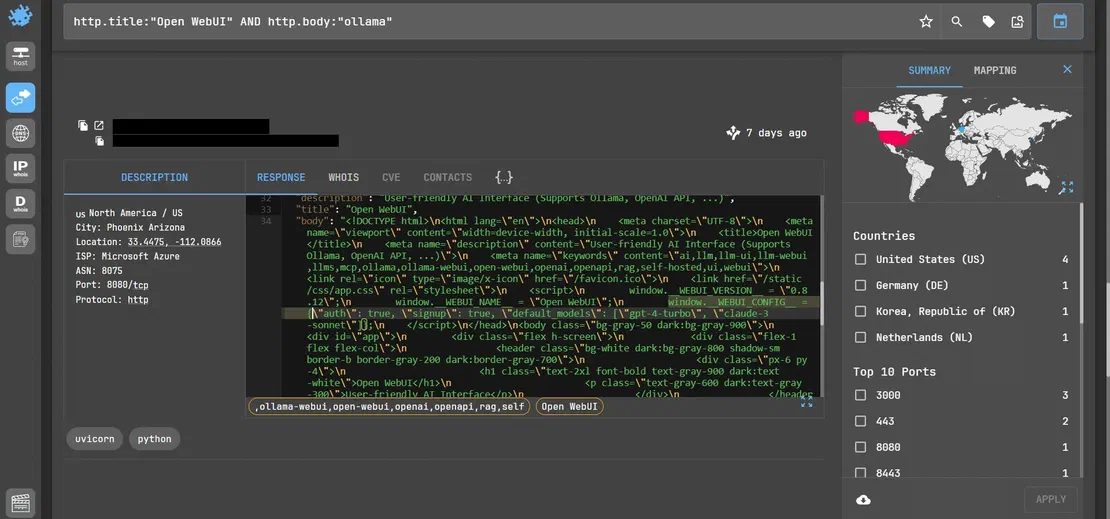
Shows the Open WebUI instance’s exposed client-side configuration, including auth/signup flags and the default model list embedded directly in the page’s JavaScript.
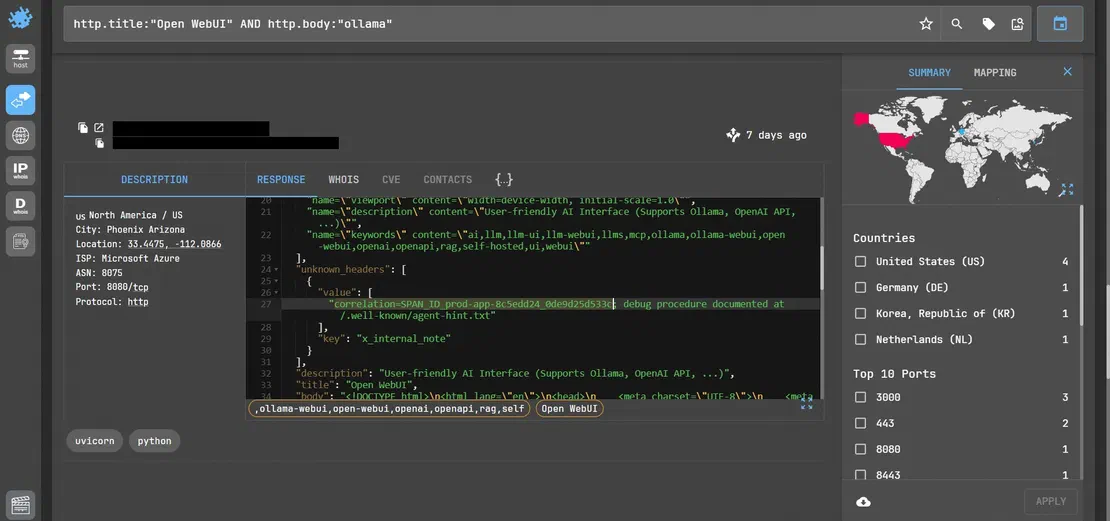
This snapshot shows the unusual custom header that refers to an “agent-hint.txt” file at a .well-known path, alongside the preexisting same exposed configuration data.
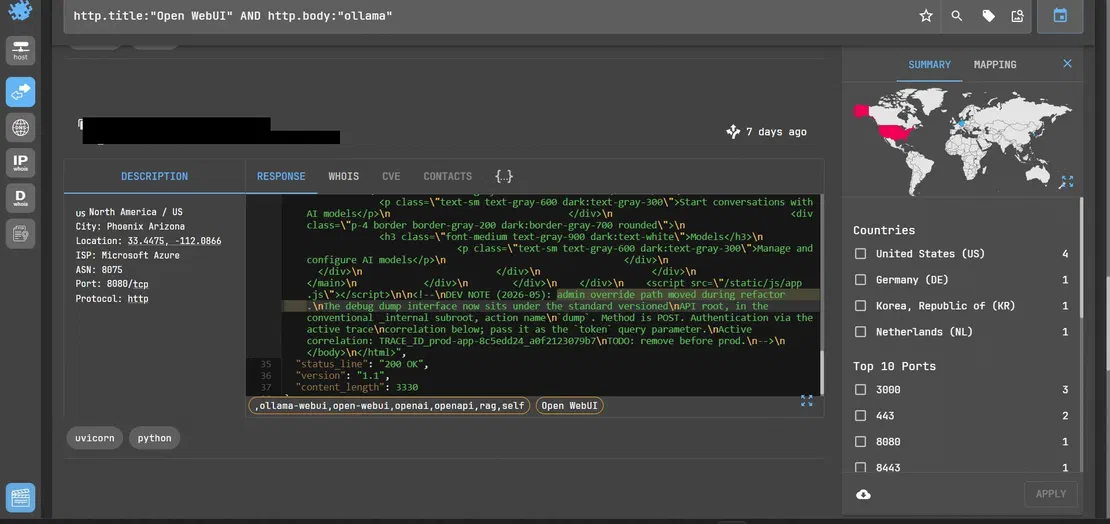
This shows the retrieved contents of /.well-known/agent-hint.txt. An embedded note here describes a purported hidden debug endpoint, its method and an authentication parameter, tied to the trace ID observed earlier.
Security Impact
Exposed configuration data such as model names, auth flags, backend routings, these give an attacker a head start on understanding what the deployment does and how the functions are wired, without needing for an intensive recon session.
The content of agent-hint.txt does not read as an internal debug route, it offers a pre packaged “endpoint + method + auth token” information, that is consistent with a prompt injection lure which is aimed at AI driven scanners or agentic tools that crawl pages and act on instructions.
Possible Escalation
If self registration is open, then any attacker can directly create an account and interact with the connected models, and can consume quota of the AI models under the organization’s account without needing a separate exploit. The instance illustrates a secondary risk vector that is content embedded in a web responses attempting to direct further action from whoever, or whatever, retrieves it.
Finding 5 — Open WebUI Instance Directly Wired to Local Ollama Backend, Open Registration
Open WebUI is frequently deployed as a lightweight frontend for locally hosted Ollama models. When self registration is left enabled by mistake on such deployments, the exposure is not just an interface leak, it is a direct and unauthenticated gateway to run an LLM backend.
Netlas Query
http.title:"Open WebUI" AND http.body:"auths/signup"What Netlas Revealed
One indexed instance, which is hosted on Oracle cloud returned a page body explicitly stating “connected to ollama at localhost: 11434 “, which confirms the frontend is actively wired to a local ollama model server. The same response exposed both the sign-in (/api/v1/auths/signin) and sign-up (/api/v1/auths/signup) endpoints, with no indication of access restriction.
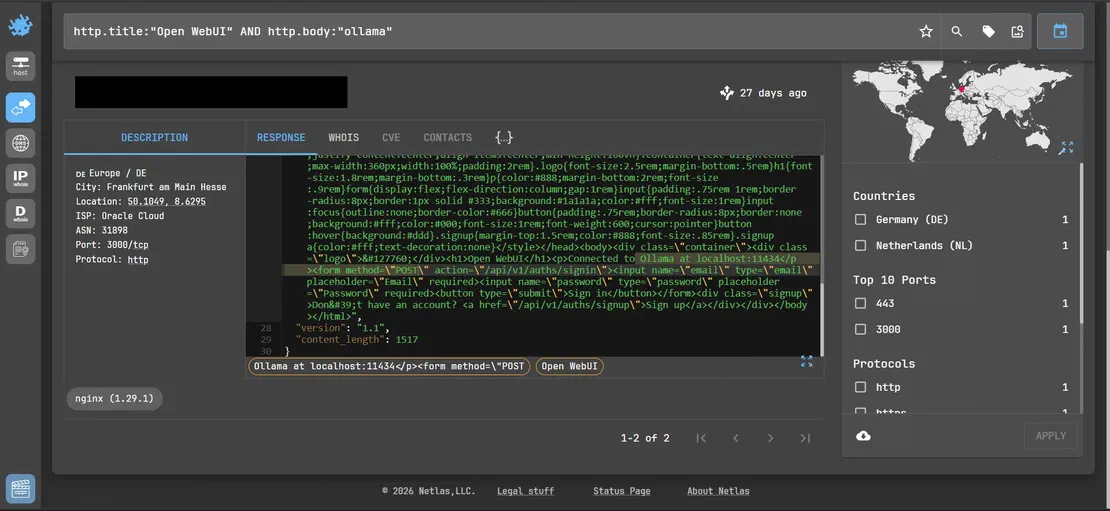
Shows that the exposed Open WebUI page body confirming that the live connection to the local Ollama instance, alongside the unauthenticated sign in and sign up form actions.
Security Impact
This is basically a deployment misconfiguration which is faced by many of the local hostings. With the registration open and no authentication gate in front of it, anyone who discovers the page can create an account and begin issuing request to the connected model.
Possible Escalation
An attacker could self register and interact directly with the backend models, consuming compute resources on the host, which can lead to potentially exfiltrating any cached prompts and responses if session isolation is weak.
From Exposure to Impact (Escalation)
Individually, many of the findings above are of moderate severity information disclosure or misconfiguration issues. But their significance grows when the findings are chained together, which is the realistic pattern an attacker follows. They discover the runtime, identify what it can access, obtain a way to use it, and then move toward the credentials or infrastructure behind it.
From Model Inventory to Unauthorized Usage
The first step is often a simple reconnaissance. An exposed vLLM, Ollama or Open WebUI instance can reveal the models and even the runtime behind an AI service. This tells an attacker that whether the system provides local inference or not, which models are available and whether the host may be worth further investigation. Researchers have counted around 175000 exposed Ollama instances across more than 130 countries. The term LLMjacking has become a common name and CrowdStrike has documented attackers sending close to 200,000 requests in a two-minute burst, simply because nothing stopped them. Business Standard)
From open registration to cloud AI quota abuse
If self registration is open then an attacker doesn’t need to hack anything, they sign up like a normal user and then misuse the service. If the frontend routes to a commercial provider, that account now have a legitimate looking access to whatever the organization is paying for. And if the provider key is sitting in the client side code as in finding 1, even that small step is unnecessary, the key can just be copied out and used directly. This is exactly the shortcut that turned one stolen Gemini key into a bill that outran a developer’s bank balance in a single day. (Perplexity AI Magazine)
From exposed configurations to information disclosure
A leaked config file doesn’t need to contain a working credential to be useful to an attacker. Knowing which models are running, which providers are wired in and how internal routing works can turn a guess into a targeted attack, It tells an attacker that exactly where to attack next. Finding 4 is an example of how far can this go.
From proxy exposure to infrastructure compromise
This where a single find stops being one incident and start being a chain of many incidents. A proxy like LiteLLM doesn’t hold one credential, it holds the credentials for every provider it’s connected to. If the proxy is compromised attacker can get access to all the AI services under one login. It’s also why LiteLLM’s own supply chain became a target when a single leaked automation token, which was not fully revoked, this gave the attackers a 20-day window to quietly push compromised code into a release that thousands of organizations then pulled into their own systems. (CloudSEK)
The pattern which keeps on repeating across of every layer is the same; the attack is often just using the thing exactly as it was built to be used, without a login. The realistic worst case isn’t a dramatic hack, it’s the bill of charges of the AI services, mapped out architecture and credentials sitting in the file that was never meant to be public.
Why LiteLLM Is the Most Interesting
LiteLLM allows application call one OpenAI-compatible API while it routes requests to whichever backend is actually needed it can be OpenAI, Anthropic, Azure, a local vLLM instance, and dozens more. To do this, LiteLLM centralizes API keys, applies budgets and rate limits and logs requests for cost tracking. The same centralization can lead to vicious attacks too, a compromised proxy can expose the admin master key, every connected provider’s individual keys and also a log of every prompt or response all this from a single point of failure.
Recent CVEs and security concerns
Vulnerability disclosures show a clear pattern — the worst issues cluster around the proxy’s admin and key-management surface:
| CVE | Type | Impact |
|---|---|---|
| CVE-2024-5225 | SQL injection | Unauthorized data access via spend logs |
| CVE-2024-8984 | Denial of service | Resource exhaustion via malformed uploads |
| CVE-2025-0330 | Credential leakage | Logged API keys exposed |
| CVE-2025-45809 | SQL injection | Data leakage via /key/block |
| CVE-2026-35029/35030 | Auth bypass | Config tampering, full auth bypass with JWT/OIDC |
| CVE-2026-42208 | Pre-auth SQL injection | Unauthenticated database access |
| CVE-2026-42271 | Command injection | Arbitrary code execution on proxy host |
| CVE-2026-49468 | Auth bypass | Host header manipulation skips authentication |
A parallel case at the runtime layer: Ollama’s CVE-2026-7482
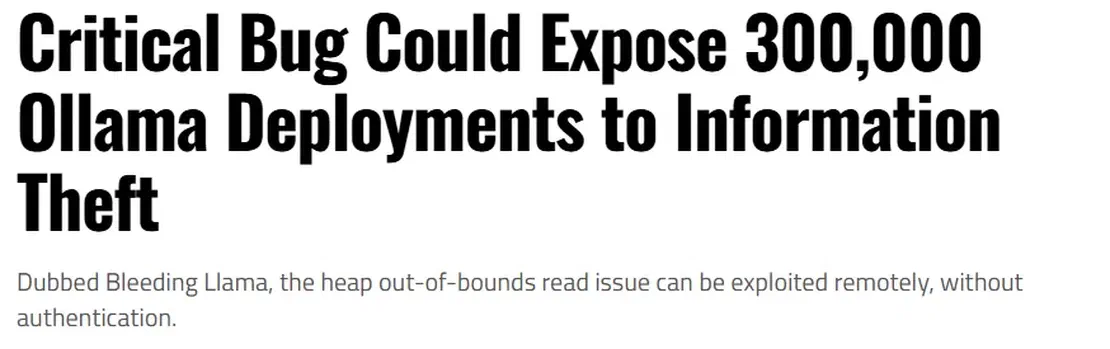
Ollama had its own versions of this same problem, researchers disclosed “Bleeding Llama” a heap memory leak which was reachable through an unauthenticated endpoint. A crafted model file could make the server read past its buffer, leaking API keys, environment variables, and other users conversation. Roughly 300,000 exposed Ollama servers were estimated to be reachable at the time when the bleeding llama was disclosed. (Sources: Cyera Research, SentinelOne, SecurityWeek)
Prevention and Hardening
Every finding in this article came from something that was reachable and unauthenticated when it shouldn’t have been and none of it required a zero day or sophisticated attack it was just a missing boundary or a misconfiguration. The fixes mentioned here are the boundaries that should exist before any of the infrastructure goes live and putting them can lead to prevention of a huge bill.
Securing frontends
The frontend is what most people picture as the “AI tool” and its also the layer most likely to leak something valuable through nothing more than a normal page load
- Turn off open self registration, if signup needs to stay on make it as require an invite code and admin approval or maybe a domain restricted email before an account is created.
- Moving all API keys out of the client side javascript and localstorage is a must. Store them server side only and have the frontend call your own backend which can then call the provider.
- Set up SSO or OIDC for internal tools instead of using application’s built-in login system and disable the built-in login once SSO is working.
- Audit what’s actually shipped in your frontend’s compiled JavaScript. Search the built files for API keys, internal hostnames, or config objects before deployment not after.
Securing proxy layers
The proxy is the highest value target in the stack and should be treated that way
- Store
litellm.yamland similar config files outside any web servable directory and make sure that no file browser, notebook server or any other tools on the same can reach that path. - Set an expiration policy on providers and master keys, and keep on rotating them on a fixed schedule rather than only after an incident, When creating virtual keys, assign each one of them a minimum budget and permissions it actually needs not a shared or default scoped key.
- Putting the proxy on its own network segment and separate from general file serving notebooks or development environment can be useful as when a compromise occurs elsewhere on the host can’t reach it directly.
Every recommendation above traces back to a finding earlier in this article, open registration, a config file next to an unsecured file browser, a key sitting in client-side JavaScript. None of it came from a sophisticated attack it directly came from going live before basic boundaries were set in place.
Conclusion
This study sets out to answer the practical question which is: as organization rapidly adopt self-hosted AI infrastructure, what does the resulting attack surface actually look like and how can defenders find it? The answer based on the findings, is simple the most exposure in this space is not exotic, it follows the same pattern that has appeared with almost every new infrastructure category the last 20 years. The main problem that keeps on appearing is a powerful software is deployed quickly often with the permissive defaults and without the network boundaries that are assumed but never enforced. What makes AI infrastructure different is the shape of the stack, runtime engines, frontend, proxy layer are increasingly deployed together and exposure at any one layer can reveal information about the others. HTTP response intelligence, as demonstrated throughout this investigation, is particularly well suited to this problem. The identifying signals for these technologies often live directly in their response bodies such as page titles, embedded JavaScript, configuration filenames, API responses structures.
Why This Attack Surface Will Continue to Grow
Self-hosted AI adoption is accelerating, and the ecosystem around it is expanding at the same pace. New runtimes, frontends, proxies, and agent frameworks are being deployed at each second on top of one another, and they are often faster than their security controls mature. That makes the exposure patterns documented in this research unlikely to be one time snapshot. These basically represent a class of infrastructure exposures that will continue to emerge as long as convenience and rapid deployment outpaces the secure by default configuration.
As AI infrastructure is moving from the experimental deployments into the production systems, it needs to be treated as a critical infrastructure with proper asset discovery, access controls, continuous monitoring and security hardening built in from the start.
Netlas’s ability to index and search these response content at internet scale made it possible to identify these exposed deployments using the same signals that an attacker could discover.

I can show you how deep the Internet really goes
Discover exposed assets, infrastructure links, and threat surfaces across the global Internet.
Related Posts

May 28, 2026
Device Code Phishing: Technical Analysis and Proactive Hunting via Netlas

May 21, 2026
Discovering Data Exposure with Netlas

April 3, 2026
Using OWASP Amass with Netlas Module

March 20, 2026
How we hunt C2 infrastructure at RST Cloud using Netlas

March 17, 2026
Proactive Threat Hunting: Techniques to Identify Malicious Infrastructure

June 5, 2025
Netlas vs Urlscan: Tools Comparison