






Plug & Pwn: Mapping the Windows PnP Auto-Install Attack Surface
September 10, 2026
9 min read

I don’t usually write up other people’s talks, but this one wouldn’t leave me alone. When I first read through the Plug & Pwn research Alejandro Hernando and Borja Martínez presented at DEF CON 341, what stuck with me wasn’t the SYSTEM shell at the end. It was how ordinary the setup is. In the physical demonstration, nobody clicks anything or logs in. The remote variant starts with an authenticated RDP session. You plug in a device — or, in the remote version, you don’t even do that — and Windows quietly goes off, fetches a signed vendor package, and runs it with the highest privileges the OS has.
That’s not a bug in the usual sense. It’s Plug and Play doing exactly what it was designed to do. And that’s what makes it worth looking at from a reconnaissance angle, because “working as intended” attack surface is the kind that sits around for years.
This writeup does two things. First, it walks through how the auto-install flow actually works and where the privileged primitives hide, so the exposure makes sense rather than feeling like magic. Then it flips to the outside-in view: given that the interesting variant rides over RDP, what can you actually see from the internet, and how do you narrow a scan down to hosts that are plausibly in range? I’ll use Netlas for the mapping part.
Everything below is defensive/research framing. The point here is understanding and measuring exposure. The research combines vendor behaviors and known flaws; it doesn’t claim every component is a newly disclosed vulnerability.
What actually happens when you plug something in
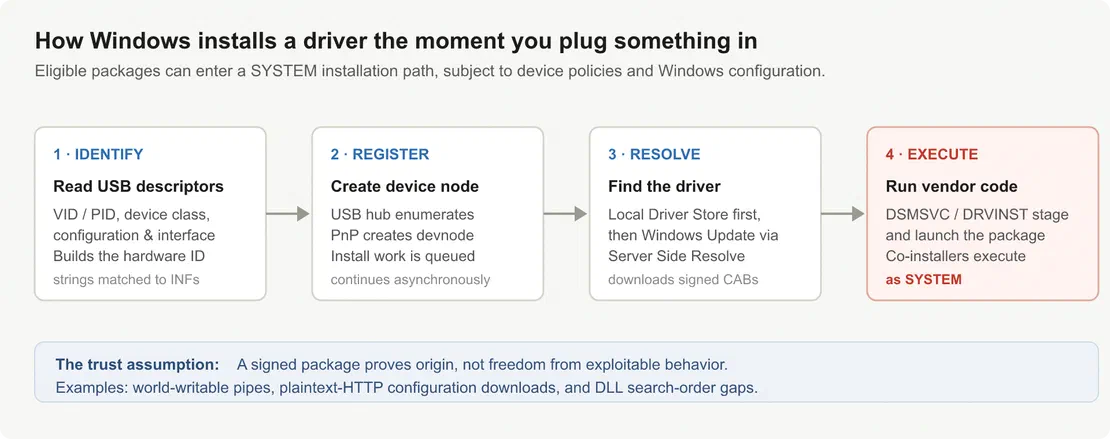
Break the process into four steps, and it stops looking mysterious.
Identify. Windows reads the device’s USB descriptors — vendor ID, product ID, device class, plus the configuration and interface descriptors. From those, it assembles the hardware ID strings. These strings are the whole game: they’re what Windows matches against driver INF files to decide “what is this thing and whose driver do I need.”
Register. The USB hub enumerates the device and the PnP Manager creates a device node. The researchers’ PNP simulate tool reproduces part of this process through SetupAPI; its calls should not be confused with the physical USB enumeration sequence.
Resolve. Windows checks for a compatible package locally and may obtain one from Windows Update through Server Side Resolve. A package appearing in an IUpdateSearcher query does not establish that PnP will download it automatically.
Execute. The staged package is installed, and its components run. Co-installer DLLs and setup executables fire here, and they inherit the service’s context. That context is NT AUTHORITY\SYSTEM.
The chain requires no administrator rights, no UAC prompt, and in the physical case, no logged-on user. The researchers demonstrated this on a machine with no user session. Package installation depends on device policies, package availability, and Windows configuration.2
Why a signed package isn’t a safe package
Signed vendor packages are often assumed safe. Signing establishes origin, not whether the code exposes attacker primitives when running as SYSTEM.
And in practice, vendor packages are full of exactly those primitives. The research walkthrough describes these shipped components:
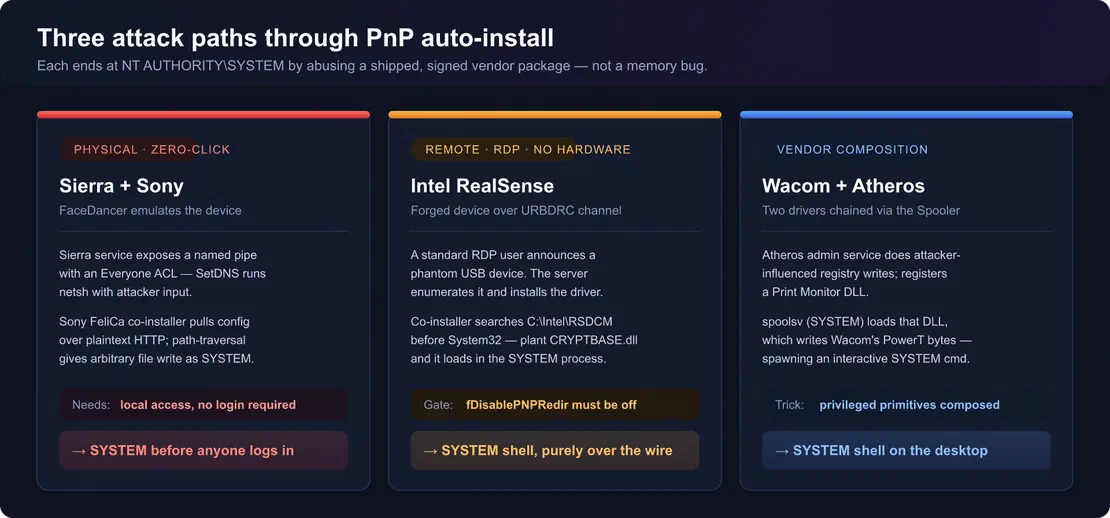
- Sierra Wireless ran a service as
SYSTEMthat exposed a named pipe with anEveryoneread/write ACL. ItsSetDNShandler took an arbitrary IP and shelled out tonetsh. - Sony FeliCa’s signed co-installer fetched its configuration over plaintext HTTP and trusted everything it got back. Its filename-parsing logic — split on the last
/— could be coaxed into path traversal, giving an attacker-controlled arbitrary file write anywhere on disk, asSYSTEM. - Intel RealSense’s co-installer dropped executables into a writable directory (
C:\Intel\RSDCM) that got searched beforeSystem32. Plant aCRYPTBASE.dllthere, and it loads inside the privileged process. Classic search-order hijack. - Wacom + Atheros get composed into one chain: Atheros’s admin service performs attacker-influenced registry writes, which are used to register a Print Monitor DLL that the Spooler (
spoolsv,SYSTEM) loads at startup — which in turn writes the magicPowerTregistry bytes that make Wacom’s service spawn an interactiveSYSTEMshell on the desktop.
These chains exploit logic and trust flaws, not memory corruption. PnP exposes the affected components without requiring administrator installation.
Recommended Reading
Top 10 Hacking Devices for Ethical Hackers in 2026

The part that faces the internet
The physical attack — FaceDancer plus a Cynthion/GreatFET emulating a USB device — is a great demo, but it requires someone to be standing at the machine. The variant that matters for external recon is the RDP one, because it removes the hardware entirely.
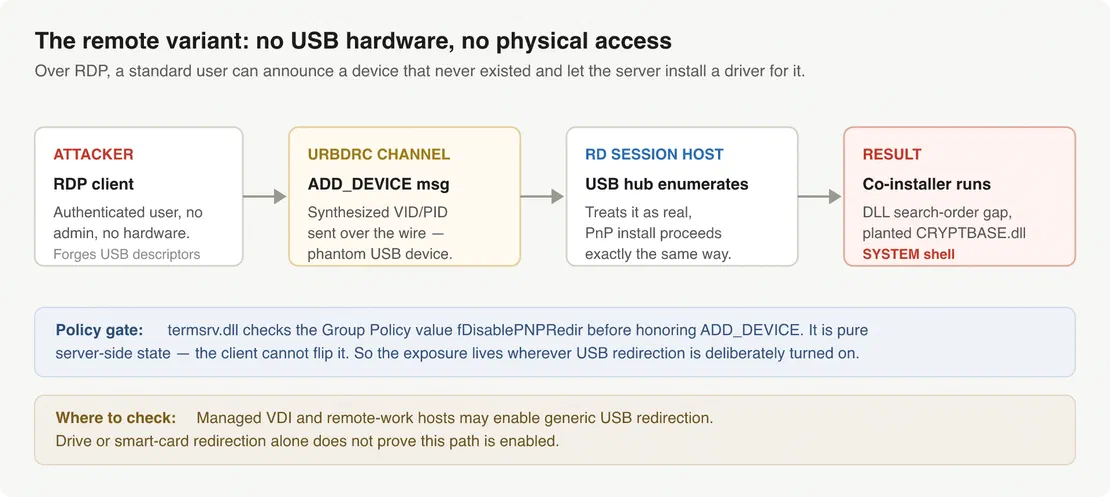
RDP has a feature called USB redirection. It lets supported USB devices appear inside a remote session. Generic USB redirection differs from higher-level drive or smart-card redirection; a working USB drive or security key in a session does not mean this attack path is enabled. Under the hood, it runs over the URBDRC virtual channel: the client sends an ADD_DEVICE message describing a USB device, and the server’s USB hub driver enumerates it. From the server’s point of view, a redirected device and a physical one are indistinguishable — so PnP auto-install kicks off just like before.
A standard user in an RDP session can present a device with fully controlled descriptors. By forging the VID/PID of a known device, the server will fetch and install the driver, enabling co-installer DLL hijack. No admin rights or hardware required; SYSTEM access is achieved.
A server-side policy gate controls scope. Before ADD_DEVICE is accepted, termsrv.dll checks the Group Policy value fDisablePNPRedir. This path is disabled by default and is enforced server-side; the client cannot change it. Only RDP hosts with USB redirection explicitly enabled are in scope.
Managed VDI and Desktop-as-a-Service environments may enable generic USB redirection for peripherals. These are logical inventory starting points, but not proof of vulnerability. Citrix or Horizon branding does not confirm use of the RDP URBDRC path.
From “an interesting bug” to “how much of this is out there”
From the attacker’s side, the interesting question is where the remote path might be available. Exposed RDP services are the starting point. Reported Windows builds, domain names, login screens, and remote-desktop portals can then help identify managed environments worth investigating further.
You cannot read fDisablePNPRedir across the internet. It’s not in a banner. External reconnaissance builds a picture of the environment; the remote attack still requires authenticated RDP access, enabled USB redirection, and a usable driver-installation path.
Netlas records more than open ports. Its RDP response fields include NTLM computer and domain names, reported Windows builds, negotiated security modes, and, where available, screenshots with searchable OCR text. Here’s how I’d use those signals to work from broad exposure toward a smaller set of leads.3
Start with everything speaking RDP. Select services identified as RDP:
protocol:rdpThat gives you the initial pool. The next queries explore different characteristics of those services, so keep the broad results available as you follow individual leads.
Pull toward managed Windows environments. The structured build field can be combined with a dotted DNS-domain name to focus on modern Windows systems reporting domain-style identities:
protocol:rdp
AND rdp.ntlm_info.product_version:>=10.0.0
AND rdp.ntlm_info.dns_domain_name:*.*This query returned approximately 104,000 response records in the completed August 7–21, 2026 scan, when tested on September 10. It is a useful starting group for research into managed environments. Single-label domains and hosts with missing metadata need separate consideration; a dotted name by itself does not establish AD membership or USB-redirection policy.
For a particular build, use an exact value:
protocol:rdp AND rdp.ntlm_info.product_version:"10.0.20348"Computer names can add another clue. If the results reveal a naming convention for session hosts or virtual desktops, follow it through this query:
protocol:rdp
AND rdp.ntlm_info.netbios_computer_name:(RDS* OR VDI*)These keyword patterns are case-sensitive. Adjust them to the names you observe, and use the results as leads about a host’s role. The rdp.rdp_protocol field adds context about negotiated RDP security; NLA-enabled services remain relevant because the demonstrated attack begins with an authenticated session.
Add the VDI / DaaS shape. Remote-desktop deployments often publish recognizable front doors: RD Web, Horizon, Citrix gateways, and DaaS login pages. Search their HTTP responses separately:
http.title:"RD Web Access"http.body:"VMware Horizon" OR http.body:"Citrix Gateway"Those results can help connect a provider or organization to remote-desktop infrastructure. A gateway may front session hosts on different addresses, and Citrix or Horizon branding alone does not establish use of the RDP USB-redirection path.
Screenshots provide another way to recognize the environment. Use rdp.has_screenshot:true to find captured screens and rdp.text to search for visible organization names or login-banner wording:
protocol:rdp AND rdp.text:"Example Corporation"Treat the recognized text as an attribution clue, then check it against the reported hostnames, domains, and other observations.
Narrow to the organization or assessment scope. Once a lead points to a particular environment, follow its reported DNS or NetBIOS domain:
protocol:rdp AND (
  rdp.ntlm_info.dns_domain_name:"corp.example.com"
  OR rdp.ntlm_info.netbios_domain_name:"EXAMPLE"
)Use the actual internal names found during reconnaissance; they may differ from the public website domain. Correlate the results with DNS and network information, since unrelated systems can share generic names.
For an authorized assessment, constrain the queries to the agreed IP ranges or a dedicated organizational ASN. The addresses, domains, and ASN placeholder below should be replaced with the assessment’s actual values:
protocol:rdp AND ip:"203.0.113.0/24"protocol:rdp AND whois.asn.number:<YOUR_ASN>Use the numeric ASN without the AS prefix. Shared cloud ASNs cover multiple customers, so use the assigned IP ranges there. Apply the same scope to web searches by grouping the alternatives before adding the range:
ip:"203.0.113.0/24" AND (
  http.title:"RD Web Access"
  OR http.body:"VMware Horizon"
  OR http.body:"Citrix Gateway"
)The result is an outside-in picture of exposed RDP services and the remote-desktop environments around them. It gives a red team concrete leads to validate within the engagement, and gives the blue team a view of what an external observer can learn before ever logging in.
Request Your Free 14-Day Trial
Submit a request to try Netlas free for 14 days with full access to all features.
If you’re the one defending these boxes
Flip the same reconnaissance around and it becomes an inventory problem. The blue team can connect the external observations to the actual session hosts and check the settings an internet-wide scanner cannot see.
Assess your own exposure first. Run the same queries against your IP ranges and reconcile the reported identities with your asset inventory. Review unexpected hosts and missing metadata as well as recognized session hosts. Use screenshots and login-banner text to add context to the host records.
Group the exposed services by reported Windows build and negotiated security mode to organize the review:
netlas stat 'protocol:rdp AND ip:"203.0.113.0/24"' \
  -g rdp.ntlm_info.product_version,rdp.rdp_protocol \
-s 20 -f jsonThis returns up to 20 groups from the latest available data. Add --indices 2026-08-07 to use the completed scan cited above. Counts describe service responses; confirm machine identity and Windows edition against your own records.
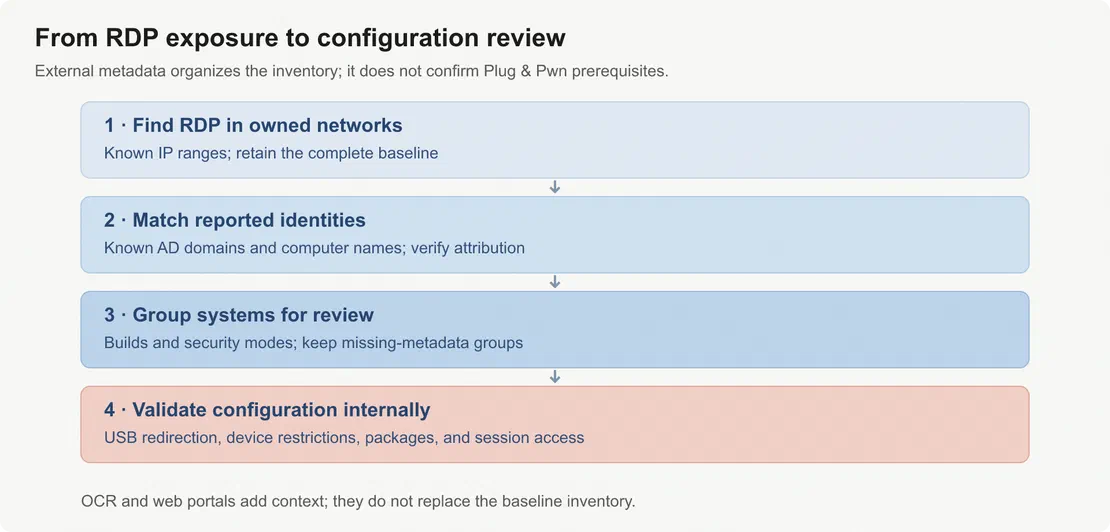
Check the prerequisites on the hosts. Review session access, effective USB-redirection policy, device-installation restrictions, and affected package versions. These internal checks establish whether the path described in the research is available. An exposed service or recognizable portal is a reason to investigate, while the host configuration determines the next action.
Kill redirection where you don’t need it. If a session host has no business exposing client USB devices, fDisablePNPRedir is your friend. Turn it on and the remote variant of this whole class of attack simply has nowhere to land.
Block the co-installer path. The DisableCoInstallers setting prevents legacy co-installer DLLs from running during device setup. This neutralizes several attack chains, including those in the Sony FeliCa and Intel RealSense demos. It does not remove the auto-install surface but eliminates a common execution vector. Verify this setting across your fleet and combine it with device installation restrictions or hardware-ID allowlists. Co-installer blocking alone is not sufficient.
Monitor for indicators: driver installs with no user present, svchost/DRVINST staging packages at unusual times, new Print Monitor registrations, world-writable named pipes, or co-installer processes making plaintext HTTP requests. Any of these on a server-class host warrants investigation. Multiple indicators on a host not expected to install drivers indicate a problem.
Why this one is worth remembering
Plenty of privilege-escalation research is a race against the next patch. This feels different, and I think it’s because the researchers didn’t attack a flaw so much as they attacked an assumption — that automatically fetching and running signed vendor code is a safe convenience. As long as that assumption holds, and as long as USB redirection stays a checkbox in managed environments, there’s a standing surface here that isn’t going anywhere with a single fix.
External reconnaissance cannot directly identify the vulnerability; Group Policy values are not externally visible. The value is in turning a conference demo into a measurable question for your own network: which exposed remote-desktop assets require review of device-installation and redirection policies? This should be answered internally before an external party does.
After reading the talk, I reviewed the exposed RDP assets in my own scope. I’d rather find the forgotten RDP box myself than read about it later.

Book Your Netlas Demo
Chat with our team to explore how the Netlas platform can support your security research and threat analysis.
Alejandro Hernando and Borja Martínez, Plug & Pwn: Weaponizing Windows PnP Auto-Install, DEF CON 34. Research site · Presentation slides. ↩︎
Coverage of the research: BleepingComputer · The Hacker News. ↩︎
Netlas documentation: Query language · RDP response fields · Scanning coverage. ↩︎
Related Posts

August 5, 2026
Desktop AI Supercomputers and Automated Cyberattacks

May 21, 2026
Discovering Data Exposure with Netlas

April 3, 2026
Using OWASP Amass with Netlas Module

March 13, 2026
Using Uncover with Netlas.io module

October 10, 2025
I Analysed Over 3 Million Exposed Databases Using Netlas

June 20, 2025
AI-Driven Attack Surface Discovery